DiDO Coins Top Up: Instant Direct Account Credit
DiDO Voice brings people together through dynamic audio chat rooms, live interactive streams, voice parties, and community gaming. To make the most of your time on the platform, DiDO Coins serve as the primary in-app currency, giving you access to virtual gifts, room customizations, and VIP status privileges.
BitTopup provides a direct, secure, and straightforward way to recharge your DiDO account using only your unique DiDO ID. You never have to share passwords or link third-party social profiles. Simply select your desired package, input your ID, complete payment through your preferred method, and receive your coins directly into your DiDO balance.
What Are DiDO Coins and How Are They Used in DiDO Voice?
DiDO Coins are the digital currency used across the DiDO Voice platform. Whether you are hosting a party room, supporting a popular streamer, or participating in community events, coins provide immediate access to premium features.
Primary Uses of DiDO Coins
- Animated Virtual Gifting: Send special effects and animated gifts to room hosts, broadcasters, and friends during live voice chats to show appreciation and boost their room rankings.
- Room Customization & Effects: Unlock entrance banners, audio effects, and unique room decorations that distinguish your profile when entering voice lounges.
- VIP Badges & Privilege Tiers: Gain access to exclusive chat badges, premium profile frames, and special seat privileges in high-capacity voice rooms.
- Interactive Party Activities: Join in-app voice party games, community challenges, and seasonal events that require coin entry.
| Feature | Benefit in DiDO Voice | Requirement |
|---|---|---|
| Premium Virtual Gifts | Supports room hosts and displays visual animations | DiDO Coins |
| Custom Profile Frames | Highlights your avatar across room member lists | DiDO Coins |
| Exclusive Entry Effects | Displays custom animations when joining a voice room | DiDO Coins |
| In-Room Party Games | Enables participation in group mini-games and contests | DiDO Coins |
How to Find Your DiDO ID for Coin Recharge
To ensure your coins reach the correct account, you must enter your exact DiDO ID during checkout. Follow these steps to find and copy your ID within the app:
- Open the DiDO app on your mobile device and log in to your account.
- Tap the Profile or Me tab located in the lower right corner of the main screen.
- Locate your numeric DiDO ID displayed beneath your profile picture and nickname.
- Tap the copy icon next to your ID to copy the number directly to your clipboard.
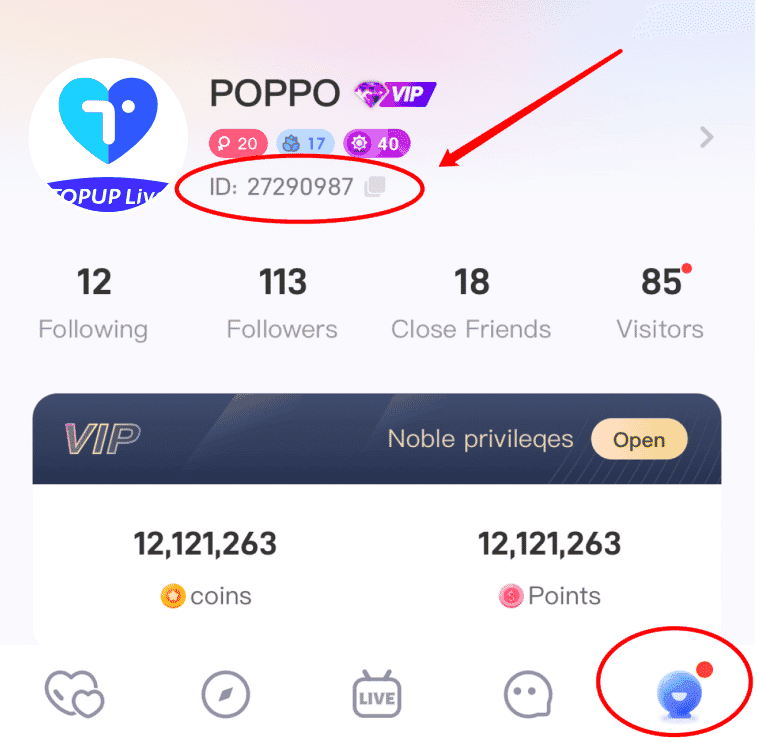
Always double-check the copied digits before submitting your order on BitTopup to avoid delivery delays.
Step-by-Step Guide to Top Up DiDO Coins Online
Recharging DiDO Coins on BitTopup takes only a few moments. Follow this simple guide:
- Select Your Package: Review the available DiDO Coins amounts on this page. Choose the package size that matches your needs. Current pricing, packages, and available denominations are displayed directly on the live checkout interface.
- Enter Your DiDO ID: Paste your numeric ID into the required input field. Make sure there are no spaces or extra characters.
- Choose a Payment Method: Select from the available international and localized payment options shown at checkout.
- Confirm and Pay: Click the pay button and follow the on-screen instructions to complete your payment securely.
- Check Your In-App Balance: Open your DiDO Voice app, visit your wallet or profile section, and confirm your updated coin balance.
Safe and Secure DiDO Coin Recharge: No Password Needed
Account safety is a core priority for online recharges. BitTopup processes your order directly via your public DiDO ID.
- Zero Password Requests: You will never be asked for your DiDO password, verification codes, or personal social media login details.
- No Account Sharing: Your account remains entirely in your hands. You do not need to grant external access to anyone.
- Protected Transactions: Standard payment encryption protocols safeguard your transaction data from start to finish.
This ID-only top-up system ensures your account remains protected against unauthorized access while delivering your coins quickly.
Why Choose BitTopup for DiDO Voice Recharges
BitTopup is designed to provide global users with an efficient, transparent, and dependable top-up experience.
- Frictionless ID-Only Top-Up: Enter your ID, pay, and get credited without complex account verification hurdles.
- Global and Localized Payment Methods: Access a diverse array of trusted payment methods tailored for users across multiple regions.
- 24/7 Customer Support: If you ever have a question about your order, our dedicated customer service team is available around the clock to assist you.
- Multi-Language Interface: Manage your recharges easily with platform support optimized for global communities.
Troubleshooting DiDO Coin Delivery and Order Inquiries
If your coins do not appear immediately after completing payment, review the following troubleshooting steps:
- Restart the DiDO App: Completely close the DiDO Voice app from your device background apps and reopen it to refresh your wallet balance.
- Check Your Order Status on BitTopup: Log in to your BitTopup account and review your order history to confirm that your transaction status shows as completed.
- Verify Your DiDO ID: Ensure that the ID submitted during purchase matches your active in-app ID.
- Contact Support for ID Errors: If you accidentally submitted an incorrect DiDO ID, contact BitTopup 24/7 customer support immediately with your order reference number. If the order has not yet been processed to the incorrect account, our team will assist in updating your details.
Frequently Asked Questions About DiDO Coins Top Up
How do I top up DiDO Coins using my DiDO ID?
Select your preferred coin package on BitTopup, enter your numeric DiDO ID in the player field, choose your payment method, and complete the payment. Your coins are credited directly to your in-game balance.
Where can I find my DiDO ID in the app?
Open the DiDO app, tap the Profile (or Me) icon in the bottom navigation bar, and look right below your avatar and username. Tap the copy icon next to your ID number to copy it.
Do I need to share my DiDO password to recharge coins?
No. BitTopup requires only your DiDO ID. Never share your password or SMS verification codes with anyone.
How long does it take for DiDO Coins to appear in my account?
Orders are processed promptly after payment verification. In most cases, your coins reflect in your DiDO app balance shortly after checkout.
What should I do if I entered the wrong DiDO ID during recharge?
Contact BitTopup customer support immediately via live chat or support ticket with your transaction details. If the order has not been dispatched, our support agents will assist you with correcting the recipient ID.
What can I purchase with DiDO Coins inside the DiDO app?
DiDO Coins can be used to send virtual animated gifts, unlock avatar decorations and room badges, enter special voice room events, and access exclusive VIP perks.