


Dimo Top Up: Voice Chat Diamonds & In-App Perks
Dimo is a popular interactive voice chat room and live audio social platform where users connect, host audio parties, play interactive mini-games, and share moments with friends worldwide. To participate fully in the community, users rely on diamonds—the primary premium in-app currency of Dimo. Diamonds enable you to send animated virtual gifts to room hosts, activate visual entrance banners, participate in voice room PK battles, and upgrade your account level.
BitTopup provides a direct, secure method to complete your Dimo top up online. By using only your numerical Player ID, you can top up your balance quickly without sharing personal credentials or passwords.
Important Disambiguation Note: This service is exclusively for the Dimo Voice Chat Room mobile entertainment application. It is not affiliated with or intended for DIMO Web3 telematics or decentralized IoT automotive networks. Please ensure you are topping up your Dimo voice chat entertainment account.
What Are Dimo Diamonds Used For?
Dimo diamonds serve as the central utility asset across the entire Dimo voice chat ecosystem. When you recharge diamonds to your account, you gain access to several premium social features:
- Virtual Gifting: Send dynamic 2D and 3D animated gifts to voice room hosts and performers during live audio streams to show appreciation and boost room popularity rankings.
- VIP Badges & Aristocracy Tiers: Reach higher VIP levels to display exclusive nameplates, premium mic rings, custom chat bubbles, and special text colors inside public rooms.
- Room Entrance Effects: Announce your arrival in any voice chat room with high-tier luxury vehicles, mystical beast animations, and custom audio fanfare.
- PK Battles & Gifting Contests: Support your favorite broadcasters during timed room battles to help them win community tournaments and leaderboard rankings.
- Audio Room Customization: Unlock custom room themes, background effects, and specialized room layout tools for hosts.
How to Find Your Dimo Player ID Inside the App
To complete an order on BitTopup, you only need your unique Dimo Player ID. Follow these steps to locate your ID in seconds:
- Launch the Dimo application on your mobile device.
- Tap the Profile / Me icon located in the bottom right corner of the main screen.
- Look beneath your display name and profile picture to find your numerical Player ID (also labeled as UID or ID).
- Tap the copy icon beside the number, or write it down carefully to avoid manual input errors.
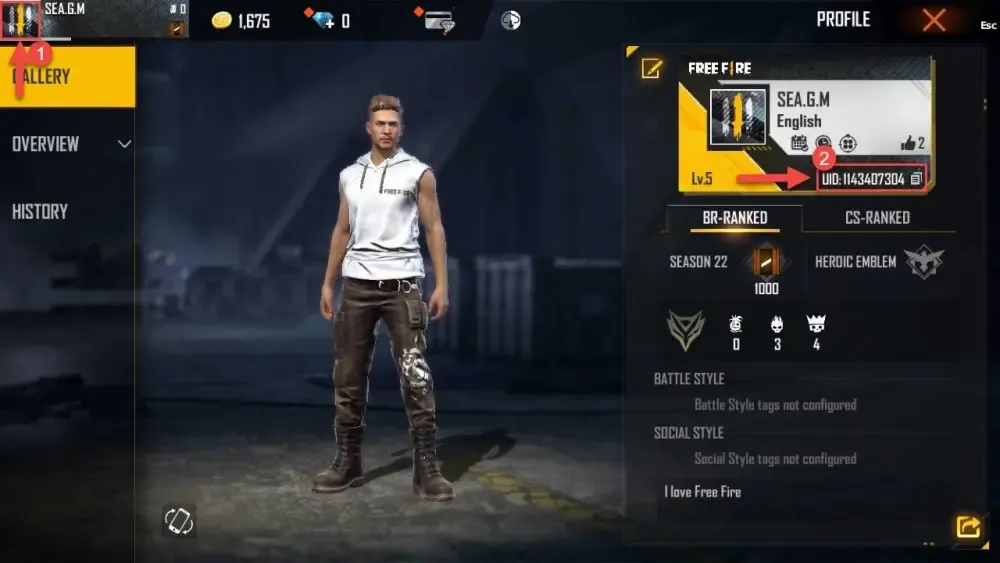
Always double-check your Player ID before submitting your order on BitTopup, as digital currency credits directly to the account number provided.
Step-by-Step Guide: How to Recharge Dimo on BitTopup
Recharging your Dimo account on BitTopup requires only a few simple steps:
- Select Your Diamond Package: Browse the live catalog on this page and choose the diamond denomination that fits your needs.
- Enter Your Dimo Player ID: Paste your numerical Player ID into the designated field.
- Review Current Pricing: Verify the order details and real-time prices displayed directly at the live checkout.
- Choose Payment Option & Pay: Select your preferred secure checkout method from the available global options and complete the transaction.
- Check In-App Balance: Once payment confirmation is complete, open the Dimo app to confirm your updated diamond balance.
Dimo Top-Up Feature Overview
| Feature | Details |
|---|---|
| Application | Dimo Voice Chat Entertainment App |
| Required Account Info | Player ID (Numerical UID) only |
| Login Credentials Needed | None (Zero password sharing required) |
| Main Currency | Dimo Diamonds / In-app Coins |
| Key Uses | Virtual gifts, entrance effects, VIP badges, room ranking |
| Region Availability | Global service coverage |
| Order Tracking | Available via BitTopup Order History |
Security Benefits of ID-Only Top-Up Without Sharing Passwords
Account safety is a critical priority when buying virtual currencies online. BitTopup utilizes a direct Player ID recharge model that protects your personal data:
- No Password or Social Login Required: You never have to share your Dimo password, Google login, Apple ID, or phone verification codes. Your login credentials stay private.
- No Account Hijacking Risk: Because third parties never access your login session, there is zero risk of unauthorized account changes, stolen gift inventories, or lost chat room ownership.
- Compliance & Account Integrity: Direct ID-based recharges preserve your account status without triggering suspicious login flags from new IP addresses or unfamiliar locations.
Delivery Timeframes and Order Status Checking in 2026
All Dimo top-up orders on BitTopup process automatically through automated delivery pipelines. In 2026, standard orders process immediately after payment validation.
To check your order progress:
- Navigate to the Order History section on BitTopup.
- Check the real-time status of your transaction (e.g., Processing, Completed, or Pending Payment).
- If your order shows Completed but you do not see the diamonds immediately, fully close and restart your Dimo mobile app to refresh the server connection.
Troubleshooting Common Dimo Top-Up and Payment Issues
If you experience any delay or issue during your recharge, use these troubleshooting steps:
- Incorrect Player ID Entered: If you submitted an incorrect Player ID, immediately contact BitTopup 24/7 customer support with your Order ID. If the order has not yet been processed by the automated pipeline, support can help correct the information. Note that orders already sent to a valid third-party ID cannot be reversed.
- Balance Not Updating: Refresh your profile inside the Dimo app by pulling down on the screen, or log out and log back in to force a server synchronization.
- Payment Pending: Some international payment providers require brief security checks. Check your email or banking portal for confirmation prompts.
- Customer Support Assistance: BitTopup customer service is available around the clock to assist with payment verification, order status checks, and general recharge inquiries.
Frequently Asked Questions (FAQ)
Where can I find my Dimo Player ID?
Open the Dimo app, tap the Profile (Me) tab at the bottom right, and your numerical Player ID will be visible directly beneath your avatar and username.
Do I need to share my Dimo account password for a recharge?
No. Recharges on BitTopup require only your Dimo Player ID. You should never share your account password, SMS verification codes, or linked social account details.
How long does it take to receive Dimo diamonds after payment in 2026?
Orders typically process directly upon successful payment clearance. Your diamonds will reflect in your in-app wallet shortly after order completion.
What should I do if I entered the wrong Dimo Player ID?
Contact BitTopup customer support immediately with your transaction number. If the order is still pending, support agents will attempt to update your details. If the order has already delivered to the entered ID, the transaction cannot be recalled.
What payment methods can I use to buy Dimo diamonds on BitTopup?
BitTopup supports a comprehensive range of secure international payment methods, including credit/debit cards, e-wallets, and regional payment solutions. Check the checkout section for all live payment channels currently available in your region.
What can I do with Dimo diamonds in the voice chat room?
Diamonds allow you to send visual and animated gifts to room hosts, buy VIP aristocracy status, unlock luxury room entrance animations, support creators in PK battles, and customize your voice profile.