

Garena Delta Force SEA Top Up: Direct UID Recharge
Delta Coins serve as the primary premium currency in Garena Delta Force SEA, allowing operators to obtain exclusive weapon finishes, tactical gear, character appearances, and seasonal battle passes. BitTopup provides a direct top-up service tailored specifically for players on the Southeast Asian server network.
Our system processes orders through your numeric Garena Delta Force User ID (UID). You never need to share account passwords, verification codes, or personal login credentials. Select your desired Delta Coin pack, submit your player ID, and complete payment. Live pricing, regional fees, and available payment channels update directly on the BitTopup checkout screen.
How to Recharge Delta Coins for Garena Delta Force SEA
Completing a recharge takes only a few steps. Follow these instructions to send Delta Coins directly to your Garena game profile:
- Select the Delta Coin Package: Review the listed coin denominations on the product screen and pick the quantity you wish to purchase.
- Enter Your User ID: Type your numeric Garena Delta Force User ID into the designated input field. Double-check the digits to ensure they match your in-game profile.
- Review Order Details: Confirm that the selected package and player ID are accurate before proceeding.
- Choose a Payment Method: Select your preferred payment channel from the checkout options presented on screen.
- Complete the Transaction: Follow the on-screen payment instructions. Once the payment clears, your Delta Coins are delivered straight to your in-game account.
How to Find Your Garena Delta Force User ID
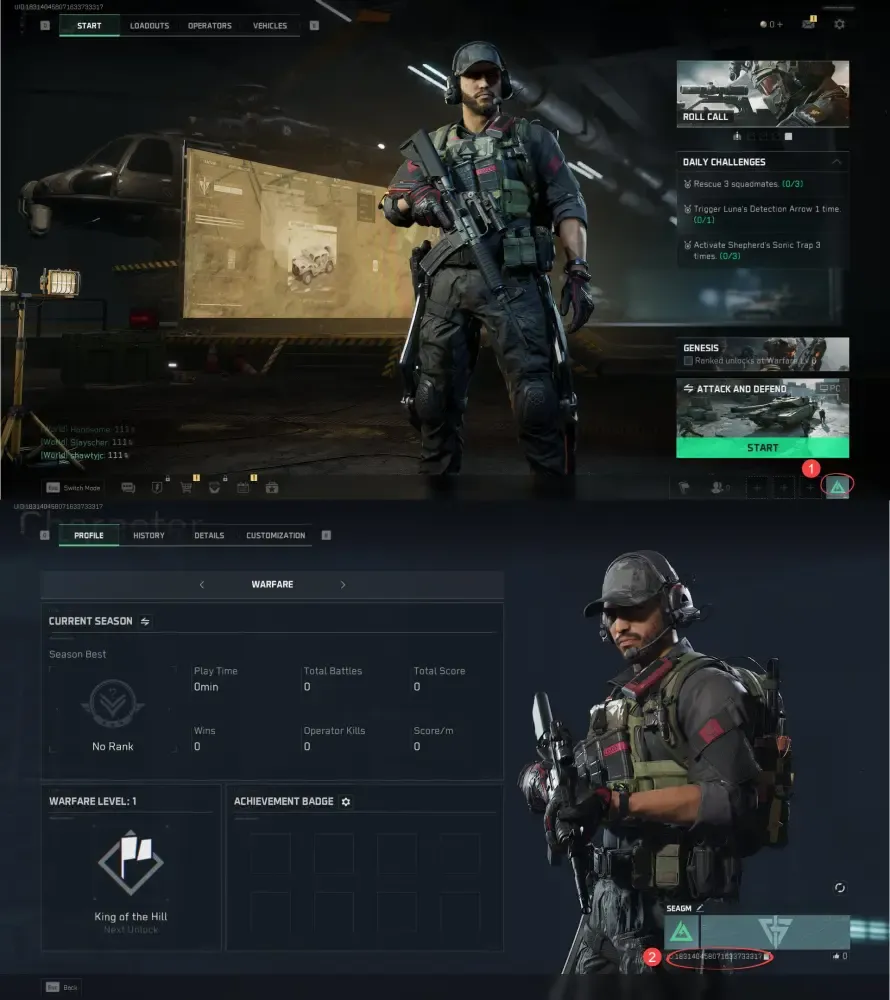
Your User ID is a unique numeric identifier tied to your Garena Delta Force character. BitTopup requires only this number to credit your purchases.
- Launch the Garena Delta Force client and log in to your SEA account.
- In the main lobby screen, click on your Avatar / Profile Icon located in the upper-left corner.
- Open the Basic Info tab on your profile page.
- Locate your numeric User ID (UID) displayed beneath your player nickname.
- Click the Copy Icon next to your UID to copy the exact numbers to your clipboard and paste them directly into the BitTopup recharge box.
Garena Delta Force SEA vs Delta Force Global: Server Compatibility Guide
Delta Force operates under distinct publishers across different global territories. Garena distributes and manages the dedicated Southeast Asia (SEA) version of Delta Force, whereas other regions are published separately on Steam and international launchers.
CRITICAL NOTICE: Top-ups purchased on this page are strictly compatible with accounts operating on the Garena Delta Force SEA server. If your account is registered on the global PC launcher, Steam global client, or non-SEA regional servers, top-ups processed here will not deliver to your profile.
Server & Version Compatibility Matrix
| Platform / Launcher | Regional Server | Top-Up Compatibility |
|---|---|---|
| Garena PC Launcher | Southeast Asia (SEA: SG, MY, PH, TH, ID, etc.) | Supported (100% Compatible) |
| Garena Mobile Client | Southeast Asia (SEA) | Supported (100% Compatible) |
| Steam Client | Global / North America / Europe | Not Supported |
| Official Global PC Launcher | International / Level Infinite | Not Supported |
Before ordering on BitTopup, check your game client launcher to ensure you log in through Garena.
What Are Delta Coins and What Can You Buy in 2026
Delta Coins are the premium currency used across all major game modes in Delta Force SEA, including Warfare and Operations. In the 2026 season, Delta Coins give you access to several key game features:
- Tactical Armament & Battle Pass: Unlock the premium tier of the seasonal Battle Pass to gain exclusive weapon blueprints, tactical outfits, XP boosters, and operator skins as you level up.
- Weapon Appearance Draws & Bundles: Purchase tactical weapon finishes, inspection animations, custom optics reticles, and premium weapon charms.
- Operator Customization: Equip specialized camo patterns, tactical voice packs, calling cards, and operational patches.
- MandelBrick Decryption Keys: Acquire decryptor items required to unlock sealed tactical cases and high-tier extracted loot crates in Operations mode.
- Direct Item Store Purchases: Buy limited-time tactical skin packs and store-exclusive weapon designs as they rotate through the seasonal 2026 store.
Why Recharge Garena Delta Force on BitTopup
- Password-Free Security: We only require your numeric User ID to complete the top-up. Your Garena login, password, and linked social accounts remain completely private.
- Accurate Regional Delivery: Our direct processing pipeline is tailored for SEA accounts, ensuring prompt delivery without server routing errors.
- Live Checkout Transparency: Pricing, conversion rates, and localized transaction options are calculated in real time directly on the product checkout screen.
- 24/7 Dedicated Support: If you ever have a question about your order status or transaction details, our customer support team is available around the clock to assist you.
Safety and Payment Methods for Delta Force SEA Recharges
Account safety is a core priority when buying digital game currency. BitTopup maintains strict data protection standards across all checkout flows:
- Zero Account Sharing: Never share your login credentials with third parties or unofficial sellers claiming to provide cheap top-ups. BitTopup uses official UID crediting methods that do not require access to your personal account.
- Encrypted Checkout: All checkout pages utilize industry-standard SSL encryption to protect your transaction details and billing information.
- Verified Order Logs: Every purchase generates a trackable order reference number, enabling immediate verification by our customer support team if you ever need order tracking.
Troubleshooting Common Delta Force SEA Top-Up Issues
If your Delta Coins do not reflect immediately in your in-game balance after checkout, check the following points:
- Check Your In-Game Mail / Wallet: In most instances, Delta Coins update directly to your wallet counter at the top of the main lobby. In certain promotional drops, items or bonus coins may arrive via the in-game Mailbox system. Check both locations.
- Restart the Game Client: Completely close the Garena Delta Force client and restart the game. This forces your client to sync its balance with the live server.
- Verify Your Submitted UID: Compare the User ID on your BitTopup receipt with the UID shown on your profile screen. If you submitted an incorrect digit, contact our support team immediately with your transaction ID.
- Check Payment Processing Status: Make sure your payment method confirmed the transaction deduction. Delays from banking networks can sometimes take a few minutes before our automated delivery system receives the payment confirmation.
Frequently Asked Questions About Garena Delta Force Top Up
How do I recharge Delta Coins in Garena Delta Force SEA?
Select the Delta Coin package you wish to purchase on BitTopup, enter your Garena Delta Force User ID, and proceed to checkout. Choose your preferred payment method and finalize the purchase. Your Delta Coins will be credited to your game account once the transaction clears.
Where can I find my Garena Delta Force User ID?
Open Garena Delta Force and tap your Avatar/Profile icon in the upper-left corner of the main lobby. In the Basic Info tab, you will find your numeric User ID directly beneath your player name. Use the copy button next to the digits to copy your UID accurately.
Can I use this top-up service for Delta Force Global or Steam accounts?
No. This product is strictly reserved for the Garena Southeast Asia (SEA) version of Delta Force. Accounts registered through Steam, global launchers, or other non-Garena regions cannot receive Delta Coins from this recharge page.
Do I need to share my Garena account password to complete a top-up?
No. BitTopup only requires your numeric User ID. We will never ask for your Garena password, email access, phone verification code, or social login credentials.
How long does it take for Delta Coins to be credited to my account?
Top-ups are processed through automated digital delivery systems as soon as payment confirmation is received. Most orders reflect in your in-game balance within a few moments of payment completion.
What should I do if my Delta Force Delta Coins have not arrived?
First, restart your game client to refresh your account data, and check your in-game mailbox. If the coins do not appear, locate your BitTopup Order Number and contact our 24/7 customer support team via live chat for prompt assistance.