




Telegram Top Up: What Are Telegram Stars and How Do They Work?
Telegram Stars are the official digital currency built directly into the Telegram messaging platform. They allow users to pay for digital services, purchase items within Telegram Mini Apps, subscribe to paid content channels, and send tips to content creators. Introduced to establish a unified payment standard across mobile and desktop devices, Telegram Stars make direct microtransactions simple across the entire platform ecosystem.
When you own Telegram Stars, your balance attaches directly to your Telegram account. You can spend them on:
- Mini App Goods: In-game currencies, virtual items, tools, and premium features inside gaming and productivity bots.
- Paid Channel Content: Unlocking exclusive media, articles, and private video streams published by creators.
- Creator Reactions and Tips: Sending paid Star reactions on channel posts to support community managers and independent creators.
- Digital Subscriptions: Managing ongoing access to specialized Telegram channels and utility services.
Unlike traditional payment setups that require entering credit card details inside third-party web views, Telegram Stars process instantly inside your native chat window.
How to Recharge Telegram Stars on BitTopup (Step-by-Step)
BitTopup provides a direct, secure process to top up your Telegram Stars balance using only your public numerical User ID. No account login, verification codes, or passwords are required.
- Select Your Star Package: Choose the number of Telegram Stars you need from the product options available on BitTopup.
- Provide Your Telegram User ID: Type your numeric User ID accurately into the required field. Make sure you use your numerical ID, not your @username.
- Complete the Payment: Select your preferred payment method on the BitTopup checkout page and confirm your order.
- Receive Your Stars: Once payment is processed, the Stars transfer straight to your Telegram account balance for immediate use.
Live pricing and currency rates update automatically on the BitTopup checkout screen based on the package selected.
How to Find Your Telegram User ID Safely
Your Telegram User ID is a unique numeric identifier assigned to your profile. It is distinct from your @username and phone number. Because BitTopup never asks for your password, phone number, or login verification code, using your numeric User ID ensures your account remains completely safe.
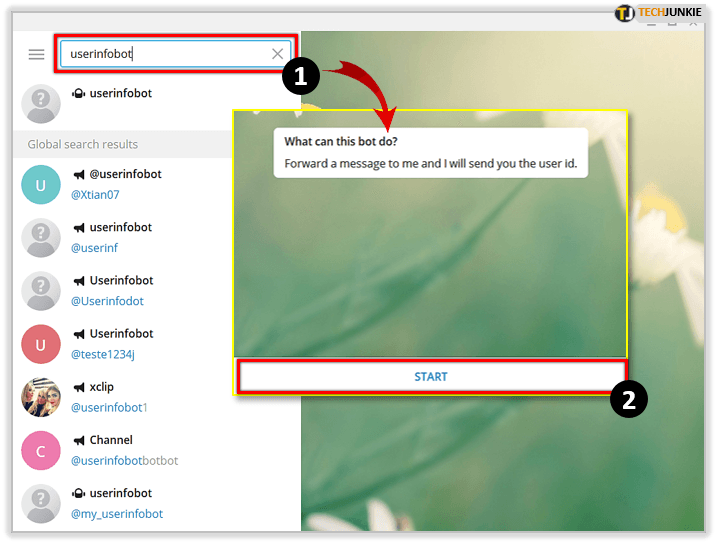
Follow these steps to locate your Telegram User ID:
- Open your Telegram application on mobile or desktop.
- Use the search bar to locate an official verification bot, such as
@userinfobotor@raw_data_bot. - Start the bot by tapping Start or sending the message
/start. - The bot will instantly reply with your profile information, displaying your Id (a sequence of numbers such as
123456789). - Copy this exact number string and paste it into the User ID field on BitTopup.
Never share your SMS confirmation codes or two-factor authentication passwords with anyone during a recharge process. A valid top up only requires this public numeric ID.
Benefits of Recharging Telegram Online vs In-App Purchases
Buying Telegram Stars directly through mobile app stores on iOS and Android frequently carries extra costs due to standard 30% platform commission fees. Recharging online through third-party platforms like BitTopup offers clear advantages:
- Lower Markup: Web-based orders bypass app store commission surcharges, providing more Stars for your money.
- Third-Party Gifting: You can recharge Stars for any Telegram user by simply entering their User ID. In-app store purchases restrict you strictly to your own logged-in device account.
- Flexible Payment Alternatives: Pay using multiple local and global payment solutions without needing an active card linked to your Google Play or Apple ID account.
- Account Safety: You never need to connect personal bank accounts or store payment cards permanently inside messaging apps.
Telegram Stars Packages and Pricing Overview 2026
Telegram Stars come in set packages designed for different use cases, ranging from small tips to heavy gaming inside Mini Apps. Below is an overview of standard Star tiers and their common applications:
| Telegram Stars Amount | Primary Use Case | Target Telegram Activity |
|---|---|---|
| 50 - 150 Stars | Micro-tips & Reactions | Supporting channel posts and creator polls |
| 250 - 500 Stars | Basic Digital Unlocks | Unlocking single paid posts or short guides |
| 1,000 - 2,500 Stars | Mini App Upgrades | In-game passes, energy refills, and bot tools |
| 5,000 - 10,000 Stars | Premium Subscriptions & Bundles | High-tier creator channel access and gaming packs |
All active prices and currency conversions are displayed in real-time on the BitTopup checkout page before you place an order.
Telegram Stars vs Telegram Premium: What Is the Difference?
It is essential to understand the difference between Telegram Stars and Telegram Premium, as they serve entirely different purposes within the Telegram ecosystem.
- Telegram Stars: A consumable virtual currency. You purchase Stars in bundles and spend them as you go on specific items, Mini App transactions, and creator tips. Once spent, your balance decreases until you top up again.
- Telegram Premium: A recurring monthly or annual platform subscription. Premium provides global utility perks, such as double upload limits (up to 4 GB), faster download speeds, voice-to-text transcriptions, animated profile pictures, and ad-free public channels.
Telegram Stars do not activate Telegram Premium features, and a Telegram Premium subscription does not grant a recurring monthly allowance of Telegram Stars.
Safe Recharge Practices: Protecting Your Account Data
To ensure your Telegram account remains fully protected when recharging online, adhere to these security rules:
- Never Submit Logins: Genuine top-up services never request your login code, SMS pin, or 2FA cloud password.
- Verify Numeric IDs: Double-check that your User ID consists only of numbers. Entering an @username instead of the numeric ID will cause processing errors.
- Keep Your App Updated: Ensure your Telegram client is updated to the latest 2026 build so that newly credited Stars render immediately in your balance menu.
- Track Your Order: Keep your BitTopup order reference number handy after purchase. BitTopup customer support is available 24/7 to confirm delivery status or verify your details.
Frequently Asked Questions
How much do 10,000 Telegram Stars cost?
The cost of 10,000 Telegram Stars depends on current currency rates and checkout options. Check the live pricing table on BitTopup to view the real-time rate for 10,000 Stars in your selected local currency.
How do I find my Telegram User ID for top up?
Search for @userinfobot inside the Telegram search bar, start the bot, and copy the numeric ID returned in the chat. Enter this number into the User ID box on BitTopup.
Do I need to share my Telegram password to recharge?
No. BitTopup only requires your public numerical User ID. You should never disclose your password, two-factor authentication passcodes, or SMS verification codes.
What can I purchase with Telegram Stars?
You can use Telegram Stars to purchase items inside Telegram Mini Apps, pay for digital tools and bot subscriptions, unlock paid channel content, and send paid star reactions to creators on public channels.
Why is recharging Telegram Stars on the web cheaper than the app store?
Mobile app stores apply a platform fee of up to 30% on digital goods bought inside mobile applications. Web recharges avoid these standard app store commission fees, resulting in better base rates.
Can I top up Telegram Stars for another person using their User ID?
Yes. Because the top-up process only requires a numerical User ID, you can send Telegram Stars to any friend, family member, or colleague by entering their specific User ID at checkout.
How much do 2,000 Telegram Stars cost in 2026?
Exact pricing for 2,000 Telegram Stars varies by local currency and real-time processing rates. Check the package selection menu on BitTopup to view current rates and available checkout options.