What Makes User ID Recharge Different
Traditional login-based recharge requires:
- Username and password entry
- Verification codes (valid only 120 seconds)
- Account security layer navigation
- 15-30 seconds per step, compounding during server congestion
User ID recharge bypasses these entirely. Transaction flow: provide numerical ID → select diamond package → complete payment → diamonds appear. No session management, no credential verification, no authentication timeouts.
Technical distinction: Login methods authenticate the user first, then process payment. User ID methods authenticate the payment through secure gateways, then credit the verified account. This reversal eliminates authentication queues during peak usage.
Why Speed Matters During Live Events
Live streaming operates on real-time dynamics where timing impacts broadcaster rankings and viewer engagement. During the Mid-Year Gala (July 16-22, 2025) with 30% bonus Diamonds, thousands compete to send high-value gifts during critical ranking windows.
A 60-second delay from login authentication means missing final PK battle moments when gift values carry maximum impact. Broadcasters announce flash gift challenges lasting 2-3 minutes, creating urgency that login-based systems can't accommodate when server loads spike.
The 98% completion rate within 3 minutes includes payment processing, transaction verification, and diamond delivery. PayPal transactions complete in 2-5 seconds, credit cards in 3-8 seconds—impossible when adding login authentication layers.
How to Find Your Bigo User ID in Seconds
Your Bigo User ID remains permanent across iOS, Android, and web platforms, making it reliable for recharge regardless of device.
Locating User ID on Mobile App
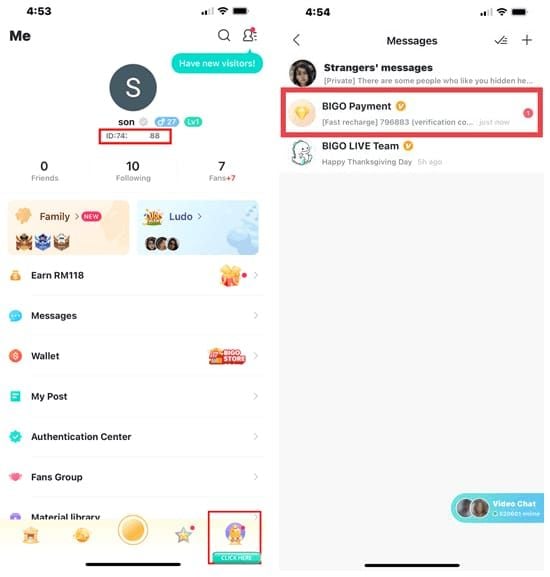
- Launch Bigo Live app
- Tap Me icon (bottom-right corner)
- Find your nickname at top
- User ID appears directly below as ID: followed by numerical digits
The ID consists of 8-10 numerical digits with no letters or special characters. When copying for recharge, omit the ID: prefix—enter only the numerical sequence. If your profile shows ID: 901216366, enter 901216366.
Both iOS 13.0+ and Android 8.0+ display the User ID in this consistent location. Version 6.37 or later shows enhanced visibility.
Saving Your User ID for Quick Access
Pro tip: Screenshot your Me page profile showing your User ID and save it as Bigo_ID_Recharge for instant access during live events.
Alternatively, copy your numerical ID to your device's notes app or password manager. Many users create quick-access widgets on their home screen for one-tap copying during urgent recharge situations.
For users supporting multiple broadcasters across time zones, maintaining readily accessible copies eliminates 20-30 seconds navigating to your profile during critical gifting moments.
Step-by-Step: Recharge Bigo Diamonds via User ID
Pre-Recharge Checklist
Before starting, verify you have:
- Numerical Bigo Live User ID copied or memorized
- Sufficient funds in preferred payment method (GCash, PayPal, credit/debit cards, 7-Eleven, GrabPay, Apple Pay)
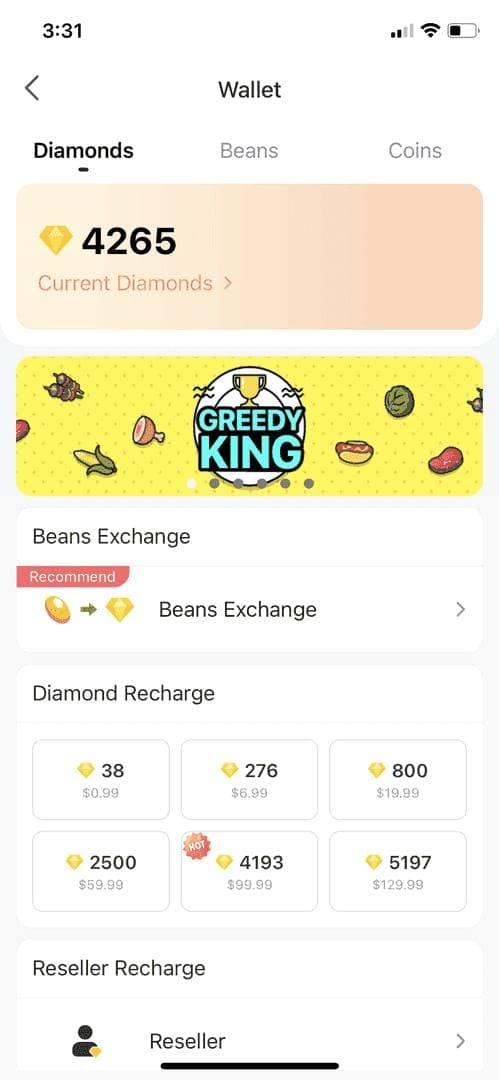
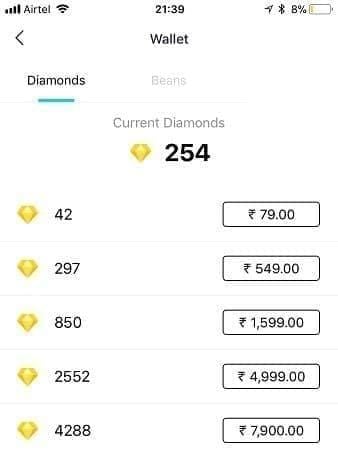
- Current diamond balance checked (Me > Wallet)
- Stable internet connection
Account limits: 4000 Diamonds per day per account. Individual order limits vary from 4000 Diamonds (S1 tier) to 40000 Diamonds (S5 tier) based on account status.
Verify HTTPS padlock icon in browser address bar before entering payment information.
Entering User ID and Selecting Diamond Package
- Navigate to recharge platform
- Locate Bigo Live ID input field
- Enter numerical User ID exactly as shown on profile
- Double-check each digit
Select desired diamond package:
- First-time: $1 = 56 Diamonds (promotional)
- Standard: 100 Diamonds for S$2.58 (27% off from S$3.51)
- Standard: 1000 Diamonds for ₱1109 (Philippines)
For regional recharges, BitTopup supports top up Bigo coins United States with localized payment methods and competitive exchange rates.
Completing Payment Without Login Credentials
- Click Buy Now after confirming User ID and package
- System redirects to payment method selection (no Bigo password required)
- Choose payment option:
- PayPal: 2-5 second processing
- Credit card: 3-8 second verification
- Mobile wallets (GCash, GrabPay): comparable speeds
- Complete payment through provider's standard checkout
No OTP codes from Bigo Live required—authentication occurs through payment provider's security protocols only.
Verifying Successful Diamond Delivery
After payment confirmation:
- Open Bigo Live app
- Navigate to Me > Wallet
- Verify updated diamond balance
If diamonds don't appear within 30 seconds, refresh wallet by pulling down on screen or switching between Wi-Fi and mobile data.
Check transaction history through payment provider to confirm charge processed. This serves as verification evidence if needed, though delays occur in less than 2% of User ID recharges.
Security Analysis: Is User ID Recharge Safe?
What Information User ID Reveals (and Doesn't)
Your Bigo Live ID is a read-only identifier that allows others to:
- Find your profile
- View public content
- Send you gifts
It does NOT grant access to:
- Account settings
- Password changes
- Linked payment methods
- Private messages
When providing User ID for recharge, platforms can only credit diamonds to the associated account. No withdrawal capabilities, profile modifications, or account control transfers occur through User ID alone.
Worst-case scenario: someone purchases diamonds for your account—unlikely given financial cost to attacker.
Encryption and Payment Protection
Secure platforms implement HTTPS encryption (padlock icon in browser). This protects User ID and payment information during transmission.
Payment processing occurs through established gateways (PayPal, Stripe) maintaining PCI DSS compliance. Your credit card details, bank information, and payment credentials never pass through the Bigo recharge platform—processed entirely within your payment provider's secure environment.
The separation of User ID (public identifier) from payment credentials (private financial data) creates two-layer security. Even if a recharge platform experiences a breach, exposed User IDs carry minimal risk compared to compromised login credentials.
Comparing Security: User ID vs Password Login
Login-based recharge requires entering your Bigo password on third-party platforms, creating credential exposure risks. If platforms store passwords insecurely or experience breaches, your account becomes vulnerable.
User ID recharge eliminates this entirely. You never provide account access credentials to external platforms. The recharge service operates as a payment processor that credits your account, not an account manager requiring authentication.
Speed Advantages During High-Traffic Live Events
Why Login Systems Slow Down During Peak Events
Authentication servers process login requests sequentially, creating queues when thousands simultaneously attempt recharge. During major events like Mid-Year Gala (July 16-22, 2025), login request volumes increase 300-500% above baseline.
Each login requires server resources to verify credentials, check session validity, generate verification codes, and maintain security protocols. Queue length increases processing times from typical 5-10 seconds to 45-60+ seconds during extreme peaks.
User ID recharge bypasses authentication servers, routing directly to payment processing systems that scale effectively under load. Payment gateways handle transaction volumes orders of magnitude larger than Bigo's user base, maintaining consistent 2-8 second processing regardless of concurrent traffic.
Real-World Time Comparison
Normal conditions:
- Login-based: 30-45 seconds (10s login + 15s navigation + 10s selection + 5-10s payment)
- User ID: 15-20 seconds (5s ID entry + 5s selection + 5-10s payment)
High-traffic events:
- Login-based: 60-90 seconds (including authentication delays and potential timeout errors)
- User ID: 15-20 seconds (maintains baseline as payment processing isolated from Bigo's authentication)
This 40-70 second advantage during peak periods determines participation versus exclusion in 2-minute gift challenges.
Optimal Recharge Timing Strategies
Pre-Event Recharge vs Mid-Stream Top-Up
Pre-event recharge ensures immediate gifting capability when broadcasts begin. Best for scheduled events with announced start times.
Calculate expected budget: If you normally send 500-1000 diamonds per hour during PK battles, a 3-hour event requires 1500-3000 diamonds pre-loaded.
Mid-stream top-up becomes necessary when events exceed expected duration or spontaneous challenges emerge. The 98% completion within 3 minutes makes this viable even during active broadcasts.
Monitoring Your Diamond Balance
Enable balance notifications in Me > Settings > Notifications. Set 500-diamond warning threshold for sufficient recharge time before reaching zero.
Keep wallet page accessible through quick-switching or split-screen functionality. This allows real-time monitoring without leaving broadcast stream.
Maintain minimum buffer of 200-300 diamonds above planned spending. The invite bonus of 200 Diamonds for referring 5 friends provides useful emergency reserve.
Emergency Recharge Scenarios
Emergency recharges occur when unexpected gift challenges arise with insufficient balance. User ID method's 15-20 second completion makes it viable, but preparation improves success.
What works:
- Save User ID and payment method in password managers or note apps
- Reduces emergency recharge from 20 seconds to under 10 seconds
- For ultra-critical situations, maintain pre-authorized balances with PayPal for one-click purchasing (2-5 seconds)
Troubleshooting User ID Recharge Issues
Diamonds Don't Appear Immediately
- Verify transaction completed via payment provider's confirmation email
- Refresh wallet: Me > Wallet, pull down screen
- Switch between Wi-Fi and mobile data to force synchronization
- Wait full 3-minute processing window before escalating
Most transactions complete in seconds, but network conditions occasionally extend delivery to 2-3 minutes within normal parameters.
Incorrect User ID Entry Errors
Double-check entered User ID against profile's displayed ID. Common errors:
- Transposing digits
- Including ID: prefix
- Entering someone else's ID from recent interactions
If confirmed incorrect entry after payment, contact platform support immediately with transaction receipt. Most platforms cannot reverse completed transactions.
Prevention: Copy numerical ID directly from profile rather than manual typing to eliminate transcription errors.
Payment Declined: Common Causes
Payment declines originate from:
- Insufficient funds
- Expired payment methods
- Security holds from bank
- Exceeding daily transaction limits
Check payment provider's notification for specific decline reasons. Verify sufficient balance to cover package cost plus transaction fees.
Security systems sometimes flag rapid or unusual transaction patterns as fraud. Contact payment provider to confirm transaction legitimacy and request temporary security hold removal.
Advanced Tips for Frequent Participants
Setting Up One-Click Recharge Shortcuts
Create browser bookmarks or mobile shortcuts navigating directly to Bigo diamond recharge page with User ID pre-filled. Many platforms support URL parameters that auto-populate the ID field.
Configure payment provider's quick-pay features (PayPal One Touch, saved credit cards) for instant checkout, eliminating 5-10 seconds entering payment credentials.
iOS users: Shortcuts app can create workflows that open recharge page, paste User ID from clipboard, and navigate to payment in single action. Android users: use Tasker for similar automation.
Managing Multiple Bigo Accounts
Users maintaining separate accounts for different broadcaster communities can leverage User ID recharge without constant login switching. Save each account's User ID with descriptive labels in notes app or password manager.
When recharging, select appropriate User ID for target account. Eliminates 30-45 seconds required to log out and into another account.
Be mindful of 4000 Diamonds per day per account limit. Distribute recharges across accounts based on planned gifting schedules.
Maximizing Diamond Value During Special Events
Special events like Mid-Year Gala's 30% bonus diamond promotion (July 16-22, 2025) offer enhanced value. Plan major purchases during promotional periods.
Monitor broadcaster announcements for flash gift challenges offering multiplied impact during specific windows. Pre-load diamonds before announcements for immediate participation.
Combine promotional bonuses with invite bonus of 200 Diamonds for referring 5 friends to maximize total acquisition.
User ID Recharge vs Alternative Methods
Speed Comparison
- User ID recharge: 15-20 seconds (normal and peak)
- In-app recharge: 25-35 seconds (normal), 60-90 seconds (peak)
- Third-party login: 30-45 seconds (normal), 75-120 seconds (peak)
- Direct carrier billing: 20-30 seconds (premium pricing)
User ID recharge is fastest during scenarios where speed matters most—high-traffic live events with time-sensitive gifting.
Security Level Assessment
- In-app recharge: Maximum security (within Bigo's controlled environment), but slower
- User ID recharge: Strong security (payment gateway separation, no credential exposure), fast
- Login-based third-party: Highest risk (credential exposure on external platforms)
When to Use Each Method
Use User ID recharge for:
- Time-sensitive situations during live events
- Emergency top-ups during broadcasts
- High-traffic periods when authentication systems slow
Use in-app recharge for:
- Maximum security when time pressure doesn't exist
- Pre-loading diamonds days before scheduled events
Consider login-based platforms only when:
- Significant price advantages justify additional time and minor security trade-offs
FAQ
What is a Bigo User ID and where do I find it?
Your Bigo User ID is an 8-10 digit numerical identifier below your nickname on the Me page. Tap Me icon at bottom-right, locate ID: label followed by numerical digits. Works across iOS, Android, and web.
Is it safe to recharge Bigo diamonds using only User ID?
Yes. User ID is a public identifier allowing only diamond crediting, not account access. You never provide passwords or authentication credentials. Verify HTTPS encryption and use established payment providers.
How long does User ID diamond recharge take?
98% complete within 3 minutes, most in 15-20 seconds. PayPal: 2-5 seconds, credit cards: 3-8 seconds. If diamonds don't appear immediately, refresh wallet or switch between Wi-Fi and mobile data.
Can I recharge someone else's Bigo account with their User ID?
Yes. Enter their User ID and complete payment. Verify ID carefully before payment—transactions cannot be reversed after completion.
Why is User ID recharge faster than login method?
User ID bypasses authentication servers creating bottlenecks during high-traffic events. Login methods require credential verification, session management, and two-factor authentication. User ID routes directly to payment processing, maintaining consistent speed.
What happens if I enter the wrong Bigo User ID?
Diamonds credit to the account associated with entered User ID. Most platforms cannot reverse completed transactions. Copy numerical ID directly from profile to prevent transcription errors. Contact platform support immediately if error discovered after payment.
Ready to experience instant diamond delivery during your next live event? Visit BitTopup now to recharge Bigo Diamonds via User ID in under 60 seconds—no login required, completely secure, and optimized for live stream timing.