



Bigo Live Diamond Delay Fix 2026: 7 Solutions
March 2026 is a rough month for Bigo Live Diamond recharges. Three things hit simultaneously: the March 1 tier reset (00:00 UTC) flooded servers with simultaneous recharge attempts, a new app update cycle broke payment handshakes for unupdated users, and tightened payment gateway security reviews added processing time across the board. Community data shows 80% of pending transactions resolve within 48 hours — but if you're mid-stream, waiting isn't an option.


The March 1 Reset Is the Hidden Culprit
Most troubleshooting guides miss this entirely. When Bigo Live's tier standings reset on March 1 at 00:00 UTC, it triggers a massive simultaneous recharge spike. Peak hours (6–11 PM local) already add 20–30% to standard processing times. Stack a tier reset on top, and even fast payment methods crawl.
Recharging 90 minutes before reset windows avoids this entirely. If you missed that window, you're dealing with the aftermath.
Security Reviews and Payment Method Speed
Any package over 5,000 diamonds triggers an automatic 24–48 hour security review — intentional fraud prevention, not a bug. First-time purchases on new accounts extend that to 48–72 hours.
| Payment Method | Normal Time | During Delays |
|---|---|---|
| Digital wallets (GoPay, GCash) | 2–5 min | 15–45 min |
| Credit/debit cards | 5–15 min | 30–90 min |
| Bank transfers | 15–30 min | 2–6 hours |
| In-app store (Apple/Google) | 5–10 min | 20–60 min |
Other Common Causes
- Outdated app: BIGO Live version 5.0+ is required. Older versions break the diamond credit handshake silently — payment goes through, diamonds don't arrive.
- VPN/proxy: Causes 10–20% of all delivery failures. If you're running one, that's your first suspect.
Diagnose Before You Fix
Jumping straight to clear cache and retry wastes time if your actual problem is a security hold. Spend three minutes here first.
Step 1 — Find your Transaction ID: Me → Wallet → Transaction History. It's a 15–25 character alphanumeric code. Screenshot it now — you'll need it for any support escalation.
Step 2 — Check whether you were actually charged:
- No charge at all → Transaction failed before processing. Safe to retry.
- Charge shows pending → Gateway still processing. Wait 30 minutes before acting.
- Charge shows completed, no diamonds → Do not retry. Follow the escalation steps below.
Step 3 — Check network and app version: Bigo Live needs minimum 1 Mbps; 5+ Mbps is optimal. Confirm your app is version 5.0+.
Step 4 — Match your situation:

| Your Situation | Most Likely Cause | Best First Fix |
|---|---|---|
| New account, first purchase | Security review (48–72 hr) | Wait; contact support at 72 hrs |
| Package > 5,000 diamonds | Security review (24–48 hr) | Wait; contact support at 48 hrs |
| Charged, no diamonds, old account | Sync/delivery failure | Wallet refresh + cache clear |
| Transaction failed, not charged | Network/gateway timeout | Switch network, retry |
| Pending > 6 hours, peak hours | Server congestion | Off-peak retry |
| VPN active | Connection block | Disable VPN, set DNS to 8.8.8.8 |
7 Fixes That Work in March 2026
1. Switch to Bigo Live's Website Instead of the App
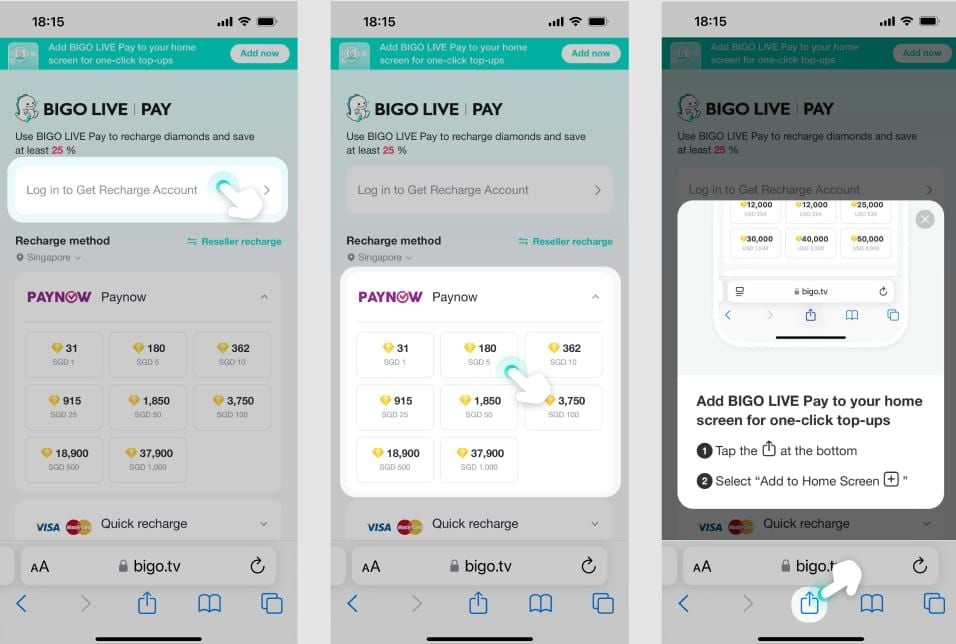
Go directly to bigo.tv and recharge through your browser. This bypasses the Apple App Store or Google Play processing layer entirely — which is exactly where most March 2026 delays are happening for iOS and Android users.
2. Change Your Payment Method
Digital wallets consistently outperform everything else during congestion. If your credit card recharge is stuck, switching to GoPay, GCash, or a regional equivalent can cut processing from 30–90 minutes down to 2–5 minutes. Speed hierarchy: digital wallets → credit cards → bank transfers.
3. Clear Cache and Force-Restart (Exact Steps)
This resolves 70–80% of Android glitches. Your diamonds may already be credited — the app just isn't displaying them.
Android: Settings → Apps → BIGO Live → Storage → Clear Cache. Then: Settings → Apps → BIGO Live → Force Stop. Wait 30 seconds, reopen.
iOS: Settings → General → iPhone Storage → BIGO Live → Offload App, then reinstall. Or force-close by swiping up and swiping BIGO Live away. Wait 30 seconds before reopening.
After reopening, do a manual wallet refresh: pull down on Me → Wallet 3–5 times with 60–90 second waits between each pull. Community testing confirms this fixes 50–95% of sync issues.

4. Switch Networks
Sounds too simple. Works anyway. Switching from WiFi to mobile data (or vice versa) forces a new network handshake and resolves 80% of delivery failures from gateway timeouts. If that doesn't work, enable airplane mode for 10 seconds, then disable — resets the network stack without a full restart.
For persistent issues, set DNS manually to 8.8.8.8 (Google) or 1.1.1.1 (Cloudflare). This clears the 10–20% of cases where ISP-level DNS routing blocks Bigo Live's payment confirmation servers.
5. Use BitTopup for Near-Instant Delivery
When in-app recharges are stuck and you can't wait, a third-party top-up is a legitimate option. Buy Bigo Live diamonds with instant delivery through BitTopup: enter your BIGO ID, select your package, complete payment, and diamonds credit directly to your account. No app store gateway involved — which is exactly what's causing most March 2026 delays.
The only thing to verify with any top-up service: it should require your BIGO ID only, never your password or login credentials.
6. Retry During Off-Peak Hours
Community testing shows 70% of transactions clear within 2 minutes during off-peak hours (2–6 AM local time). Asian users average 2–3 minutes delivery; European and North American users average 5–10 minutes. If your situation isn't urgent, this is the most reliable fix with zero effort.
And going forward: recharge 90 minutes before any major event or ranking reset. That buffer keeps you clear of the traffic spike entirely.
7. Submit a Priority Support Ticket — With the Right Information
Most users submit incomplete tickets and get auto-responses that restart the clock. Submit everything upfront.
Path: Me → Settings → Feedback & Help → Contact Us → Payment Issues → Diamonds Not Received
Include in your first message:
- BIGO ID (8–12 digit numeric code, found under Me → Profile)
- Transaction ID (15–25 character alphanumeric code)
- Payment method used
- Exact amount charged
- Screenshot of bank/payment confirmation showing completed charge
- Timestamp of purchase
You can also reach support at feedback@bigo.tv, support@bigo.tv, or +65 63519330 (GMT+8, 9 AM–6 PM Singapore time).
Realistic timelines: Support acknowledgment within 24 hours. Diamond credit or refund: 1–3 business days for standard cases, 5–7 business days for complex ones.
Money Deducted, No Diamonds — Do This Now
Less than 1% of pending transactions result in lost payments after proper escalation. Your money is almost certainly recoverable.
First 30 minutes:
- Do not retry the purchase.
- Screenshot your bank statement showing the completed charge.
- Do the wallet refresh sequence (pull down 3–5 times, 60–90 second waits).
- Force close and reopen the app. Check your balance — credit sometimes arrives before the display updates.
Still nothing after 30 minutes: Submit the support ticket above with all details included. Escalate after 48 hours for standard purchases, 72 hours for first-time or large purchases.
Which Regions Are Hit Hardest
Regional cause differs — and so does the best fix.
Southeast Asia (Indonesia, Philippines, Thailand, Vietnam): Digital wallet gateways (GoPay, GCash, TrueMoney) are queued from reset traffic. Switch to credit card or web-based recharge at bigo.tv.
Middle East and South Asia (Saudi Arabia, UAE, India, Pakistan): Regional banks flag international gaming transactions for manual review — holds can run 7–14 days on unverified accounts. Complete full account verification first; it reduces delays by 80–95%.
Europe and North America: App Store payment latency is the dominant issue. Fix: switch to web-based recharge instead of in-app purchase.
How to Prevent This Going Forward
Complete account verification now. Verified accounts 6+ months old experience 80–95% fewer delays. Incomplete verification can hold transactions 7–14 days. Path: Me → Settings → Account Security.
Enable two-factor authentication. Pre-clears your account's security status, reducing delays by 80–95%. Same path: Me → Settings → Account Security → Enable 2FA.
Start small on new accounts. First 2–3 purchases should be 500–1,000 diamond packages. Large packages on new accounts trigger the extended security review every time — no exceptions.
Never recharge with an active VPN. Disable before every transaction. If you need VPN for other reasons, set DNS to 8.8.8.8 or 1.1.1.1 to minimize routing conflicts.
Know the daily limits. Maximum 10,000–30,000 diamonds per day, 3 attempts per 24 hours. Hitting the attempt limit while troubleshooting a failed transaction locks you out for the rest of the day — a common trap.
For players who want to skip the in-app payment uncertainty altogether, recharge Bigo diamonds without transaction delays through BitTopup bypasses the app store friction causing most March 2026 issues.
FAQ
How long should a normal recharge take? Digital wallets: 2–5 min. Credit cards: 5–15 min. Bank transfers: 15–30 min. Add 20–30% during peak hours (6–11 PM local). Off-peak (2–6 AM local), 70% of transactions clear within 2 minutes.
Pending over 48 hours — is my money gone? Almost certainly not. Less than 1% of cases result in lost payments after escalation. Past 48 hours on a standard purchase (72 hours for first-time or large), contact support immediately with your BIGO ID and Transaction ID. Don't retry — duplicate charges are a real risk.
Can I cancel a pending transaction? Not through the app. If your bank still shows pending (not yet settled), contact your bank directly — they may reverse the authorization. If already settled, go through Bigo Live support for a refund or diamond credit.
Is third-party top-up safe? The key check: the service should require only your BIGO ID, never your password or login credentials. Legitimate platforms credit diamonds directly using your BIGO ID — no account access required.
Why does my recharge keep failing even after retrying? Three most likely causes: (1) You've hit the 3-attempt-per-24-hour limit. (2) Account verification is incomplete, triggering automatic holds. (3) VPN or restrictive DNS is blocking Bigo Live's payment confirmation servers. Check all three before trying again.
Will Bigo Live compensate me for server-caused delays? No official compensation policy for delays alone. But if your payment was charged and diamonds never arrived, support will credit the diamonds or issue a refund — typically within 1–3 business days when a complete ticket is submitted.
The March 2026 situation is real, but it's temporary and almost always recoverable. Use the diagnostic table to match your situation to a cause, apply the targeted fix, and you'll resolve this faster than users who try solutions at random. Past 48 hours with a completed charge and no diamonds? Don't wait — submit that support ticket with your full transaction details today.
Recommended News






Recommend products



Table of Contents
- Why Transactions Are Delayed Right Now
- The March 1 Reset Is the Hidden Culprit
- Security Reviews and Payment Method Speed
- Other Common Causes
- Diagnose Before You Fix
- 7 Fixes That Work in March 2026
- 1. Switch to Bigo Live's Website Instead of the App
- 2. Change Your Payment Method
- 3. Clear Cache and Force-Restart (Exact Steps)
- 4. Switch Networks
- 5. Use BitTopup for Near-Instant Delivery
- 6. Retry During Off-Peak Hours
- 7. Submit a Priority Support Ticket — With the Right Information
- Money Deducted, No Diamonds — Do This Now
- Which Regions Are Hit Hardest
- How to Prevent This Going Forward
- FAQ
Recommend products



Recommended News

Zenless Zone Zero Controller Not Working: Fixes and Best Keybinds

Cheap StarMaker Coins for SupernovaX 2026 Auditions (12-23% Off)

MICO Live Coins MENA After v5.2: Cheapest Deals 2026

How to Redeem NCRCKYT8EF Code for Free Eggy Coins (Aug 2026)

Taka Live 1.2.11 Draining Battery Fast After the July 2026 Update? Causes and Fixes
PUBG G-COIN CDK June 2026: Is the $91.43 Double Promo Actually Worth It?
Buy PUBG Mobile UC Cheap for the Naruto Shippuden Collab (July 2026): Costs, Best Packs & Safe Top-Up

Where Winds Meet Mountain Autumn Event Rewards July 2026: Full List, Currency & Priority


































































































