What Triggers the Daily Purchase Limit
Daily limits activate when cumulative in-app transactions reach predetermined thresholds within 24-hour rolling periods. Standard credit/debit cards enforce $500-$2,500 daily caps, premium cards allow $5,000+ for verified accounts. Regional variations: PHP 50,000-100,000 (Philippines), IDR 25-50 million (Indonesia).
For reliable alternatives, platforms like BitTopup offer cheapest Poppo coins recharge with independent purchase quotas separate from in-app restrictions.
The system tracks all payment methods linked to your account—switching cards doesn't reset quotas if registered under the same profile. Each transaction contributes to running totals, whether purchasing 7,000 Coins ($0.58-$0.85) or 870,000 Coins ($94.73-$98.51).
Standard Limit Amounts for Different Account Types
Basic accounts face most restrictive limits. New users typically encounter $500 daily caps until completing identity verification and establishing transaction history. Verified accounts with consistent usage gradually access higher tiers, reaching $2,500 for standard cards.
Premium payment methods unlock significantly higher quotas. Verified premium credit cards process $5,000+ daily purchases, essential for serious competitive gifters in major PK tournaments. Regional payment systems impose separate restrictions—digital wallets in Southeast Asia often have independent daily limits.
Account level influences purchase capacity. Level 5 accounts required for PK participation typically have higher trust scores, potentially qualifying for increased limits. Thresholds remain dynamic, adjusting based on transaction patterns and account standing.
Reset Times and Regional Variations
Daily limits reset on 24-hour rolling basis from first transaction, not midnight. First purchase at 3 PM means quota refreshes at 3 PM next day. This creates strategic timing opportunities for competitive gifters planning around major events.
Regional variations significantly impact structures. Philippine users face PHP 50,000-100,000 caps, Indonesian accounts encounter IDR 25-50 million restrictions. International transactions add complexity with 24-48 hour processing delays and separate quota tracking.
The Critical Problem: Running Out of Coins During Live PK Events
PK battles create intense, time-sensitive scenarios where running out of coins means immediate competitive disadvantage. Unlike casual gifting, PK events demand rapid-fire coin deployment with zero tolerance for purchase delays.
Real Scenarios When Limits Impact Your Support
During heated PK battles, top supporters routinely spend 430,000 Coins ($46.82-$50) within minutes to maintain streamer leads. When daily limits cap at $500, you can only purchase approximately 4.3 million coins before hitting restrictions—often insufficient for multi-hour tournament finals.

Most frustrating scenario: mid-battle coin depletion and in-app purchases failing with daily limit exceeded errors. Your streamer depends on consistent gift flow, but you're locked out while competitors continue supporting. This creates visible gaps in gift animations that demoralize your team and embolden opponents.
Team PK events amplify this problem. When multiple supporters coordinate large gift waves, one person hitting limits disrupts synchronized strategies. Your inability to participate affects entire team dynamics during crucial moments.
How High-Traffic Events Increase Coin Consumption
Major PK tournaments consume coins at rates 5-10x higher than regular sessions. Competitive gifters report spending 870,000 Coins ($94.73-$98.51) per hour during intense battles, quickly exhausting standard daily limits within first 60-90 minutes of multi-hour events.
High-traffic periods create additional complications. When thousands simultaneously attempt purchases during popular PK events, even successful transactions face delays. App store purchases add 5-10 minutes delay during peak traffic, manual processing takes 30 minutes to hours—unacceptable when battles shift momentum every few minutes.
Psychological pressure intensifies consumption. As PK scores tighten, supporters instinctively increase gifting frequency and value, rapidly depleting reserves. Adequate pre-purchased coins evaporate faster than anticipated when adrenaline-fueled competitive dynamics take over.
Instant Reload Method 1: Using BitTopup for Immediate Coin Delivery
Third-party recharge platforms provide the most effective solution for bypassing in-app purchase limits during critical PK events. These services operate independent quota systems that don't count against Poppo daily limits.
Why BitTopup Offers Independent Purchase Quotas
BitTopup maintains separate transaction tracking from Poppo's in-app system, allowing coin purchases even after exhausting official app limits. This independence stems from different payment processing channels—Poppo routes through registered merchant accounts, BitTopup uses alternative payment gateways with distinct quota management.
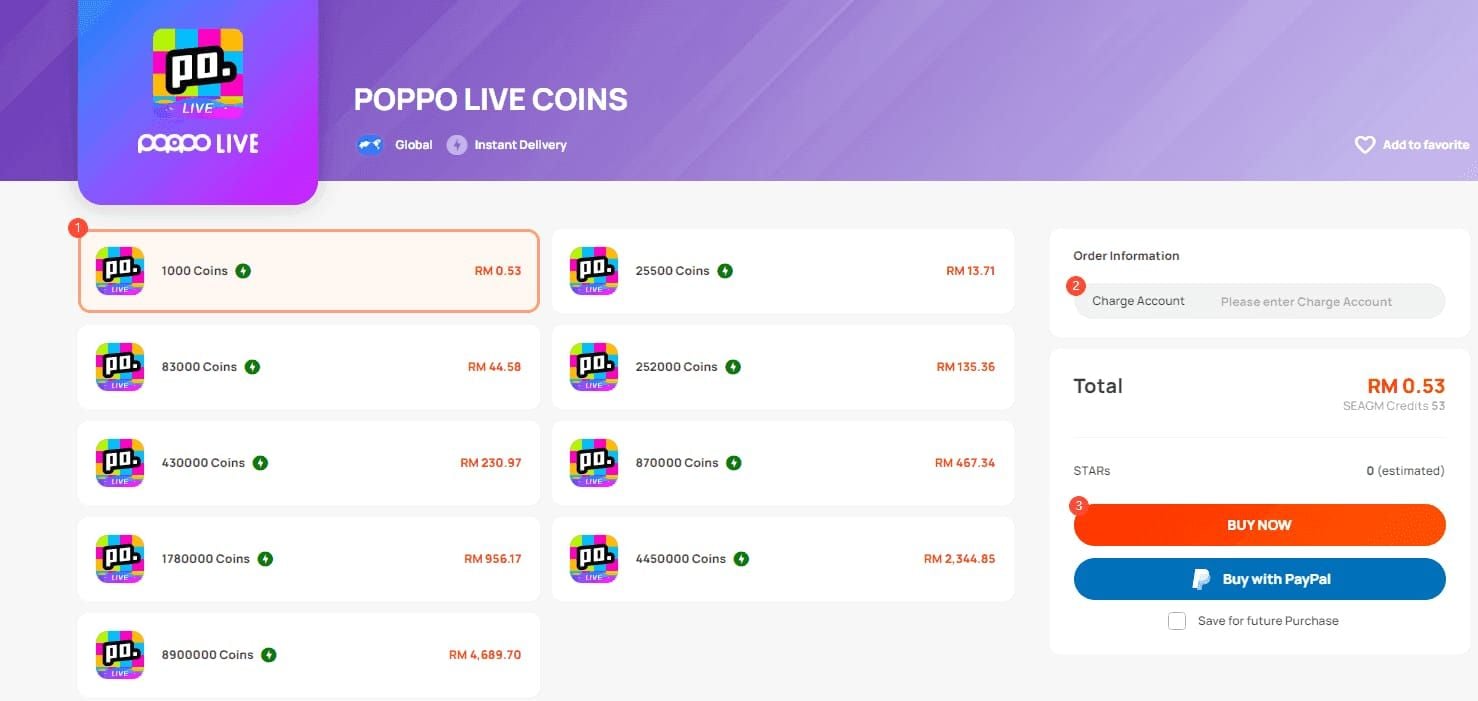
Canadian users particularly benefit, as buy Poppo coins Canada options through BitTopup bypass regional restrictions affecting direct in-app purchases. Competitive pricing delivers 430,000 Coins for $46.82-$50 and 870,000 Coins for $94.73-$98.51, matching or beating in-app rates with superior availability.
Automated User ID-based delivery eliminates manual processing delays. Unlike app store purchases requiring human verification during high-traffic periods, BitTopup's automated infrastructure processes 98% of orders within 1-5 minutes regardless of platform load.
Step-by-Step Process for Emergency Reloads
Execute emergency reloads in four streamlined steps:
- Locate Your Poppo User ID: Open Poppo Live, tap Me icon in bottom navigation. User ID appears as 9-10 digit numeric identifier in profile section. Copy exactly—incorrect IDs cause delivery failures.

Access BitTopup Platform: Navigate to BitTopup's Poppo coin section while keeping Poppo app open in background. Select desired coin package—70,000 Coins ($7.60) for quick support or 870,000 Coins ($94.73-$98.51) for sustained PK participation.
Complete Payment Verification: Enter 16-digit card number without spaces, expiration date (MM/YY format), CVV 3-4 digits. Complete 3D Secure OTP verification within 5 minutes to prevent timeout. Turn off VPN during payments to avoid IP mismatches triggering security blocks.
Confirm Delivery: Digital wallets process in 1-2 minutes, credit cards in 3-5 minutes, UPI payments in 30-60 seconds. Refresh Poppo Live app or log out/in to update coin balance. Screenshot transaction receipt if coins aren't credited within 3-5 minutes for support verification.
Delivery Speed Comparison: BitTopup vs In-App Purchases
BitTopup's automated system delivers 70% of orders under 60 seconds, 98% within 1-5 minutes. This consistency stems from dedicated server infrastructure maintaining performance during high-traffic periods.
In-app purchases face variable delays based on platform load. During normal periods, official app transactions complete in 2-3 minutes. Major PK events create bottlenecks—app store purchases add 5-10 minutes delay when thousands simultaneously recharge. Manual processing escalates to 30 minutes or hours during peak traffic.
Payment method selection impacts delivery timing. Digital wallets consistently outperform traditional cards, processing in 1-2 minutes versus 3-5 minutes for credit cards. UPI payments achieve fastest completion at 30-60 seconds, ideal for emergency mid-battle reloads.
Instant Reload Method 2: Multiple Payment Method Strategy
Diversifying payment methods creates redundant coin access channels preventing single points of failure during critical PK moments. This strategy requires advance setup but provides unmatched reliability when limits threaten competitive participation.
How Different Payment Methods Affect Purchase Limits
Each payment method maintains independent daily limits based on issuer policies and transaction history. Your credit card's $2,500 daily cap operates separately from digital wallet limits, effectively multiplying total available purchase capacity.
Standard credit cards enforce $500-$2,500 daily limits per card, not per account. Registering multiple cards from different issuers creates separate quota pools—primary card with $2,500 limit plus secondary card with $1,500 limit provides $4,000 total daily capacity.
Digital wallets like PayPal, regional e-wallets, and bank-linked payment apps each maintain distinct limits. These often exceed card-based restrictions, with some allowing $3,000-$5,000 daily transactions. UPI payments in supported regions frequently offer highest limits, sometimes reaching $10,000+ for verified accounts.
Setting Up Backup Payment Options in Advance
Configure multiple payment methods during calm periods, not during active PK battles. Add at least three distinct payment types to BitTopup account: one primary credit card, one backup card from different issuer, one digital wallet or UPI option.
Verify each method with small test transactions before relying on them during events. Process 7,000 Coin purchases ($0.58-$0.85) using each method to confirm functionality, understand processing speeds, identify verification requirements that might cause delays.
Document each payment method's daily limit and reset time in quick-reference note. When primary card hits $2,500 cap at 2 PM, knowing digital wallet resets at 6 PM and backup card has $1,500 remaining allows strategic purchase planning throughout extended PK tournaments.
Pre-Event Preparation: Preventing Limit Issues Before They Happen
Strategic pre-loading eliminates most limit-related problems by building coin reserves before PK events begin. This proactive approach requires planning but provides most reliable solution for uninterrupted competitive participation.
Calculating Coin Needs for Major PK Tournaments
Analyze historical gifting patterns to establish baseline consumption rates. Review past PK events to determine average coins-per-hour spending during different intensity levels. Casual PK battles consume 200,000-300,000 coins hourly, championship finals exceed 800,000-1,000,000 coins per hour.
Factor in event duration and competitive intensity. Three-hour PK tournament at high intensity requires 2.4-3 million coins minimum, costing approximately $260-$320. Add 20-30% buffer for unexpected momentum shifts or extended overtime periods.
Consider your role in team PK dynamics. Primary supporters carrying major gifting responsibility need larger reserves than secondary contributors. If you're designated closer delivering final-minute gift waves, allocate extra coins for critical moments.
Strategic Pre-Loading 24-48 Hours Before Events
Purchase calculated coin requirements 24-48 hours before scheduled PK events to avoid last-minute technical issues and spread purchases across multiple daily limit cycles. This timing allows using today's full quota plus tomorrow's refreshed limit, effectively doubling purchase capacity.
Distribute large purchases across multiple transactions to minimize individual payment failures. Instead of one 2-million-coin purchase, execute four 500,000-coin transactions spread over several hours. This reduces payment gateway stress and provides multiple opportunities to address verification issues.
Monitor coin balance daily leading up to events. Unexpected app updates, account issues, or payment problems discovered 48 hours early allow time for resolution. Finding problems 10 minutes before PK battle starts leaves no recovery options.
Creating a Coin Reserve Buffer System
Maintain permanent coin reserve equal to one hour of high-intensity PK consumption—typically 800,000-1,000,000 coins for serious competitive gifters. This buffer handles unexpected PK challenges from rival streamers or spontaneous events without advance notice.
Never deplete reserve below one-hour threshold during regular streaming sessions. Treat this balance as emergency-only funds reserved exclusively for competitive PK situations. Casual gifting should come from separate coin allocations purchased as needed.
Replenish reserve immediately after PK events before resuming regular gifting. Process replacement purchases within 24 hours while event remains fresh in memory, ensuring buffer stays ready for next competitive challenge.
Advanced Strategies from Experienced Competitive Gifters
Top Poppo supporters employ sophisticated techniques maximizing gifting capacity while minimizing limit-related disruptions. These community-tested strategies separate casual participants from serious competitive gifters.
Timing Your Purchases to Maximize Daily Quotas
Execute first daily purchase immediately after previous day's reset time to access fresh quota as early as possible. If yesterday's first purchase occurred at 2 PM, buying at 2:01 PM today resets limit with maximum time remaining for additional transactions.
Split large pre-event purchases across quota boundary to access two daily cycles. Purchase maximum limit at 11 PM, then wait until 11:01 PM next day to access refreshed quota for additional coins. This effectively doubles 24-hour purchase capacity for major events.
Coordinate purchase timing with scheduled PK events. For tournament starting at 8 PM, execute first daily purchase at 8 AM to ensure limit resets at 8 AM following day—after event concludes. This prevents mid-event limit problems while maintaining maximum flexibility.
Coordinating with Other Supporters During Team PK Events
Establish communication channels with fellow supporters before team PK events to coordinate gifting strategies and share limit status updates. When one supporter hits limits, others temporarily increase contribution rates to maintain consistent team gift flow.
Designate specific supporters for different battle phases based on remaining purchase capacity. Supporters with fresh daily limits handle early-event gifting, while those who pre-loaded large reserves serve as closers for final-phase gift waves.
Create backup supporter roles for critical moments. If team's primary gifter hits limits during final 10 minutes, pre-designated backups immediately activate reserves to prevent visible gaps in gift animations signaling weakness to opponents.
Common Mistakes That Leave You Without Coins at Critical Moments
Even experienced supporters make preventable errors compromising PK participation. Understanding common mistakes helps avoid similar situations during competitive gifting.
Waiting Until the Last Minute to Purchase
Procrastinating coin purchases until hours before PK events eliminates safety margin for addressing technical problems. Payment verification failures, network issues, or unexpected account restrictions discovered 30 minutes before battle start leave insufficient time for resolution.
Last-minute purchasing concentrates transaction volume during peak platform traffic. When thousands simultaneously recharge before popular PK events, even normally reliable payment methods face delays. App store purchases add 5-10 minutes delay during high-traffic periods, potentially causing missed opening battle phases.
Psychological pressure of urgent purchasing increases error rates. Rushing through payment verification leads to typos in card numbers, incorrect CVV entries, or skipped 3D Secure confirmations triggering transaction failures requiring 5-10 minute retry waits.
Not Having Backup Payment Methods Ready
Relying on single payment method creates single point of failure completely blocking PK participation. When primary credit card hits limits or encounters unexpected verification issues, having no configured alternatives means immediate removal from competitive action.
Discovering backup payment methods require new verification processes during active PK battles wastes critical minutes. Setting up new digital wallet or adding secondary card mid-event involves email confirmations, identity verification, and test transactions consuming 15-30 minutes.
Failing to test backup methods before events means discovering limitations under pressure. Secondary payment option might have lower limits, slower processing, or regional restrictions you didn't anticipate, leaving inadequate emergency reload capacity when primary methods fail.
Troubleshooting: When Purchases Fail During Live Events
Technical failures during active PK battles require rapid diagnosis and resolution to minimize participation gaps. Understanding common failure modes and solutions prevents extended downtime during critical moments.
Distinguishing Between Limit Errors and Technical Issues
Limit errors display specific messages: daily purchase limit exceeded or transaction quota reached, clearly indicating you've hit spending caps. These require switching to alternative payment methods or platforms rather than retrying same transaction.
Technical failures show different error patterns: payment processing failed,network timeout, or verification error indicate problems unrelated to purchase limits. These often resolve through basic troubleshooting rather than requiring payment method changes.
Verify actual limit status before assuming technical problems. Check purchase history to calculate total daily spending—if genuinely below limits but receiving errors, focus on technical troubleshooting rather than switching payment methods unnecessarily.
Quick Network Troubleshooting Steps
Ensure minimum 1 Mbps internet connection required per September 28, 2025 update. Test connection speed using any speed test tool—slow connections cause payment timeouts appearing as transaction failures but actually stemming from network inadequacy.
Turn off VPN during payments to avoid IP mismatches triggering fraud detection systems. Payment processors verify IP location matches registered billing address; VPN usage creates geographic discrepancies automatically blocking transactions as potential fraud.
Switch between WiFi and mobile data if one connection type fails. Sometimes network-specific routing issues affect payment gateway access—WiFi might block certain payment processor domains while mobile data routes successfully, or vice versa.
Contacting Support Without Missing Critical Moments
Screenshot transaction receipts immediately when payments succeed but coins don't credit within expected 3-5 minute delivery windows. This documentation enables support teams to quickly locate and resolve transactions without lengthy verification processes.
Use platform live chat support rather than email during active events. Live chat provides real-time assistance resolving issues within minutes, while email support involves hours or days of back-and-forth extending well beyond PK event conclusions.
Provide specific details in support requests: exact transaction time, payment method used, transaction ID from receipt, and Poppo User ID. Complete information allows support agents to immediately investigate rather than wasting time requesting basic details through multiple message exchanges.
Maximizing Your Poppo Gifting Capacity: Long-Term Solutions
Sustainable competitive gifting requires systems extending beyond emergency workarounds. These long-term strategies build reliable infrastructure for consistent high-level PK participation.
Account Verification to Potentially Increase Limits
Complete all available identity verification processes to maximize account trust score and potentially qualify for higher purchase limits. Verified accounts with confirmed identity documents, linked payment methods, and established transaction history often receive preferential limit treatment.
Build consistent transaction patterns demonstrating reliable payment behavior. Regular smaller purchases over months establish account as low-risk, potentially triggering automatic limit increases as platform algorithms recognize stable usage patterns.
Maintain positive account standing by avoiding chargebacks, payment disputes, or suspicious activity flags. Accounts with clean payment histories receive better limit treatment than those with past issues, even if problems were resolved favorably.
Building Relationships with Reliable Recharge Platforms
Establish accounts with multiple trusted third-party recharge platforms before needing emergency alternatives. BitTopup provides competitive pricing, fast delivery, and independent purchase quotas, but having secondary platform options creates additional redundancy for worst-case scenarios.
Test each platform's delivery speed and reliability during low-pressure periods. Process small transactions to verify each service actually delivers coins as advertised and understand specific processes before relying on them during critical PK moments.
Monitor platform reputations within Poppo community. Experienced supporters share insights about which services maintain reliability during high-traffic events versus those failing when needed most. Community knowledge helps select most dependable options for backup infrastructure.
Frequently Asked Questions About Poppo Purchase Limits and Instant Reloads
What is the daily purchase limit for Poppo coins?
Standard payment cards enforce $500-$2,500 daily limits, premium cards allow $5,000+ for verified accounts. Regional variations: PHP 50,000-100,000 (Philippines), IDR 25-50 million (Indonesia). Limits reset on 24-hour rolling basis from first transaction, not midnight.
How fast can I get Poppo coins during a live PK event?
Using User ID-based automated top-ups through platforms like BitTopup, 98% of orders deliver within 1-5 minutes, 70% complete under 60 seconds. Digital wallets process in 1-2 minutes, credit cards in 3-5 minutes, UPI payments in 30-60 seconds. In-app purchases face 5-10 minute delays during high-traffic events.
Can I use multiple payment methods to bypass Poppo limits?
Yes—each payment method maintains independent daily limits. Your credit card's $2,500 cap operates separately from digital wallet limits, effectively multiplying total purchase capacity. Register multiple cards from different issuers plus digital wallets to create separate quota pools accessible when individual methods reach limits.
What's the fastest way to reload Poppo coins when the limit is reached?
Switch to third-party platforms like BitTopup that maintain independent purchase quotas separate from in-app limits. Use UPI payments for 30-60 second delivery or digital wallets for 1-2 minute processing. Have your 9-10 digit Poppo User ID ready, select coin package, complete payment verification, and coins credit automatically.
Is it safe to use third-party platforms for Poppo coin recharge?
Reputable platforms like BitTopup use secure payment processing and automated delivery systems protecting your information. Verify platform reliability through community reviews and test with small transactions before major purchases. Avoid sharing Poppo password—legitimate services only require public User ID for coin delivery.
How should I prepare for major PK tournaments to avoid limit issues?
Calculate coin needs based on event duration and intensity (typically 800,000-1,000,000 coins per hour for competitive battles). Pre-load 24-48 hours before events to spread purchases across multiple daily limit cycles. Configure backup payment methods, test delivery speeds, and maintain permanent reserve equal to one hour of high-intensity consumption.
Don't let purchase limits stop you from supporting favorite streamers during critical PK moments! Visit BitTopup now for instant Poppo coin delivery with independent purchase quotas, multiple payment options, and 24/7 availability. Get your coins in minutes and never miss another PK battle victory!