Regional Gateway Restrictions
Poppo's payment system blocks PayPal in Philippines and Taiwan due to compliance and fraud prevention. The gateway verifies your IP address, device location, and account registration country in real-time. When these match restricted regions, PayPal automatically disappears.
Payment Infrastructure Changes
Version 2.9.6 introduced stricter verification protocols cross-referencing payment methods with profile location data. Requirements: iOS 13.0+/Android 8.0+ with 500MB free storage for enhanced security features.
Country Limitations: US, UK, Germany, France
Even in supported markets, issues occur. The app needs minimum 1 Mbps download/0.5 Mbps upload speeds. Slower connections cause timeouts making PayPal appear unavailable.
US players face daily international transaction limits ($300-500) resetting at midnight ET. Exceeding these blocks PayPal without clear errors.
App Version Impact
Version 2.9.6 contains critical payment gateway updates. Users on 2.9.5 or older frequently report missing payment options that reappear after updating.
Monthly cache clearing (Settings > Apps > Poppo Live > Storage > Clear Cache) resolves 60-70% of visibility issues.
Diagnosing Payment Issues
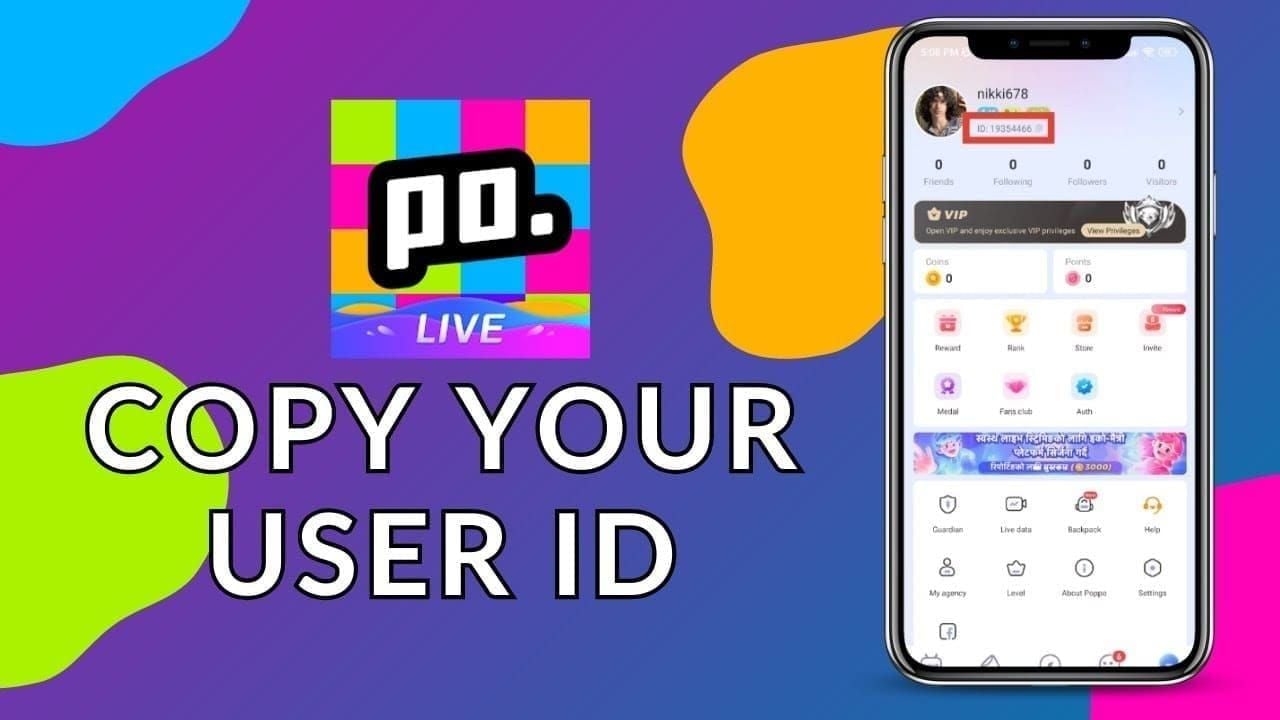
Start by verifying your User ID—the 7-10 digit number below your profile picture (long-press to copy). This determines which payment gateways you can access.
Check Account Region
Navigate to Profile > Settings > Account Information. Your registered country permanently determines payment availability. If outside supported territories, PayPal never appears.
Account region can't be changed after registration without creating new profiles.
Verify App Version
Check Settings > About. Compare against version 2.9.6. Even one minor version mismatch causes gateway failures.
Update process:
- iOS: App Store > search Poppo Live
- Android: Google Play > My Apps & Games > Updates
- Force-close after updating: double-tap home, swipe up, wait 30 seconds, relaunch
Payment Method Compatibility
Pull down payment list 2-3 times at 10-second intervals during checkout. This refreshes gateway connections.

Test with smallest package (2100 coins/$0.29 or 6000 coins/0.99€) to verify functionality without risk.
Common Error Messages
Error 1001 (insufficient funds): Add 10% buffer for authorization holds that release in 24-48 hours.
Error 1004 (3D Secure failure): Enroll via bank app > Card Settings > Verified by Visa/Mastercard SecureCode > wait 24-48 hours for activation.
Error 1006 (IP mismatch): Disable VPN via Settings > VPN > toggle off > wait 5 minutes before retry.
Card Decline Causes
Declines occur from AVS mismatches, international blocks, insufficient funds, and 3D Secure gaps.
AVS Mismatch
Payment processors compare billing addresses. Minor discrepancies—apartment numbers, abbreviations, ZIP formatting—trigger declines. US banks enforce strict AVS for international merchants, causing 40-50% first-time failures.
Enter addresses exactly as they appear on bank statements, including capitalization and punctuation.
International Transaction Blocks
Banks auto-block unfamiliar international merchants. Contact your bank's international department before purchases. Request pre-authorization for Poppo Live's payment processor. Activation takes 15-30 minutes, valid for 90 days.
Authorization Holds
Banks place $1 holds on new payment methods. If balance is $10 and purchase is $9.99, the hold creates $9 available, causing decline.
Maintain 10% buffer above purchase amounts. Holds release in 24-48 hours but stack with retries. Limit attempts to 3 per 24 hours at 15-30 minute intervals.
3D Secure Issues
OTPs remain valid 5 minutes but need entry within 60 seconds. Delayed entry causes timeouts.
Enroll before purchasing: bank app > Card Settings > Verified by Visa/Mastercard SecureCode > verify identity > wait 24-48 hours.
Why VPNs Fail (Critical)
VPNs create more problems than solutions. Payment gateways detect VPN traffic through IP reputation databases, connection patterns, and geographic inconsistencies.
Detection Systems
Processors analyze device fingerprints, browser configs, connection latency, and GPS coordinates. Contradictory signals—US IP with Philippine timezone—flag transactions as high-risk, causing automatic declines.
Poppo's gateway specifically checks for VPN provider IPs, data centers, and proxies. Transactions from these sources face automatic rejection.
Account Security Risks
VPN access triggers security locks requiring identity verification. Sudden location changes appear as account compromise. Locks require government ID, address proof, and 1080p selfies for KYC Level 5 (24-48 hour processing).
Multiple VPN logins from different countries can cause permanent restrictions.
Terms Violations
Poppo's terms prohibit location-masking technologies. Violations allow account termination with coin balance forfeiture. The platform audits high-value accounts, cross-referencing transaction locations against activity patterns.
Payment processors can blacklist your card across all merchants using the same gateway—permanent blacklisting at card number level.
Instant Solution: BitTopup Method
Third-party platforms deliver coins immediately without regional restrictions or card declines. BitTopup operates independently of Poppo's in-app infrastructure.
What Makes BitTopup Different
BitTopup processes purchases through direct User ID delivery, bypassing regional verification. Enter your 7-10 digit User ID, select package, pay, receive coins in 10-60 seconds.
98% delivery rate within 30-60 seconds vs. in-app PayPal's 5-15 minutes.
Supported Regions
Accepts payments from all countries where Poppo operates. US players get domestic processing avoiding international blocks. UK users access GBP pricing eliminating 2-3% conversion fees.
German players use SEPA transfers (zero fees). French users access euro-zone options processing faster than cross-border methods.
Top up Poppo Live coins before weekly reset without payment restrictions.
Purchase Process
- Navigate to BitTopup's Poppo Live section
- Select coin package (2100 to 1M+ coins)
- Enter User ID (7-10 digits below profile picture—long-press to copy)
- Double-check each digit—incorrect IDs can't be reversed
- Choose payment method:
- Credit cards: 30-60 seconds
- UPI (India): 5-15 minutes, zero fees
- GCash (Philippines): 2-5 minutes, 1-2% fees
- Complete payment through secure gateway
- Receive confirmation + delivery in 10-60 seconds
- Verify: Profile > Coins
Delivery Timeframes
98% delivery within 30-60 seconds for standard packages. Bulk orders (500K+ coins) take 2-5 minutes for verification.
Peak periods (6-10 PM per timezone) extend to 90-120 seconds but remain faster than in-app processing.
Failed deliveries (under 2%) trigger automatic refunds within 24 hours. Causes: incorrect User IDs, security restrictions, server maintenance.
Buy Coins Without PayPal (Complete Guide)
Alternative methods work regardless of region, bypass card declines, and often cost less.
Payment Options That Work
Credit/debit cards: Process through BitTopup's domestic gateways avoiding international blocks. Require 3D Secure enrollment (24-48 hour activation). Transactions complete in 30-60 seconds with $1 holds releasing in 24-48 hours.
UPI (India): Zero fees, 5-15 minute processing through domestic banking. Requires linking bank account to UPI app. Avoids 2-3% PayPal conversion fees.
GCash (Philippines): 2-5 minute processing, 1-2% fees (lower than PayPal international rates). Bypasses regional PayPal blocks with mobile-optimized flows.
Selecting Coin Packages
Packages range from 2100 coins ($0.29) to multi-million bundles. Calculate weekly gifting budget by tracking 7-day spending, then buy 2-3 weeks coverage to minimize fees without excessive stockpiling.
Larger packages offer better per-coin rates but lock funds. Balance cost efficiency against liquidity needs.
Test smallest packages ($0.29) when trying new payment methods to verify functionality before larger purchases.
Entering User ID Correctly
User ID = 7-10 digit number below profile picture. Long-press to copy to clipboard. Paste into BitTopup's field—don't type manually.
Verify pasted ID matches by comparing first and last three digits. Incorrect IDs cause irreversible delivery to wrong accounts.
User ID is always purely numeric, never contains letters. If can't locate: tap profile picture > Settings > Account Information.
Confirming Delivery
Open Poppo Live > Profile > Coins. Successful deliveries appear in 10-60 seconds (98% of transactions). If not visible in 2 minutes, force-close app (double-tap home, swipe up, wait 30 seconds) and relaunch.
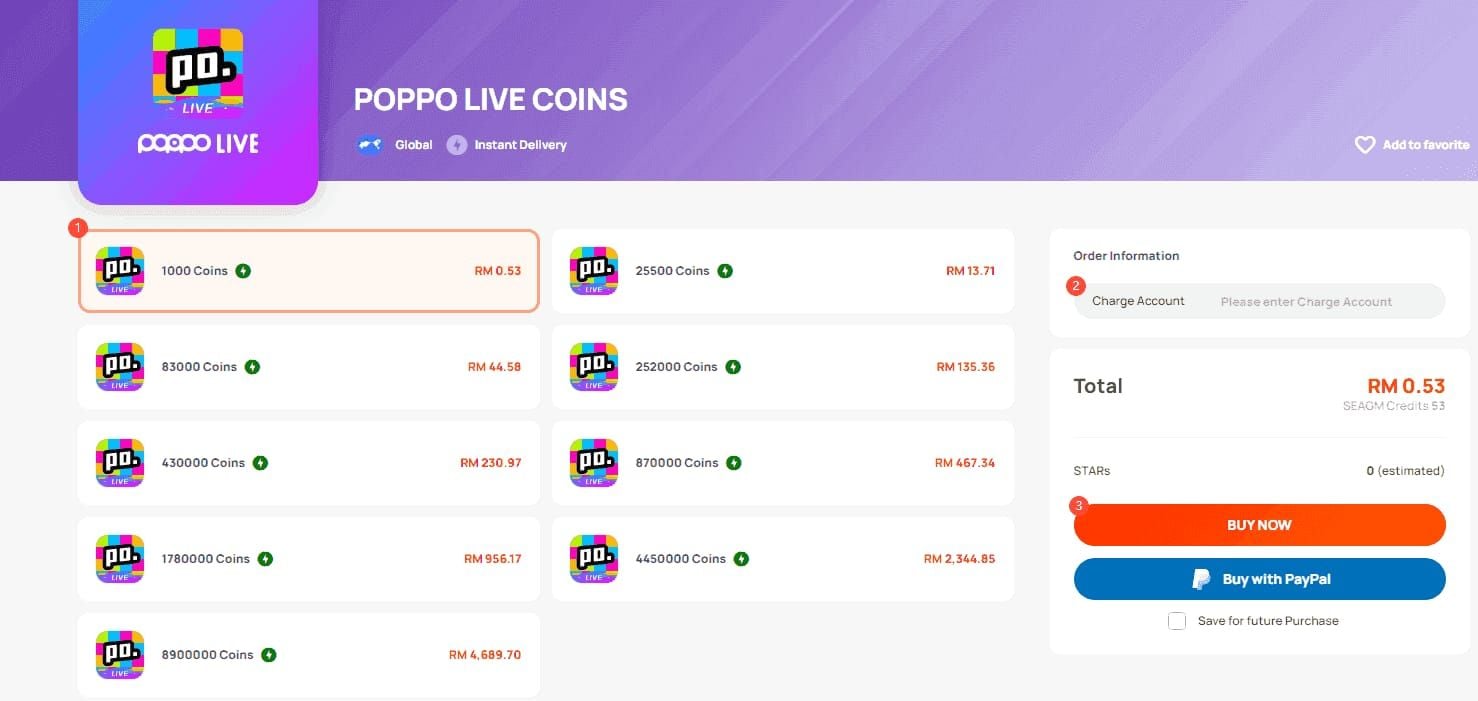
Check BitTopup order history for Completed status with delivery timestamp. Screenshot this confirmation.
Delays beyond 5 minutes indicate User ID errors or server issues. Contact BitTopup support with order number and User ID.
Regional Solutions by Country
United States
Daily international limits: $300-500, reset midnight ET. Plan large purchases before reset. Contact bank for limit increases.
Domestic credit cards process faster through BitTopup than in-app PayPal—no international merchant flags. Eliminates 24-48 hour authorization holds.
Enable 2FA: Settings > Account Security > scan QR code.
United Kingdom
GBP-denominated pricing eliminates 2-3% conversion fees (saves £2-3 per £100 vs. in-app).
Enroll in Verified by Visa/Mastercard SecureCode before purchasing (24-48 hour activation).
Time purchases around GBP/USD fluctuations (2-4% weekly swings) for better rates if not urgent.
Germany
SEPA transfers: zero fees, 1-2 business day processing. Eliminates 1.5-2% card fees—cost-effective for planned purchases.
Pre-authorize BitTopup as trusted merchant for recurring purchases to prevent fraud alerts.
Use prepaid cards/digital wallets for privacy (SEPA includes name/bank details). Adds 1-2% fees but provides anonymity.
France
Euro pricing eliminates conversion losses. French banks impose strict international merchant verification—call before first purchase to notify of upcoming transactions.
Pre-notification flags account for 30-90 days, covering multiple purchases.
Document purchases with screenshots for chargeback protection under French consumer laws.
Payment Method Comparison
In-App vs Third-Party
In-app PayPal: 5-15 minutes, 2-3% conversion fees, regional restrictions. Credit cards: 30-60 seconds, 30-40% decline rate for first-time users.
BitTopup: 98% delivery in 30-60 seconds regardless of region, bypasses declines, often better per-coin rates. Tradeoff: trusting third-party with User ID.
Transaction Fees
PayPal: 2-3% conversion + 1-2% international fees = 3-5% total. $100 purchase costs $103-105.
Credit cards: 1-3% foreign transaction fees + 1-2% conversion = 2-5% total for international merchants.
BitTopup: All fees included in displayed price—no hidden charges.
Success Rates
- In-app PayPal: 70-80% (supported regions), 0% (unsupported)
- In-app credit: 60-70% first-time, 85-90% repeat
- BitTopup: 98% all methods
When to Use Each
In-app PayPal: Supported regions, need official records, can wait 5-15 minutes.
In-app credit: Small test purchases, urgent gifting (30-60 seconds), though higher decline rates.
BitTopup: Guaranteed delivery any region, fastest processing (10-60 seconds), repeated in-app failures.
Security Best Practices
Verify Platforms
Legitimate platforms display business registration, addresses, contact methods. BitTopup shows transparent company details, support channels, SSL certificates (https://), PCI compliance.
Check independent reviews across multiple sources—forums, social media—not just platform testimonials.
Verify payment gateways redirect to recognized processors (Stripe, PayPal, major networks), not unknown pages.
Protect Account Info
Never share passwords with third-parties. Legitimate services only need User ID (7-10 digits), never login credentials.
Enable 2FA: Settings > Account Security > scan QR code.
Use unique passwords for Poppo Live. Password managers generate/store unique complex passwords per service.
Secure Transaction Indicators
Secure pages show padlock icons in address bar, use https:// URLs. Confirms encrypted connections.
Legitimate gateways only ask: card number, expiration, CVV, billing address. Anything beyond suggests fraud.
Monitor bank statements within 48 hours. Legitimate platforms process immediately with clear merchant names.
Failed Transaction Response
Screenshot errors showing codes, timestamps, order numbers. Evidence supports service inquiries and potential chargebacks.
Contact platform support before bank chargebacks. Most resolve issues in 24-48 hours. Chargebacks are last resort.
Check Settings > Account Security for restrictions blocking coin receipt. Restrictions require KYC Level 5 verification.
Troubleshooting Persistent Errors
Clear Cache/Data
Settings > Apps > Poppo Live > Storage > Clear Cache monthly to remove corrupted files.
After clearing, log out, wait 15 seconds, log back in to refresh session tokens.
For persistent issues: Clear Data (resets to fresh install). Resolves 90% of technical glitches but requires re-login.
Contact Bank
Call international transaction department (number on card back). Request pre-authorization for Poppo Live purchases with specific merchant name from decline notification.
Ask about daily limits and request increases for regular purchases.
Verify 3D Secure enrollment status and activation timeline (24-48 hours after enrollment).
Poppo Support vs Alternatives
Contact Poppo: Account restrictions, User ID verification, coin amount discrepancies.
Use BitTopup: Payment availability issues, regional restrictions, persistent card declines from banking limitations.
Contact bank: Multiple payment methods fail across platforms—indicates fraud holds or account restrictions.
Document Errors
Screenshot error messages with codes, timestamps, reference numbers immediately.
Record troubleshooting steps chronologically: methods tried, timing, results. Prevents repeating ineffective solutions.
Save confirmations, order numbers, delivery notifications for successful purchases. Establishes patterns to identify what changed when failures begin.
FAQ: Poppo Live Payments 2026
Why is PayPal not showing in my Poppo Live app?
Regional restrictions—PayPal only appears in US, Canada, UK, Germany, France, Australia, Singapore. Accounts registered elsewhere or accessing from Philippines/Taiwan never see PayPal. Update to version 2.9.6 and clear cache monthly for proper display in supported regions.
How do I fix card declines when buying Poppo coins?
Enroll in 3D Secure (bank app > Card Settings), add 10% buffer for authorization holds, contact bank to pre-authorize Poppo Live's processor. Limit retries to 3 per 24 hours at 15-30 minute intervals.
Can I buy Poppo coins without PayPal in 2026?
Yes—BitTopup delivers in 10-60 seconds using credit cards, UPI (India), GCash (Philippines), other regional methods. Works regardless of registered country. Enter 7-10 digit User ID, select package, pay, receive coins with 98% delivery under 60 seconds.
Is BitTopup safe for purchasing Poppo coins?
Legitimate platform with transparent pricing, secure gateways (SSL, PCI compliance), established support. Only requires User ID (never password), uses recognized payment processors, maintains 98% delivery rates. Verify official website, never share passwords.
How long does instant Poppo coin delivery take?
BitTopup: 98% within 30-60 seconds vs. in-app PayPal (5-15 min) or credit (30-60 sec). Bulk orders (500K+ coins) take 2-5 minutes. Peak hours (6-10 PM) extend to 90-120 seconds. Failed deliveries (under 2%) refund in 24 hours.
What causes payment method unavailable errors?
Regional restrictions, outdated app (update to 2.9.6), corrupted cache (clear monthly via Settings > Apps > Poppo Live > Storage), or VPN detection (disable, wait 5 min). Pull down payment list 2-3 times at 10-second intervals to refresh. Verify registered country matches supported regions.
Skip payment hassles—get Poppo coins instantly through BitTopup. Full support for US, UK, Germany, France, and all restricted regions. No card declines, 98% delivery within 60 seconds, zero hidden fees. Competitive rates, secure transactions, excellent service. Visit BitTopup to purchase Poppo coins securely today.























































































































