



Poppo VIP Auto-Renewal Glitch: Cancel & Switch Guide 2025
Poppo VIP auto-renewal glitches cause unexpected charges and failed cancellations for thousands. This guide shows how to disable auto-renewal on iOS/Android, switch to one-time payments for complete spending control, and avoid billing issues.


How Auto-Renewal Works
Poppo VIP costs $15/month, auto-renewing every 30 days unless manually canceled. Charges appear as POPPO.LIVE, Poppo Inc., Poppo Payments, PPLIVE, or P.LIVE on statements. The system links to your App Store or Google Play payment method—you can't cancel within the Poppo app itself.
For budget control, Poppo Live recharge UK via BitTopup offers one-time payments with no recurring charges, competitive pricing, and instant delivery.
Why Auto-Renewal Creates Problems
- $15/month = $180 annually—significant for casual users
- VIP benefits expire after 30 days regardless of subscription status
- Charges continue during inactive periods with no prorated refunds
- Multiple merchant names complicate budget tracking
- Silent background billing removes conscious spending decisions
Common Glitches
Failed cancellations: Users disable auto-renewal properly, yet charges continue days/weeks later.
Duplicate charging: Two $15 charges within one billing cycle, especially during app updates. Version 2.9.6 (Oct 9, 2025) addressed transaction glitches, but legacy issues persist.
Unexpected reactivation: Canceled subscriptions mysteriously resume after app reinstalls or new device logins.
Identifying Billing Issues
Warning Signs
- Duplicate charges within 30 days
- No cancellation confirmation within 24 hours
- Subscription still shows active after 48 hours
- Charges appearing after intended cancellation date
- Irregular charge intervals (shorter than 28 days or inconsistent patterns)
Check Subscription Status
iOS: Settings > [Your Name] > Subscriptions > Poppo. Active shows Renews on [date]; canceled shows Expires on [date].

Android: Google Play Store > Profile Icon > Payments & Subscriptions > Subscriptions > Poppo. Status displays Active or Canceled with next payment/expiration date.

Cross-reference device status with bank statements. Match transactions to expected billing dates—misalignment indicates glitches.
Review Payment History
- Download 6-12 month transaction history
- Organize Poppo charges chronologically (date, amount, merchant name)
- Calculate intervals between charges—should be consistent 30-31 days
- Compare charges against actual usage periods
- Document discrepancies with screenshots
Cancel Auto-Renewal on iOS
Access Subscription Settings
- Open Settings app
- Tap your name at top
- Select Subscriptions
- Locate Poppo VIP entry
- Tap to view details
Disable Auto-Renewal
- Tap Cancel Subscription (red text at bottom)
- Confirm when prompted
- Screen updates to Expires on [date]
- Screenshot the confirmation
- Check email for Apple confirmation within 24 hours
Verify Cancellation
- Screenshot expiration date as proof
- Set calendar reminder for 2-3 days after expiration
- Check payment method for unauthorized charges
- Contact Apple Support with screenshots if charges continue
Cancel Auto-Renewal on Android
Navigate to Subscriptions
- Open Google Play Store
- Tap profile icon (top-right)
- Select Payments & subscriptions
- Tap Subscriptions
- Locate Poppo VIP
Turn Off Recurring Payments
- Tap subscription entry
- Tap Cancel subscription
- Skip optional survey or select Continue
- Review confirmation screen
- Confirm final cancellation
- Status updates to Expires on [date]
Confirm Success
- Screenshot confirmation
- Check email for Google confirmation
- For future needs, use purchase Poppo coins online via BitTopup for one-time purchases with no subscription management
One-Time Payment: The Smart Alternative
Benefits
- Complete spending control—conscious decision per purchase
- Budget predictability—no surprise charges
- Aligns costs with usage patterns
- Eliminates subscription management anxiety
- Better for intermittent players
How It Differs from Subscriptions
Subscriptions: $15/month continuous billing through App Store/Google Play until canceled.
One-time: Purchase Poppo coins directly, use coins to activate VIP:
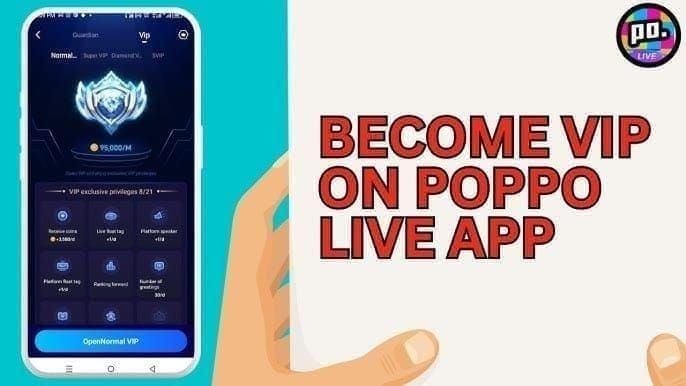
- Normal VIP: 95,000 coins
- Super VIP: 450,000 coins
- Only purchased coins count (not gifts/bonuses)
- 1:1 coin-to-VIP-point ratio
- Manual activation: Profile > VIP Center > Select tier > Recharge
When to Choose One-Time
- Active <20 days monthly
- Irregular usage patterns (1-2 weeks/month)
- Managing multiple app subscriptions
- Experiencing auto-renewal glitches
- Budget-conscious with forced spending awareness needs
Cost Comparison

Auto-Renewal Costs
- 3 months: $45
- 6 months: $90
- 12 months: $180
Constant cost regardless of usage. Favors daily users maximizing benefits.
One-Time Payment Costs
Normal VIP (95,000 coins): 3,500-3,900 coins daily for 30 days = 105,000-117,000 total return
Super VIP (450,000 coins): 16,000-16,400 coins daily = 480,000-492,000 total return
Moderate users (15-20 active days/month) save 30-50% buying VIP only during active periods.
Best Payment Method by Playing Style
Daily players (25+ days/month): Subscriptions at $0.50/day. Set calendar reminders before renewals.
Casual players (10-20 days/month): One-time payments. Track spending for two months to confirm savings.
Seasonal players (1-2 months active, then breaks): One-time payments. 3-4 annual purchases vs. 12 subscriptions = $45-60 vs. $180.
Using BitTopup for Secure Purchases
Why BitTopup Eliminates Auto-Renewal
- Exclusively one-time transactions—no subscription infrastructure
- Each purchase requires explicit user action
- Transparent upfront pricing, no hidden fees
- Encrypted payment processing with buyer protection
- High user ratings, fast delivery, responsive support
Purchase Guide
- Visit BitTopup, locate Poppo Live
- Select coin package (95,000 for Normal VIP or 450,000 for Super VIP)
- Enter Poppo user ID for delivery
- Choose payment method (credit cards, digital wallets, regional systems)
- Complete secure checkout
- Coins arrive within minutes (up to few hours during peak)
Security Features
- Industry-standard encryption
- Tokenized payments—no stored card numbers
- Buyer protection for delivery failures/errors
- Email receipts and account notifications
- Clear transaction identification for expense tracking
Advanced Spending Control
Set Monthly Budgets
- Limit gaming to 5-10% of discretionary income
- Use banking app budget categories with alerts
- Create separate prepaid card for Poppo—load monthly budget, stop when depleted
Track Expenditure
- Maintain spreadsheet: date, amount, coins, purpose
- Review statements monthly, highlight Poppo charges
- Calculate cost-per-active-day: monthly spending ÷ days used
- Adjust if cost-per-day exceeds comfort level
Create Alerts
- Calendar reminders day before typical purchase timing
- Banking alerts for Poppo charges >$10
- Screen time tracking to correlate usage with spending
- Weekly usage reviews—if <30 min/day, VIP may not justify cost
Common Misconceptions
Myth: Canceling = Immediate Loss
Truth: You maintain full access until end of current billing period. Cancel on day 5 of 30-day cycle = 25 remaining days of benefits.
Myth: Can't Reactivate After Cancellation
Truth: Reactivate anytime:
- Subscriptions: App Store/Google Play > Resubscribe
- One-time: Buy coins > Profile > VIP section > Upgrade > Confirm
How Expiration Actually Works
- VIP benefits expire after 30 days regardless of payment method
- VIP levels: Some servers maintain permanently, others reset monthly
- Expiration affects bonuses/privileges, not account or level history
Troubleshooting Persistent Issues
Contact Poppo Support
- Access via app: Settings > Help & Support
- Provide: User ID, disputed charge dates/amounts, issue description
- Prepare documentation: canceled subscription screenshots, bank statements, confirmation emails
- Request: Refund, cancellation confirmation, written assurance of no future charges
Document Evidence
- Timeline: subscription start, cancellation, expected final charge, unauthorized charges
- Screenshots with timestamps showing canceled status + continued charges
- Save all support communications in dedicated folder
Escalation Steps
- 7-10 days unresolved: Escalate to Apple Support or Google Play Support
- Charges >$50 or multiple unauthorized: File credit card/bank dispute with documentation
- Last resort: Consumer protection agency complaints for systemic billing issues
Prevention Best Practices
Manage Subscriptions Wisely
- Never subscribe during impulsive/active playing moments
- Set calendar reminder 2-3 days before renewal for conscious decision
- Quarterly audit of all app subscriptions across platforms
Regular Account Audits
- Monthly 15-min payment history review (App Store, Google Play, cards, banks)
- Cross-reference VIP status in app against payment records
- Maintain master list: all gaming subscriptions, renewal dates, costs, cancellation procedures
Calendar Reminders
- Recurring events on 25th if renewals on 1st
- Include current budget and usage in event description
- Use snooze-enabled reminder apps—repeat daily until action taken
- Consider subscription management apps for consolidated alerts
FAQ
Why does Poppo VIP keep charging after cancellation?
Cancellations take up to 24 hours to take effect. You maintain access until current period ends. If charges occur beyond this, verify status shows Expires on [date] not Renews on [date]. If canceled but charges continue, dispute with payment provider immediately.
How do I stop automatic renewal?
iOS: Settings > [Your Name] > Subscriptions > Poppo VIP > Cancel. Android: Google Play > Profile > Payments & Subscriptions > Subscriptions > Poppo VIP > Cancel. Screenshot canceled status. Verify no charges after current period.
What's the difference between subscription and one-time payment?
Subscription: $15/month auto-charges until canceled. One-time: Buy coins (95,000 Normal/450,000 Super VIP), manually activate. One-time eliminates auto-renewal glitches, offers spending control. Subscriptions suit daily users.
Will I lose VIP immediately after canceling?
No. Full access until current period ends. Cancel day 10 of 30-day cycle = 20 remaining benefit days. VIP deactivates only after paid period expires.
How long does cancellation take?
Immediate processing—status updates in seconds. Takes up to 24 hours to take effect in billing. Cancel 48+ hours before next renewal. Confirmation emails arrive within minutes to hours.
Does BitTopup offer one-time Poppo VIP?
Yes. Buy exact coins needed (95,000/450,000), instant delivery, manual activation via app. No subscriptions, no auto-renewal, competitive pricing, secure transactions.
Take Control Today! Purchase Poppo VIP via BitTopup—no auto-renewal, no surprises. Secure one-time payments, competitive pricing, fast delivery, trusted by thousands!
Recommended News








Recommend products



Table of Contents
- Understanding Poppo VIP Auto-Renewal
- How Auto-Renewal Works
- Why Auto-Renewal Creates Problems
- Common Glitches
- Identifying Billing Issues
- Warning Signs
- Check Subscription Status
- Review Payment History
- Cancel Auto-Renewal on iOS
- Access Subscription Settings
- Disable Auto-Renewal
- Verify Cancellation
- Cancel Auto-Renewal on Android
- Navigate to Subscriptions
- Turn Off Recurring Payments
- Confirm Success
- One-Time Payment: The Smart Alternative
- Benefits
- How It Differs from Subscriptions
- When to Choose One-Time
- Cost Comparison
- Auto-Renewal Costs
- One-Time Payment Costs
- Best Payment Method by Playing Style
- Using BitTopup for Secure Purchases
- Why BitTopup Eliminates Auto-Renewal
- Purchase Guide
- Security Features
- Advanced Spending Control
- Set Monthly Budgets
- Track Expenditure
- Create Alerts
- Common Misconceptions
- Myth: Canceling = Immediate Loss
- Myth: Can't Reactivate After Cancellation
- How Expiration Actually Works
- Troubleshooting Persistent Issues
- Contact Poppo Support
- Document Evidence
- Escalation Steps
- Prevention Best Practices
- Manage Subscriptions Wisely
- Regular Account Audits
- Calendar Reminders
- FAQ
Recommend products



Recommended News

PSN Card Malaysia Code Redeemed but Balance Not Showing? Fix It

How to Farm Rare Skin Fragments in MLBB | August 2026

Genshin Impact Stygian Onslaught 7.0 Teams | August 2026

Alyosha Best Build, Teams & C6 Guide | August 2026

Cheap StarMaker Coins for SupernovaX 2026 Auditions (12-23% Off)

MICO Live Coins MENA After v5.2: Cheapest Deals 2026

How to Redeem NCRCKYT8EF Code for Free Eggy Coins (Aug 2026)

Taka Live 1.2.11 Draining Battery Fast After the July 2026 Update? Causes and Fixes


































































































