Technical Failure Points
Payment confirmation must traverse multiple verification layers before triggering SUGO's crediting system. Each layer creates potential delays:
- Credit cards: 3-7 minutes average
- Bank transfers: 15-30 minutes minimum
- First purchase 2FA: adds 15-30 minutes
- Multiple recharges within 15 minutes: triggers fraud holds
Common errors:
- Error E001 (VPN Detected): Disable VPN immediately
- Error E003 (Network Timeout): Check connection, retry
- Server maintenance: up to 2-hour delays (especially after v2.41.0.0 update Nov 24, 2025)
Account Block Risks
SUGO's automated security flags suspicious patterns. Highest suspension risks:
- Chargebacks without support escalation - System treats as fraud
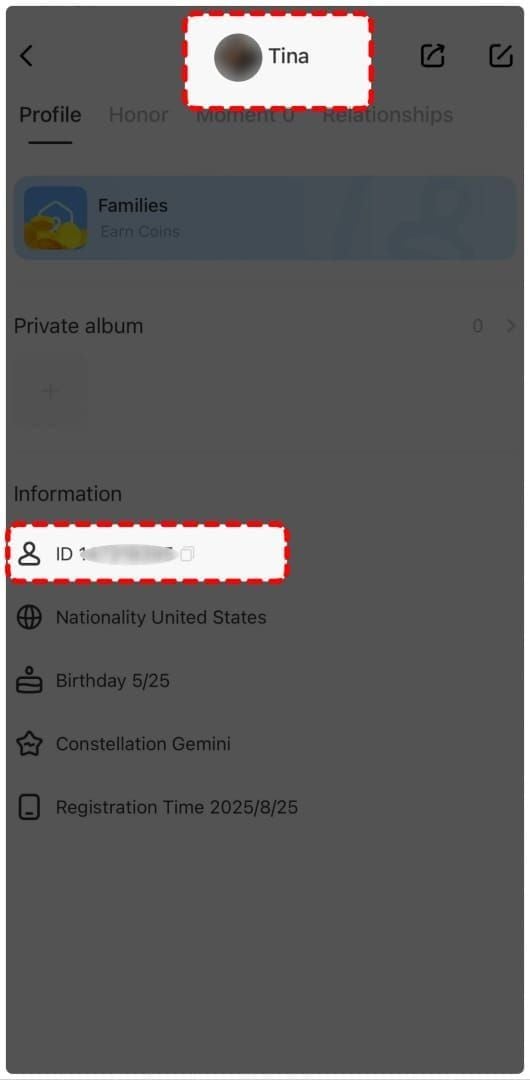
- User ID mismatches - 30% of flagged cases stem from wrong User ID (find yours: ME > View/Edit Profile, 8-12 digits)
- Duplicate purchases while pending - Appears as exploitation attempt
Real Player Solutions
- Cache clearing: Fixes 95% of connection issues (Settings > Apps > SUGO > Storage > Clear Cache, then force-close 10 seconds)
- Airplane mode toggle: Resolves 80% of network delays (10 seconds on, then off)
- 72-hour wait before escalation: 90% get ticket acknowledgment within 24 hours; investigations take 48-72 hours standard, 5-7 days complex cases
Locating Your CodaPay Reference Number
Your reference number is definitive proof linking payment to pending delivery. Secure it immediately after purchase.
Email Receipt Location
Check Transaction Details or Reference Number field in confirmation email (arrives 5-10 minutes post-payment). Case-sensitive—copy exactly as shown.
If missing: Check spam/promotions folders. Search entire mailbox for CodaPay + SUGO. Email also shows payment amount, timestamp, method—all critical for escalation.
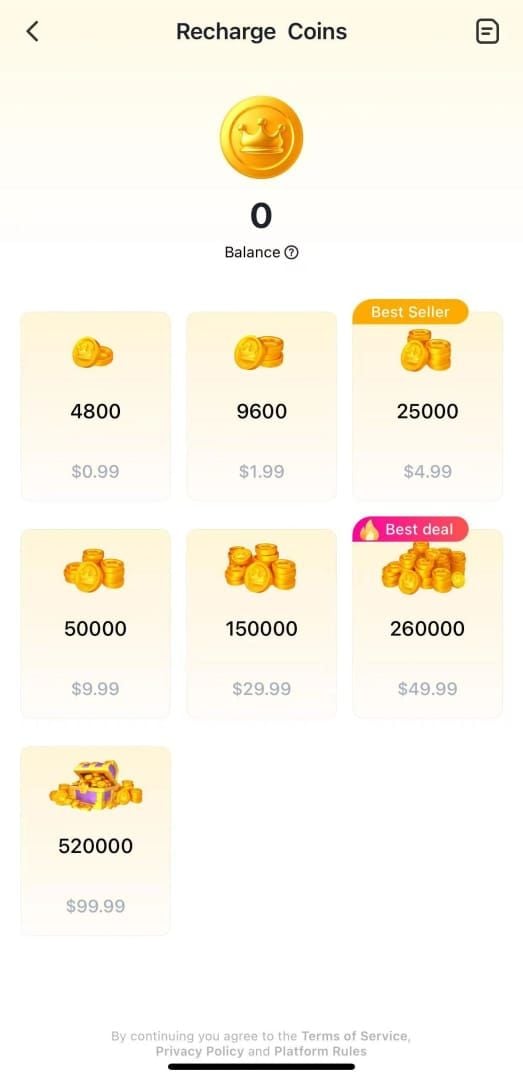
Verify coin package matches: 1200, 2400, 6250, 12500, 37500, 65000, or 130000 coins.
Payment App Transaction History
CodaPay interface: Settings > Payment History shows all transactions with reference numbers, dates, amounts, status.
Digital wallet records:
- PayPal: 180-day buyer protection, Activity tab
- Credit cards: 1-3 business days on statements (lacks detailed reference numbers)
- Bank transfers: Include unique transaction IDs as supplementary evidence
Screenshot Best Practices
Capture immediately after payment completion. Include:
- Reference number
- User ID (ME > View/Edit Profile)
- Timestamp
- Payment amount
- Coin package selected
Technical requirements:
- Max 5MB per file
- Max 10 files per ticket
- Complete information visible (no cropping critical details)
- Clear, readable (no blur)
Reference Number Details
TXN- prefix identifies CodaPay transaction. Following 12-20 characters encode transaction date, payment method, merchant ID, unique instance.
Important: Valid for 90 days. After this, recovery requires CodaPay support escalation, not SUGO's. Reference number enables manual support intervention—automated systems already have this data.
Step-by-Step Escalation Process
Before escalating: Verify payment completed through your payment method. Check coin balance (top-right corner, SUGO home screen). Force-close app, wait 10 seconds, reopen to refresh.
Step 1: Verify Payment and Wait Times
Confirm payment processed:
- Credit cards: Posted charges (not pending)
- Digital wallets: Completed status
- Bank transfers: Funds left account
Wait periods:
- New accounts: Full 1-5 minutes
- Established accounts: 30 seconds before troubleshooting
- Official escalation: 72 hours
Check SUGO version (Settings > About). Need v2.41.0+ for current payment processing.
Step 2: Prepare Documentation
Required elements:
- CodaPay reference number
- Payment receipt screenshot
- User ID (8-12 digits from ME > View/Edit Profile)
- Transaction timestamp
- Payment amount
- Selected coin package
- Troubleshooting steps completed
Verify User ID matches account expecting coins. Document each troubleshooting action taken.
Step 3: Contact SUGO Support
Navigate: ME > Help & Support > Contact Us > Payment Issues > Coins Not Received After Payment

Ticket structure:
- Transaction Reference Number: [exact TXN- string]
- User ID: [8-12 digits]
- Payment Amount: [exact amount]
- Coin Package: [1200/2400/6250/etc.]
- Transaction Timestamp: [date/time]
- Payment Method: [type]
- Troubleshooting Completed: [list with timestamps]
- Current Status: [coins not credited as of date/time]
Attach all screenshots in single submission. Don't fragment across multiple messages.
Step 4: Follow-Up Timeline
- 90% get acknowledgment within 24 hours
- Standard investigations: 48-72 hours
- Complex cases: 5-7 business days
If no acknowledgment after 72 hours: Submit follow-up with Follow-up: Ticket #[number] in subject. Include original ticket number—don't create new ticket.
Step 5: Escalate to Higher Tiers
After 7 business days without resolution, request escalation: Request Escalation to Senior Support in message. Include summary of all previous communications.
Response timing: Provide requested info within 24 hours to maintain priority. Delays move tickets to lower queues.
Document everything: Screenshot responses and timestamps. Proves escalation attempts if pursuing refunds (Visa/Mastercard: 120 days; PayPal: 180 days).
Critical Action Timeline
Understanding normal vs. problematic delays determines appropriate response.
Normal vs. Problematic Delays
Normal processing:
- 1-5 minutes: 85% of purchases
- New accounts: Longer end of range
- Established accounts: 30 seconds
Problematic delays:
- 15-30 minutes: Network/system issues—clear cache, toggle airplane mode, verify connection (need 3 Mbps download, 1 Mbps upload)
- 2+ hours: Gateway failure or server maintenance (check official announcements)
24-Hour Action Window
First 24 hours: Complete all basic troubleshooting—cache clearing, app updates, network verification, logout/login. Document with timestamps.
24-72 hours: Monitor payment method for automatic refunds. If CodaPay refunds, transaction failed at gateway level.
- Digital wallets: 1-3 days
- PayPal: 3-5 days
- Credit cards: 5-10 business days
After 72 hours: Initiate formal escalation. Delays beyond 7 days significantly reduce resolution success.
Account Flagging Warning Signs
- 3+ purchase attempts within 24 hours: Stop additional attempts
- Payment features suddenly unavailable: Account in security review—contact support immediately
- Identity verification requests: Provide documentation promptly
Why Quick Action Matters
Proactive escalation demonstrates legitimate behavior. Delayed reporting (7-10+ days) triggers automated reviews that can restrict accounts. Proper escalation creates official records protecting your account during disputes, preventing chargeback-triggered suspensions.
Common Resolution-Delaying Mistakes
Misconception: Passive Waiting Works
85% process within 1-5 minutes represent successful automated delivery. Transactions outside this window indicate failures requiring manual intervention. No automated retry systems exist—only support action resolves these.
Extended delays age transaction records beyond active investigation windows. Support prioritizes recent transactions with fresh logs.
Mistake: Incomplete Documentation
Missing info requires multiple exchanges, adding 24-48 hours per round.
Most common gaps:
- Missing User ID (support can't credit without it)
- Vague descriptions (coins didn't arrive vs. Payment completed 14:32 Jan 15, 2026. Coins not credited as of 09:00 Jan 18, 2026)
Precise timestamps enable efficient system log location.
Error: Premature Chargebacks
Chargebacks before exhausting SUGO escalation trigger immediate security reviews. System can't distinguish legitimate failures from fraud—applies identical responses.
Multiple chargebacks create permanent flags. Even after resolution, accounts face enhanced scrutiny: extended verification, reduced limits.
Use chargebacks as last resort: After exhausting official channels, document all support interactions, wait for final resolution or explicit failure.
Problem: Repeating Failed Payment Methods
Two failures with same method indicate systematic issues—switch platforms. Continuing after documented failures increases account risk through accumulated failed transactions.
Test new methods with minimum purchases (1200 coins) before larger amounts.
How Account Blocks Happen
SUGO's security analyzes transaction frequency, payment method diversity, chargeback history, User ID consistency, support patterns. Concerning combinations trigger escalating responses from holds to permanent restrictions.
Automatic Flagging System
Real-time monitoring assigns risk scores. High scores trigger manual review before delivery.
Risk factors:
- VPN usage
- Mismatched User IDs
- Rapid successive purchases
- Payment methods from regions different than account registration
Battery optimization: Set to Unrestricted (Settings > Apps > SUGO > Battery > Unrestricted). Restricted background activity prevents delivery confirmation notifications.
Chargeback Consequences
Chargebacks create permanent security database records. Even successful chargebacks generate flags persisting indefinitely. Future purchases face enhanced verification, extended processing, reduced limits.
3+ chargebacks typically result in permanent payment feature suspension, requiring third-party top-up platforms.
Duplicate Purchase Red Flags
Multiple purchases while previous remain pending creates patterns identical to card testing fraud. Each attempt generates unique records—multiple pending identical packages trigger automatic fraud alerts freezing all payment activity.
Solution: Wait full 72 hours before additional attempts. Space purchases 15+ minutes apart for different packages.
Account Protection During Issues
- Maintain consistent User ID across communications
- Disable VPN before purchases and escalation (prevents Error E001, geographic inconsistencies)
- Update to v2.41.0+ (outdated versions lack current security protocols)
CodaPay vs. BitTopup Comparison (2026)
Delivery Speed
BitTopup: Seconds via direct API integration. Bypasses gateway verification layers causing 60% of CodaPay delays. Real-time verification confirms delivery before completing purchase.
CodaPay: Multi-step process—payment confirmation, gateway processing, merchant notification, SUGO crediting. 1-5 minutes optimal; gateway issues extend to hours/days.
Success Rates
BitTopup: 99%+ through redundant verification, automated retries. Failed transactions trigger immediate support intervention (minutes, not 24-48 hours).
CodaPay: 85% within normal timeframes. 15% require extended processing or manual intervention. Higher failure rates for new accounts, peak periods.
Support Responsiveness
BitTopup: 24/7 live support, <5 minute average response. Real-time transaction data enables immediate diagnosis. Complex issues resolve in hours.
CodaPay: Through SUGO general channels—routing delays before reaching payment specialists. 90% acknowledgment in 24 hours; investigation/resolution adds 48-72 hours (standard) or 5-7 days (complex).
Why BitTopup Eliminates Failures
- Direct server integration removes intermediary failure points (eliminates 60% of gateway-caused delays)
- Pre-verification confirms User ID accuracy before processing (prevents 30% of support cases from mismatches)
- Transparent pricing prevents amount discrepancies
- Parallel processing vs. sequential (payment verification, User ID validation, crediting occur simultaneously)
- Automated retries within seconds using alternative connection paths
- Real-time monitoring alerts support to 30+ second delays for proactive intervention
BitTopup Advantage: Guaranteed Instant Delivery
Zero Delivery Failure System
Redundant verification: Multiple simultaneous checkpoints—payment, User ID, crediting occur in parallel, not sequence. Eliminates timing gaps.
Automated retries: Immediate activation on delays. Alternative connection paths prevent failed states requiring manual intervention.
Proactive monitoring: Support alerted to any 30+ second delay. Intervention before user-visible problems.
Real-Time Verification Process
Pre-purchase User ID validation: Checks against SUGO database before accepting payment. Invalid IDs trigger immediate error with correction instructions—prevents payment succeeded, coins not delivered scenario.
Atomic transactions: Both payment and crediting complete or both fail. No partial processing.
Immediate confirmation: Displays exact coins credited and current balance. Verify before leaving purchase interface.
24/7 Support
Live chat: Instant assistance, no ticket delays. Complete transaction histories and real-time system status enable instant diagnosis. Resolution in minutes.
Multilingual, global coverage: Native-language assistance across all timezones. Eliminates region-specific delays.
Proactive communication: Rare extended processing instances get direct user contact with status updates and ETAs.
Player Testimonials
Experienced players switch after repeated CodaPay failures. Time savings justify any minor price differences. New players avoid security holds and purchase limits (6250 coin max, 24-72 hour holds for $20+ don't apply to BitTopup).
Competitive pricing often beats CodaPay before promotional offers. Loyalty programs provide additional savings for regular purchasers.
Prevention Strategies
Choosing Reliable Platforms
Evaluate on delivery success rates, support quality, user reviews—not familiarity or minor price differences. Time cost of one delivery failure exceeds savings from marginally cheaper methods.
Specialized gaming platforms (BitTopup) outperform general processors. Purpose-built infrastructure addresses gaming-specific requirements.
Test new platforms with minimum purchases (1200 coins) before large transactions.
Transaction Documentation
Screenshot every confirmation immediately: timestamps, reference numbers, amounts, packages. Store in date-organized folders.
Maintain personal transaction log: dates, amounts, methods, delivery status. Enables pattern recognition.
Save all email confirmations in dedicated folders. 90-day retention makes these valuable for later-discovered issues.
Security During Top-Ups
- Disable VPN before purchases (prevents Error E001, geographic inconsistencies)
- Verify User ID before each purchase (especially with multiple accounts)
- Ensure stable connection (3 Mbps download, 1 Mbps upload minimum)
When to Switch Methods Permanently
Two failures with same method = systematic issues requiring change. Extended escalations (7+ days) signal fundamental incompatibilities—switch to proven alternatives.
New account restrictions justify immediate switching. BitTopup's verified systems provide access without arbitrary account-age limits.
Emergency Action Plan
Immediate Steps (24+ Hours Waiting)
- Clear cache: Settings > Apps > SUGO > Storage > Clear Cache (fixes 95% of connection issues)
- Force-close: Exit SUGO, wait 10 seconds, reopen
- Airplane mode toggle: 10 seconds on, fixes 80% of network delays
- Logout/login: ME > Settings > Account > Logout, wait 30 seconds, login
Effective Support Ticket Template
Transaction Reference Number: TXN-[exact string]
User ID: [8-12 digits from ME > View/Edit Profile]
Payment Amount: [exact amount]
Coin Package: [1200/2400/6250/etc.]
Transaction Timestamp: [exact date/time]
Payment Method: [type]
Troubleshooting Completed:
- Cache cleared at [timestamp]
- Force-closed at [timestamp]
- Airplane mode toggled at [timestamp]
- Logout/login at [timestamp]
Current Status: Coins not credited as of [date/time]
Attach: payment confirmation, User ID screen, current coin balance screenshots.
Backup: BitTopup for Urgent Needs
Need coins immediately for time-sensitive events while awaiting CodaPay resolution? BitTopup delivers in seconds without affecting pending escalation. Competitive pricing often matches/beats CodaPay.
Instant delivery eliminates uncertainty. Plan gameplay without delivery concerns.
Long-Term Solution
Establish BitTopup as primary platform. Instant delivery + 24/7 support + competitive pricing + zero failures = superior long-term value.
Create account during non-urgent periods. Setup takes minutes, enables instant purchases when needed.
Monitor promotional offers and loyalty programs for additional savings beyond reliability advantages.
FAQ
Why aren't my SUGO coins delivered after CodaPay payment?
Payment gateway issues (60%), system errors (25%), network instability (15%). New accounts under 7 days with $20+ purchases face automatic 24-72 hour holds. Clear cache (fixes 95%), toggle airplane mode (fixes 80%), wait full 1-5 minutes before escalating.
How long does CodaPay take to deliver SUGO coins in 2026?
85% process in 1-5 minutes. Established accounts: 30 seconds. New accounts: full 1-5 minutes. Credit cards: 3-7 minutes. Bank transfers: 15-30 minutes minimum. 2FA on first purchase: adds 15-30 minutes. Server maintenance: up to 2 hours.
Where's my CodaPay reference number for SUGO?
Email confirmation (5-10 minutes post-payment): TXN- + 12-20 characters. Or CodaPay Settings > Payment History. Screenshot immediately—90-day retention only.
Can my SUGO account get blocked if coins aren't delivered?
Chargebacks without proper escalation trigger fraud prevention. Multiple purchase attempts while pending create fraud-pattern flags. Follow 72-hour escalation timeline, provide complete documentation (including User ID), exhaust official support before payment disputes.
What's the fastest way to get SUGO coins?
BitTopup delivers in seconds via direct server integration. 99%+ success rate, 24/7 live support, competitive pricing, zero delivery failures. For immediate needs during CodaPay escalations, provides instant delivery while awaiting resolution.
How to prevent SUGO suspension during payment disputes?
Document all troubleshooting with screenshots/timestamps. Wait full 72 hours before escalation. Provide complete initial ticket info (reference number, User ID, payment proof). Avoid multiple purchase attempts while pending. Space recharges 15+ minutes. Disable VPN. Use consistent User IDs.
Stop payment delays and account risks. Get SUGO coins instantly with BitTopup—guaranteed seconds delivery, zero failures, 24/7 support. Top up now!