How Uplive Host Payment System Works: From Diamonds to Cash
Conversion rates vary by server location:
- S1/S3 servers: 160 uCoins per USD
- S2/S4 servers: 100 uCoins per USD
This regional variation directly impacts earnings—identical diamond counts produce different cash values depending on assigned server.
Minimum withdrawal thresholds by account status:
- Established broadcasters: 5,000 uCoins
- New hosts: 10,000 uCoins
- Entry-level diamond withdrawals: 10,000 diamonds
- Cryptocurrency payouts: 50,000 diamonds minimum
The Three-Stage Withdrawal Pipeline
Stage 1 - Eligibility criteria:
- 30 hours streaming over 15+ days
- At least one session exceeding 1 hour
- New accounts: 7-14 day block period
- Email/phone verification: 30-day minimum account age
Stage 2 - KYC verification:
- Standard processing: 24-72 hours
- Peak periods: 7-10 business days
- Re-submissions after rejection: +5-7 business days
Stage 3 - Payout processing:
- Established hosts: 3-5 days
- New broadcasters: 7-10 days
- Total timeline (new users): 6-13 days
- Total timeline (established hosts): 5-8 days
Host Level Requirements
Your host level determines withdrawal speed and threshold access. The platform prioritizes established broadcasters with consistent streaming histories, granting lower minimums and faster processing.
Account security requirements:
- Passwords: 6-15 characters
- Update every 90 days
- Weak security adds 3-5 business days to processing
Pre-Withdrawal Setup: Account Preparation Checklist
Before initiating withdrawal, verify:
- Active host dashboard status
- Complete profile information
- 30-hour minimum across 15+ days
- Documented sessions exceeding 1 hour
Essential Documents to Gather
Government-issued photo ID:
- Minimum resolution: 1200x900 pixels
- Clear text, visible photo, all four corners
- Blurry/low-resolution scans cause 40% of rejections
Address proof (max 90 days old):
- Utility bills
- Bank statements
- Government correspondence
- Must match Uplive account information exactly
Tax documentation:
- Tax identification numbers
- Government-issued fiscal identifiers
- Verify country-specific requirements
Account Security Settings
Enable two-factor authentication before submitting requests. Accounts without 2FA face +2-4 days processing time.
Security checklist:
- Update password if older than 90 days
- Verify registered email/phone match current info
- Platform sends verification codes during processing
- Unreachable contacts suspend payout requests
Exact Verification Fields Required
Personal Identity Verification
Full legal name:
- Enter exactly as appears on government ID
- Include middle names, suffixes, special characters
- John Smith ≠ John A. Smith (system rejects)
ID number fields:
- Alphanumeric only, no spaces/dashes
- AB-123456 → enter as AB123456
- Expiration dates: minimum 90 days remaining validity
Photo uploads:
- Front and back ID images (separate files)
- 1200x900 pixels minimum
- Under 5MB file size
- JPG or PNG format
- No glare, shadows, or text obstruction
Banking Information Fields
Bank account numbers must match verified Uplive account name. Third-party accounts trigger immediate rejection.
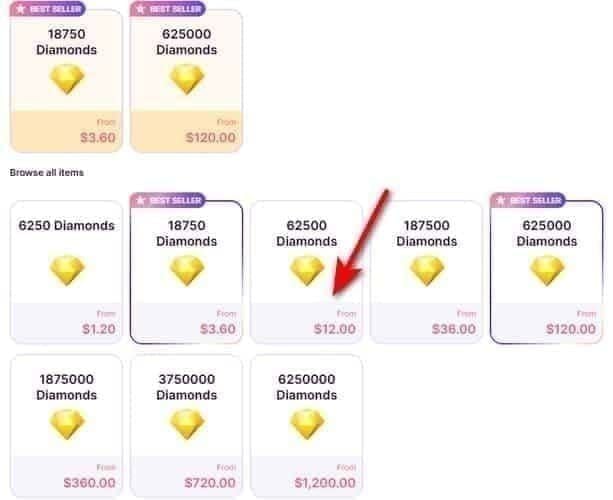
For hosts dealing with uplive cashout rejected verification fields, BitTopup offers reliable diamond recharge services with secure transactions and excellent customer service.
Routing codes by country:
- US: 9-digit ABA numbers
- Europe: IBAN formats
- Asia: SWIFT/BIC codes
Incorrect formats cause bank transfer failures, delaying payouts 5-10 business days.
Address Verification
Proof of residence standards:
- Dated within 90 days of submission
- Display full name, complete address with postal code
- Show issuing organization and issue date
- Submit clean, unaltered scans (no highlights/annotations)
Address must match across all fields: Uplive profile, ID document, proof of residence. Regional variations like Street vs St. trigger mismatch flags.
Phone and Email Verification
Phone numbers:
- Require country code prefixes: +1 (US), +44 (UK), +86 (China)
- Must receive international SMS if streaming abroad
Email verification:
- Click confirmation links within 24 hours
- Missed confirmations restart timeline
- Whitelist Uplive domains before submission
Step-by-Step Uplive Cashout Configuration
Step 1: Accessing the Withdrawal Portal

Navigate to host dashboard → Earnings or Wallet section. Withdrawal setup appears only after meeting 30-hour streaming requirement over 15+ days. If grayed out, verify streaming history.
Portal displays current uCoin balance and available withdrawal amount after commission deduction.
Step 2: Selecting Payment Method
Bank transfers:
- Processing: 1-3 business days after approval
- Approval time: 3-10 days
- Total timeline: 4-13 days
- No additional fees beyond wire charges
PayPal:
- Processing: same-day to 24 hours after approval
- Fastest for established hosts
- Regional availability varies
Payoneer:
- Processing: 1-2 business days
- Middle ground for international hosts
Cryptocurrency (BNB Chain):
- Minimum: 50,000 diamonds
- Processing: 3-7 days
- Wallet format: 0x + 40 hexadecimal characters (42 total)
- Incorrect network = permanent fund loss
Step 3: Entering Verification Fields
Input fields validate data in real-time. Red highlighting = formatting errors.
Common errors:
- Spaces in ID numbers
- Missing country codes in phone numbers
- Abbreviated names not matching ID
Date formats:
- US: MM/DD/YYYY
- Europe: DD/MM/YYYY
Step 4: Uploading Supporting Documents
Quality standards:
- Well-lit environments, no flash glare
- Documents flat against contrasting backgrounds
- All four corners visible
- Descriptive file names: Passport_Front_JohnSmith.jpg
Upload each document type separately. Automated system fails on composite images.
Step 5: Submitting for Review
System generates reference number for tracking. Save for support inquiries.
Status updates:
- Pending Review
- Under Verification
- Approved
- Rejected with Reason
Processing times:
- Standard: 24-72 hours
- Peak periods: 7-10 business days
- Mid-week submissions (Tue-Thu) process faster
Uplive Payout Timing: Processing Schedules
Platform operates weekly cycles: Monday 00:00 UTC to Sunday 23:59 UTC.
Standard Processing Timeline
Established hosts: 3-5 days after verification approval
New broadcasters: 7-10 days for first withdrawal
Total timeline:
- New users: 6-13 days (including verification)
- Established hosts: 5-8 days
Bank transfer breakdown:
- Uplive approval: 3-10 days
- Receiving bank processing: 1-3 business days
- International transfers: +2-4 days for currency conversion
Diamond-to-GFT conversions: 3-7 days
Peak Period Delays
Peak hours (14:00-22:00 UTC):
- +2-3 day delays
- Higher rejection rates
Off-peak windows (02:00-08:00 UTC):
- 30-60% faster processing
- Lower rejection rates
Holiday periods:
- Standard 24-72 hour KYC → 7-10 business days
- Plan withdrawals 2-3 weeks before fund needs
Payment Method Speed Comparison

- PayPal: Same-day to 24 hours (fastest)
- Payoneer: 1-2 business days
- Bank transfer: 4-13 days (handles larger amounts)
- Cryptocurrency: 3-7 days (gas fees: 10-50 gwei normal, avoid >100 gwei)
Critical Rejection Triggers
Rejection rates exceed 35% for first-time submissions. Understanding triggers avoids 5-7 business day resubmission delays.
Document Quality Issues
Resolution problems:
- Images below 1200x900 pixels fail automated verification
- Smartphone cameras on low resolution lose critical detail
Incomplete scans:
- Missing corners/edges trigger rejection
- System requires full document borders
Glare from flash:
- Obscures text and photos
- Use natural lighting or scanners
Name Mismatch Errors
Platform performs exact string matching. Robert ≠ Bob even for same person.
Common mismatches:
- Married hosts using maiden names on old IDs
- Special characters/accents: José ≠ Jose
- All diacritical marks must match exactly
Expired Identification
ID documents need 90+ days remaining validity from submission date. Documents expiring within this window = automatic rejection.
For non-expiring IDs, upload supplementary proof of current validity.
Incorrect Banking Information Format
US: 9-digit routing numbers + 8-17 digit account numbers (no spaces/dashes)
Europe: IBAN with 15-34 alphanumeric characters (system validates check digits)
Asia:
- China: 16-19 digits
- Japan: branch codes + 7-digit account numbers
- India: 11-16 digits with IFSC codes
Account Security Flags
Recent password changes (within 72 hours): +2-4 day manual review
New IP addresses/devices (within 7 days): Verification flag
Multiple failed logins (within 24 hours): Temporary account lock
Insufficient Earnings Balance
Attempting withdrawals below minimums = immediate rejection.
Calculate net earnings after 30-50% commission. Hosts often miscalculate gross vs. net amounts.
Troubleshooting Failed Verifications
Interpreting Rejection Notifications
Document Quality Issue: Resolution, clarity, or completeness problems
Information Mismatch: Discrepancies between fields
Expired Credentials: Document renewal required
Security Hold: Contact support directly
Resubmission Process
Resubmissions enter standard queue: 24-72 hours normal, 5-7 business days peak.
Correct all identified issues before resubmitting. Multiple failures flag accounts for enhanced scrutiny.
Update only rejected fields—modifying approved data restarts verification unnecessarily.
Contacting Support Effectively
Include in support requests:
- Reference number
- Specific rejection reason
- Corrections made
Submit during off-peak hours (02:00-08:00 UTC):
- Peak response time: 24-48 hours
- Off-peak response: 4-8 hours
Provide screenshots of errors and documents (redact sensitive info).
Alternative Payment Methods
If bank verification fails repeatedly, switch to PayPal/Payoneer with different verification requirements.
Cryptocurrency bypasses banking verification but requires 50,000 diamond minimum and proper BNB Chain wallet (0x + 40 hexadecimal format).
Advanced Withdrawal Optimization
Optimal Cashout Frequency
Weekly withdrawals:
- Balance processing efficiency with cash flow
- Mid-week submissions (Tue-Thu) reduce processing 1-2 days
Monthly withdrawals:
- Minimize per-transaction fees
- Higher risk if account issues arise
Daily withdrawals:
- Only for established hosts with PayPal/Payoneer
- New hosts lack rapid processing access
Minimizing Withdrawal Fees
BNB Chain gas fees:
- Normal: 10-50 gwei
- Avoid: >100 gwei (wait 2-4 hours for congestion to clear)
- Savings: 30-60% during low-fee periods
Off-peak submissions (02:00-08:00 UTC):
- Lower blockchain network usage
- Reduced gas fees
- Faster platform processing
Multi-Currency Considerations
Server conversion rates:
- S1/S3: 160 uCoins per USD
- S2/S4: 100 uCoins per USD
- Cannot change server assignments
Currency conversion:
- PayPal/Payoneer often beat traditional banks by 2-4%
- Applies when withdrawing to different currency than server base
Maintaining Verification Status
Once verified, maintain consistent account info to preserve expedited processing. Changing bank accounts, addresses, or phone numbers triggers re-verification (+5-7 business days).
Update passwords every 90 days, but avoid changes within 72 hours of planned withdrawals (prevents security holds).
Security Best Practices
Protecting Banking Information
Never share banking details via email/chat, even with apparent support. Legitimate support never requests sensitive info through unsecured channels.
Use unique passwords for Uplive different from banking passwords.
Two-Factor Authentication
Enable 2FA using authenticator apps rather than SMS. SMS-based 2FA vulnerable to SIM swapping.
Save backup codes separately from device. Lost 2FA access without backups = 5-10 business day manual restoration.
Recognizing Phishing Attempts
Phishing emails claim urgent verification issues. Legitimate communications never demand immediate credential entry through email links.
Check sender addresses carefully. Phishing uses similar domains like uplive-support.com instead of official domains.
Regular Account Audits
Review withdrawal history monthly for unauthorized transactions.
Update address proof before 90-day expiration to avoid verification delays.
2026 Updates and Future Changes
Enhanced Verification Technology
Automated document verification now processes in 24-72 hours vs. previous 5-7 day manual reviews. Requires higher quality standards (1200x900 pixel minimum).
Biometric verification pilots may expand globally, potentially reducing verification to under 24 hours.
Regulatory Changes
Tax reporting requirements tighten—hosts must provide government tax IDs before withdrawals. Obtain documentation proactively.
Anti-money laundering protocols flag irregular withdrawal patterns. Maintain consistent schedules and amounts.
Preparing for Updates
Platform periodically updates password requirements and security protocols. Update credentials during grace periods to avoid forced resets triggering security holds.
Monitor announcements for new payment method integrations offering faster processing or lower fees.
Frequently Asked Questions
How long does Uplive withdrawal verification take in 2026?
Standard KYC completes in 24-72 hours for proper submissions. Peak periods extend to 7-10 business days. Resubmissions add 5-7 business days.
What is the minimum withdrawal amount on Uplive?
Established broadcasters: 5,000 coins. New hosts: 10,000 uCoins. Entry-level diamonds: 10,000. Cryptocurrency: 50,000 diamonds minimum.
Why was my Uplive withdrawal request rejected?
Common triggers: images below 1200x900 pixels, name mismatches, expired IDs (<90 days validity), incorrect banking format, security flags from recent password changes or new login locations.
What documents are required for Uplive host withdrawal setup?
Government-issued photo ID (1200x900 pixels minimum), address proof (within 90 days), tax identification numbers, bank account details in correct regional format.
How do I link my bank account to Uplive for payouts?
Access withdrawal portal → select bank transfer → enter account number and routing code (no spaces/dashes) → upload verification documents → submit for 24-72 hour processing.
What verification fields cause most Uplive withdrawal failures?
Name spelling variations, improperly formatted routing codes (spaces in US numbers, incorrect IBAN check digits), phone numbers missing country codes, address mismatches showing different street abbreviations.
Need to top up your Uplive diamonds quickly and securely before cashing out your host earnings? BitTopup offers instant Uplive diamond purchases with verified payment methods, competitive pricing, fast delivery, and 24/7 customer support. Get your diamonds now and maximize your earning potential on Uplive with our secure transaction platform and high user ratings!