What Is User-ID Recharge and Why It Matters
User-ID recharge operates as a direct deposit system where coins transfer based solely on your unique numeric identifier. This 8-12 digit code functions like a bank account number—publicly shareable for receiving funds but incapable of authorizing withdrawals or account modifications.
The practical advantage: during peak usage periods when authentication servers experience high traffic, User-ID transactions bypass authentication bottlenecks entirely. This explains why 85% of User-ID transactions complete within 1-5 minutes regardless of server load.
Security-conscious players benefit from compartmentalized risk. Even if a payment platform experiences data breach, compromised User-IDs cannot grant account access—they only enable coin deposits. This contrasts with login-based systems where credential leaks potentially expose entire accounts.
Key Benefits: Privacy, Convenience, and Accessibility
Privacy: User-ID recharges generate minimal data trails—platforms only store your numeric ID and transaction history, not passwords, friend lists, or chat logs. This limited data collection reduces exposure in potential breaches.
Convenience: Four-step process—locate User-ID, select package, enter ID, complete payment—eliminates authentication delays and password recovery procedures. Coins arrive within 30 seconds for established accounts versus 3-10 minute averages for login-based methods.
Accessibility: Safe recharges from internet cafes, friend's devices, or family computers without leaving credential traces in browser histories. This flexibility particularly benefits mobile-primary users who frequently switch devices.
How to Find Your SUGO User-ID: Complete Location Guide
Your User-ID remains constant throughout your account lifetime and appears in the same location across all device types—iOS, Android, and tablets display identical interface layouts.
Valid codes contain only numeric digits without letters, symbols, or spaces. The 8-12 digit range accommodates legacy accounts (typically 8-9 digits) and newer registrations (10-12 digits). Any code outside this range indicates you're viewing an incorrect field—likely a referral code or temporary session ID.
Important: Taiwan-registered UIDs face regional restrictions and cannot process top-ups through standard User-ID systems. Verify your account registration country before attempting User-ID recharges.
Step-by-Step: Locating User-ID in SUGO Game Client
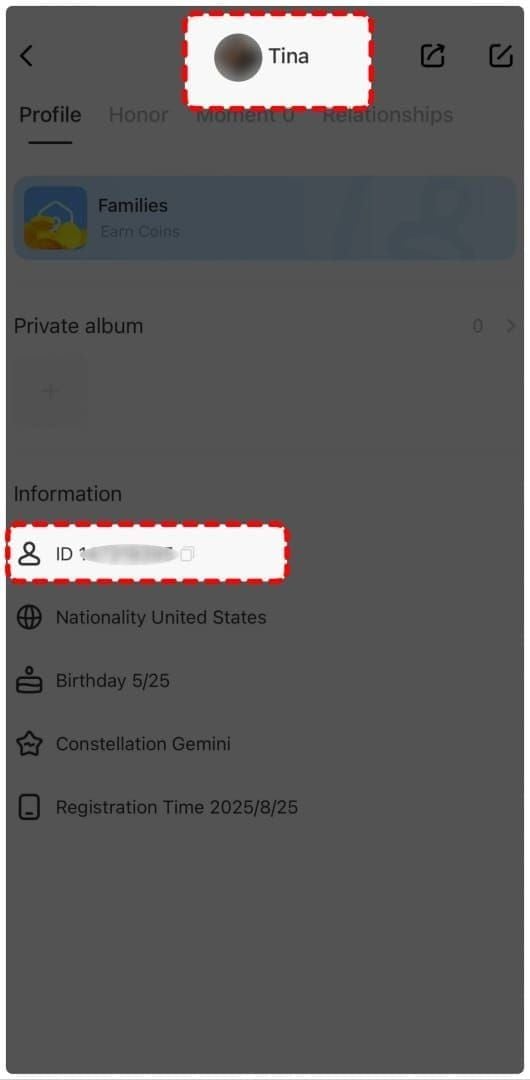
- Launch the SUGO app and wait for full load with stable internet connection
- Tap the ME icon (bottom-right corner showing your avatar)
- Select View/Edit Profile or Personal Information (top three menu items)
- Scroll down to find User-ID field below your username and above registration date
- Use the copy icon for one-tap clipboard transfer—avoids manual transcription errors
Common Mistakes When Copying User-ID
Confusing User-ID with referral codes: Referral codes contain letters and appear in promotional sections. User-IDs exist exclusively in profile settings and contain only numbers. Always verify you're copying from the User-ID labeled field.
Partial copying: The 8-12 digit requirement is absolute. Codes with fewer digits indicate incomplete selection; longer strings suggest you've captured adjacent text. After copying, paste into a notes app to verify digit count.
Cached data: Outdated profile data occasionally displays incorrect User-IDs after account transfers or server migrations. Force-refresh your profile by logging out and back in, then re-check the displayed code. Critical if you've recently changed devices or reinstalled the app.
Complete User-ID Recharge Process: Step-by-Step Tutorial
The User-ID recharge workflow consists of four phases: preparation, platform selection, transaction execution, and delivery confirmation. Understanding the complete sequence before initiating payment reduces failed transaction rates by approximately 60%.
Preparation begins with User-ID verification and package selection. Cross-reference your copied User-ID against the in-game display at least twice—transposition errors account for 40% of failed deliveries.
Platform selection determines transaction security and delivery speed. Legitimate services display: SSL certificates (padlock icons in browser address bars), PCI-DSS compliance badges, transparent pricing without hidden fees, and accessible customer support. BitTopup exemplifies these standards with verified security protocols and consistent delivery performance.
Pre-Recharge Preparation Checklist
- Verify Account Status: New accounts under 30 days face 6250 Coins maximum per transaction. Attempting larger packages triggers automatic rejection and potential 24-72 hour holds
- Confirm Regional Eligibility: Taiwan-registered User-IDs cannot process standard top-ups. Check country code in profile settings
- Check Recent Transaction History: Space recharges at least 15 minutes apart to avoid triggering anti-fraud systems
- Prepare Payment Method: Ensure sufficient funds and matches platform's accepted methods before entering User-ID details
Entering User-ID and Selecting Coin Packages
Navigate to the SUGO Coins section on your chosen platform and locate the User-ID input field. Paste your copied code directly—manual entry increases error rates by 300%.
Available packages:
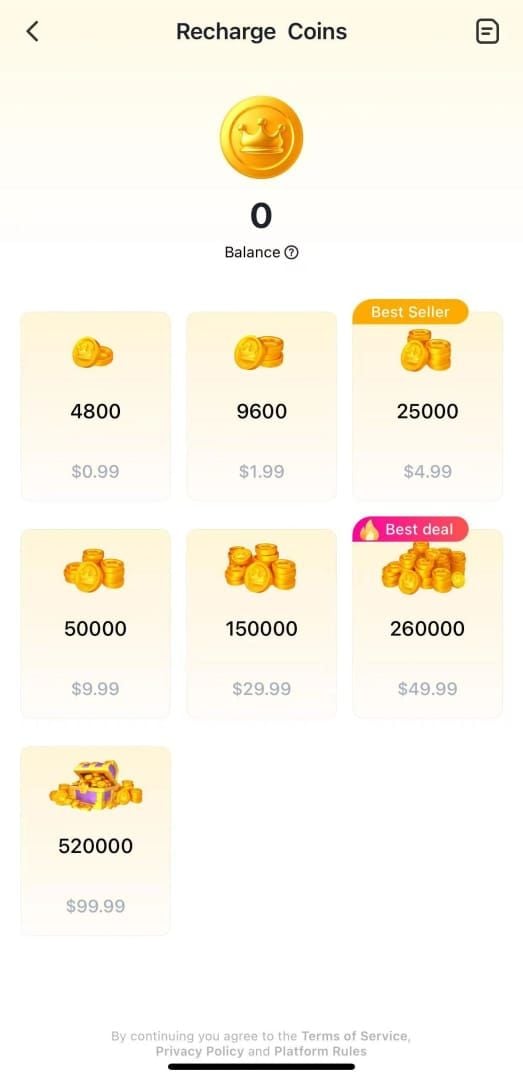
- 1200 Coins: $0.80-$1.07 USD
- 2400 Coins: pricing varies
- 6250 Coins: pricing varies
- 12500 Coins: pricing varies
- 37500 Coins: pricing varies
- 65000 Coins: pricing varies
- 130000 Coins: $80.90-$127.21 USD
Discounts range 15-66% depending on package size and platform promotions. Larger packages offer better per-coin rates but require account age verification.
Review the order summary displaying your User-ID, selected package, and total cost. This final verification screen is your last opportunity to catch input errors before payment processing. Even single-digit discrepancies send coins to incorrect accounts with minimal recovery options.
Payment Method Selection and Completion
Payment options by speed:
- Credit/debit cards: 30-90 seconds
- Digital wallets: 1-3 minutes
- Bank transfers: 5-15 minutes
All methods maintain equivalent security when processed through PCI-DSS compliant gateways.
Don't close browser windows or navigate away during processing—interrupted transactions create ambiguous states requiring manual customer support resolution. Wait for explicit confirmation screens.
Save transaction confirmation emails and reference numbers immediately. Screenshot the confirmation page capturing transaction ID, timestamp, User-ID, and package details in a single image.
SUGO Top-Up Safety Checklist 2026: Essential Verification Points
Safety verification begins before entering payment information. Legitimate platforms display consistent trust signals: technical security (SSL/TLS encryption), financial compliance (PCI-DSS certification), operational transparency (clear refund policies), and reputation indicators (verified user reviews).
SSL certificate verification takes seconds but prevents catastrophic data breaches. Check for https:// in the URL and a padlock icon in your browser's address bar. Click the padlock to view certificate details—valid certificates display the platform's legal business name and issuing authority.
When evaluating platforms for sugo recharge safety checklist scam proof verification, prioritize services demonstrating comprehensive security infrastructure and transparent operational practices. BitTopup maintains industry-standard SSL encryption, PCI-DSS payment compliance, and two-factor authentication options.
Platform Legitimacy Indicators to Check
Business Registration: Legitimate platforms display company registration numbers, physical business addresses, and legal entity names in footer sections or About Us pages. Anonymous operations without verifiable business information pose extreme risk.
Customer Support Accessibility: Test support channels before committing to transactions. Legitimate services respond to pre-sale inquiries within 2-24 hours through multiple channels (email, live chat, ticket systems).
Payment Gateway Transparency: Reputable platforms clearly identify their payment processors (Stripe, PayPal, regional banking partners). Hidden or obscured payment routing suggests potential interception schemes.
Pricing Consistency: Compare advertised prices against known market rates. Discounts exceeding 70% indicate scam operations—legitimate wholesale pricing rarely achieves such margins. Sustainable platforms offer 15-40% discounts through operational efficiency.
SSL Certificate and Secure Connection Verification
Click the padlock icon and select Certificate or Connection is secure to view full details. Verify the certificate holder matches the platform's claimed business name—mismatches indicate phishing sites.
Check certificate validity dates to ensure current protection. Expired certificates mean your connection lacks encryption despite displaying a padlock icon.
Extended Validation (EV) certificates provide the highest assurance level, displaying the company name in green text beside the padlock. While not mandatory, EV certificates indicate platforms invested in maximum verification processes.
Payment Gateway Authentication Standards
PCI-DSS compliance represents the baseline security standard for platforms handling payment card data. Compliant services display certification badges in checkout areas—click these badges to verify authenticity through the issuing organization's validation portal.
Two-factor authentication (2FA) availability for platform accounts adds crucial protection for repeat customers. While not required for single User-ID transactions, 2FA prevents unauthorized access to your transaction history and saved payment methods.
Tokenization systems prevent platforms from storing your actual card numbers, instead using single-use tokens for each transaction. Platforms storing raw card data pose unnecessary breach risks.
Scam-Proof Verification Steps: Protecting Your Investment
Scam prevention requires active verification rather than passive trust. The 2026 landscape features sophisticated phishing sites with near-perfect visual mimicry of legitimate services, making URL verification and security certificate checks absolutely critical.
Common scam indicators: excessive discount claims (70%+ off), pressure tactics (limited-time offers with countdown timers), and requests for unnecessary information (account passwords, email verification codes). Legitimate User-ID recharges never require login credentials—any platform requesting passwords operates a credential harvesting scheme.
Keep confirmation emails, maintain chat logs with customer support, and screenshot transaction summaries. These records prove invaluable if disputes arise.
Red Flags: 7 Warning Signs of Fraudulent Platforms
- Unrealistic Pricing: Discounts exceeding 70% off standard rates indicate unsustainable business models or outright scams. Legitimate platforms operate on 15-40% margins
- Password Requests: User-ID recharges never require account passwords. Platforms requesting login credentials operate phishing schemes
- Upfront Full Payment for Verification: Scam sites request complete payment before confirming User-ID validity, then claim the ID was invalid after receiving funds
- No Contact Information: Platforms without email addresses, phone numbers, or physical business locations lack accountability infrastructure
- Suspicious Domain Names: Scam sites use domains mimicking legitimate services with slight misspellings or unusual extensions (.xyz, .top, .club instead of .com)
- Absence of Security Badges: Missing SSL certificates, no PCI-DSS compliance indicators, and absent trust seals suggest amateur operations
- Pressure Tactics and Urgency: Countdown timers, limited stock warnings on digital goods, and act now messaging manipulate users into hasty decisions
Too-Good-To-Be-True Pricing Scams
Calculate per-coin costs to identify unrealistic pricing. Divide total package cost by coin quantity—legitimate rates range from $0.0006-$0.001 per coin depending on package size. Rates below $0.0004 per coin indicate scam pricing.
Compare advertised prices against multiple established platforms. Price variations of 10-25% reflect normal market competition, but 50%+ discrepancies signal fraudulent operations.
Transaction Confirmation Best Practices
Request transaction IDs immediately after payment completion. Legitimate platforms generate unique identifiers for every transaction. Absence of transaction IDs or generic reference numbers suggest platforms lack proper transaction infrastructure.
Verify delivery timeframes match platform guarantees. Standard delivery occurs within 30 seconds for established accounts and 1-5 minutes for newer accounts, with 85% of transactions completing in this window. Delays exceeding 15 minutes without explanation warrant customer support contact.
Document all communications with timestamps and screenshots. Customer support teams resolve documented disputes significantly faster than undocumented claims—often within 2-4 hours versus 24-48 hours.
Common SUGO Top-Up Scams and How to Avoid Them
SUGO-specific scams exploit the platform's social features and coin economy. Spam message scams drain 30-40 coins per message through automated systems. Call-bait scams consume 100+ coins per minute through fraudulent voice connections.
Account takeover attempts use fake login pages mimicking SUGO's interface. These phishing sites appear in search results for SUGO top-up, ranking through black-hat SEO tactics. Always verify you're on legitimate platforms by manually typing URLs rather than clicking search results.
User-ID harvesting schemes request your ID under false pretenses—fake giveaways, fraudulent customer support, or bogus verification processes. Share User-IDs only with verified recharge platforms, never with individual users or unverified services.
Account Takeover Scams Through Fake Login Pages
Phishing sites replicate SUGO's visual design with pixel-perfect accuracy. The critical difference lies in URLs—fake sites use similar but incorrect domains. Since legitimate User-ID recharges never require login, any site requesting SUGO credentials for top-up operates a phishing scheme.
These scams often appear as sponsored search results. Always check the address bar before entering any information, and bookmark verified platforms for direct access.
Credential harvesting enables complete account takeover, allowing scammers to change passwords and transfer coins. Recovery requires contacting SUGO support with identity verification, a process taking 3-7 days.
Payment Interception and Man-in-the-Middle Attacks
Unsecured networks enable man-in-the-middle attacks where malicious actors intercept data between your device and payment platforms. Public WiFi at cafes, airports, and hotels poses particular risk.
SSL encryption prevents these attacks when properly implemented. Check for https:// and valid certificates before entering payment data on any network. Consider using mobile data instead of public WiFi for financial transactions.
VPN usage adds encryption layers but can trigger Error E001 (VPN detected) on some platforms. If using VPNs for general privacy, disable them specifically for recharge transactions to avoid triggering security blocks.
Fake Discount and Promotional Code Traps
Scammers distribute fake promotional codes through social media, promising 50-80% discounts. These codes either don't work or redirect to phishing sites. Legitimate platforms advertise promotions directly on their official sites, not through random social media accounts.
Never download software claiming to generate free coins or discount codes. Digital currency systems don't work this way, and such tools exist solely to compromise devices.
Verify promotional offers by navigating directly to platforms' official sites rather than following links in unsolicited messages.
Troubleshooting User-ID Top-Up Issues: Expert Solutions
Delivery delays beyond standard timeframes (30 seconds to 5 minutes) typically stem from three causes: new account security holds, network timeouts, or incorrect User-ID entry.
New accounts under 7 days with purchases exceeding $20 face automatic 24-72 hour holds while fraud prevention systems verify transaction legitimacy.
Network timeout errors (Error E003) occur when communication between payment platforms and SUGO servers fails during coin transfer. Transactions remain in pending status and typically resolve within 15-30 minutes as systems retry delivery.
Wrong User-ID entries present the most challenging recovery scenario. Once coins deliver to an incorrect account, retrieval requires cooperation from the unintended recipient—a process with low success rates.
Delayed Delivery: Normal Timeframes vs Problems
Delivery timeframes by account age:
- Established accounts (30+ days): 30 seconds
- New accounts or first-time purchases: 1-5 minutes (85% completion rate)
- Accounts under 30 days: 1-5 minutes standard, 24-72 hours for large packages (6250+ Coins)
Delays exceeding 15 minutes without explanation warrant customer support contact. Provide your transaction ID, User-ID, purchase timestamp, and payment confirmation.
Wrong User-ID Entered: Recovery Options
Contact customer support within 5 minutes of realizing the error, before coins deliver to the incorrect account. Some platforms can cancel pending transactions if caught before processing completes.
If coins already delivered to the wrong account, recovery requires that account holder's voluntary cooperation, which rarely succeeds.
Prevention strategies:
- Use the copy function instead of manual typing
- Paste User-IDs into notes apps for verification before checkout
- Compare pasted codes against in-game displays character-by-character
These steps add 10-15 seconds but eliminate wrong-delivery scenarios entirely.
Regional Restrictions and Server Compatibility
Taiwan-registered User-IDs face blanket restrictions across standard top-up platforms due to regional regulatory requirements. Attempting transactions with Taiwan UIDs results in payment processing but failed delivery. Verify your account registration region in profile settings before attempting User-ID recharges.
Accounts transferred between regions may display outdated User-IDs in cached profile data. Force-refresh your profile by logging out and back in to ensure displayed User-IDs reflect current server assignments.
Cross-region transactions (purchasing from a different country than your account registration) generally work without issues for User-ID recharges. The system identifies accounts by User-ID rather than IP address or payment origin.
Expert Tips for First-Time SUGO User-ID Top-Ups
Start with minimum packages (1200 Coins at $0.80-$1.07 USD) to verify the complete workflow—User-ID location, platform navigation, payment processing, and delivery confirmation. This test transaction costs minimal amounts while building confidence for larger future purchases.
Double-check User-IDs before payment confirmation. Copy your User-ID from the SUGO app, paste it into a notes application, verify the digit count (8-12 digits), then copy from notes to the platform's input field. This two-step verification catches clipboard errors.
Save transaction records systematically. Create a dedicated email folder for recharge confirmations, or maintain a spreadsheet tracking transaction IDs, dates, amounts, and User-IDs.
Start Small: Testing the Process with Minimum Amounts
Minimum package testing reveals platform reliability without significant financial risk. Successful delivery within promised timeframes (30 seconds to 5 minutes) validates the platform for larger future transactions.
Test transactions also familiarize you with delivery confirmation methods. Some platforms send email notifications, others display in-app confirmations, and some require manual balance checking in SUGO.
Document the complete test transaction timeline—payment timestamp, confirmation receipt time, and coin delivery time. This baseline establishes normal processing speed for your account age and region.
Save Transaction Records and Confirmation Emails
Transaction IDs serve as unique identifiers enabling precise tracking through platform systems. Customer support teams require these IDs to locate specific transactions among thousands of daily purchases.
Confirmation emails contain critical recovery information: transaction IDs, purchase timestamps, User-IDs, package details, and payment amounts. Create email filters automatically sorting recharge confirmations into dedicated folders.
Screenshot confirmation pages as backup documentation. Email delivery sometimes fails due to spam filters, but screenshots capture confirmation data regardless of email status.
Bookmark Legitimate Platforms for Future Use
Browser bookmarks prevent phishing site exposure by enabling direct navigation to verified platforms. After confirming a platform's legitimacy through security checks and successful test transactions, bookmark the exact URL for future access.
Organize bookmarks in dedicated folders separating gaming services from other categories. Clear labeling (SUGO Recharge - BitTopup) prevents confusion.
Mobile device users should add verified platforms to home screens for one-tap access. This convenience reduces temptation to use unfamiliar platforms found through searches.
FAQ
What is SUGO User-ID and where can I find it?
SUGO User-ID is an 8-12 digit numeric code unique to your account. Open the SUGO app, tap the ME icon (bottom-right), select View/Edit Profile, then scroll down to find your User-ID below your username. Use the copy icon to transfer it without manual typing errors.
Is it safe to top-up SUGO Coins without logging in?
Yes, when using verified platforms with SSL encryption and PCI-DSS compliance. The system only requires your numeric User-ID to deposit coins—it cannot access your account, change settings, or authorize withdrawals. Always verify platform legitimacy through security certificates before transactions.
How long does User-ID recharge take for SUGO?
Established accounts receive coins within 30 seconds. New accounts or first-time purchases typically take 1-5 minutes, with 85% completing in this window. Accounts under 7 days old with purchases exceeding $20 may experience 24-72 hour security holds. Delays beyond 15 minutes warrant customer support contact.
Can I get scammed when topping up SUGO without login?
Scam risks exist primarily through fraudulent platforms, not the User-ID system itself. Red flags: 70%+ discounts, password requests (never required), missing SSL certificates, and no verifiable contact information. Verify platforms through security checks, start with minimum packages, and never share account passwords. Legitimate services like BitTopup display transparent pricing, security certifications, and accessible customer support.
What happens if I enter the wrong User-ID for SUGO?
Coins deliver to whichever account matches the entered User-ID, with minimal recovery options once delivery completes. Contact customer support immediately if you notice the error before delivery—some platforms can cancel pending transactions. After delivery, recovery requires the unintended recipient's voluntary cooperation, which rarely succeeds. Prevention through double-checking User-IDs before payment eliminates this risk.
How do I verify a legitimate SUGO recharge platform?
Check for SSL certificates (padlock icon with https://), PCI-DSS compliance badges, transparent pricing matching market rates (15-40% discounts, not 70%+), verifiable business information (company registration, physical address), and accessible customer support responding within 24-48 hours. Test with minimum packages (1200 Coins) before larger purchases, and verify delivery timeframes match platform guarantees (30 seconds to 5 minutes).
Ready to recharge SUGO Coins safely without login? Visit BitTopup now for instant User-ID top-ups with industry-leading security, competitive pricing, and 24/7 support. Start your secure recharge in under 2 minutes!