How Auto-Renew Works
Auto-renew functions through pre-authorized payment agreements established at first subscription. Your payment method receives automatic charges at predetermined intervals without additional confirmation.
Billing cycles operate on precise timestamps, not calendar days. Subscribe January 1st at 3:00 PM, renewal occurs February 1st at 3:00 PM. Cancellation must happen before January 31st at 3:00 PM to avoid charges.
StarMaker processes charges through Apple App Store or Google Play Store payment systems. Critical distinction: cancellation must occur through the platform where you subscribed, not within the StarMaker app.
Why StarMaker Uses Automatic Renewal
Automatic renewal reduces friction for active users wanting continuous VIP benefits without manual monthly purchases. The model provides predictable revenue while offering users convenience and better per-day pricing versus one-time purchases.
Coin delivery by tier:
- Monthly VIP: 400-500 coins over 30 days
- Quarterly: 1200-1400 coins across 90 days
- Annual: 4500-5000 coins throughout 365 days
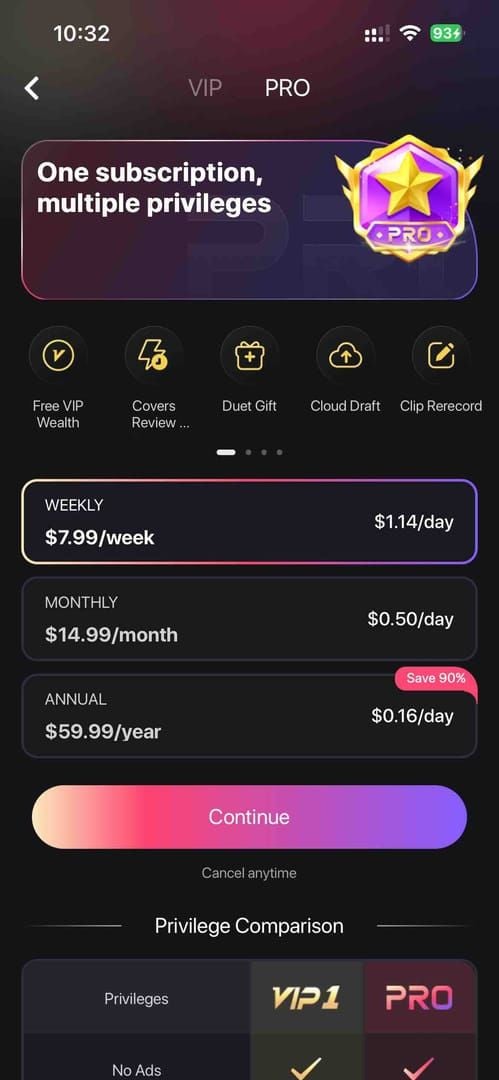
The $59.99 annual plan costs approximately $5 monthly versus $14.99 for month-to-month Pro subscriptions—significant savings for active users.
Common Unexpected Charge Scenarios
Forgotten trial periods: Most frequent source of surprise charges. Users activate free trials requiring payment verification, then forget to cancel before trial converts to paid subscription.
Multiple device subscriptions: Subscribing on both iOS and Android creates separate billing relationships, potentially doubling costs without doubling benefits.
Timezone confusion: Subscription initiated at 8:00 PM EST converts to 1:00 AM UTC. International users must calculate local cancellation deadlines carefully.
Payment method updates: New payment methods may automatically attach to dormant subscriptions, triggering unexpected renewals.
The Critical 24-Hour Cancel Window Explained
The 24-hour cancel window represents mandatory timeframe before billing period ends when cancellation must complete to prevent auto-renew charges. StarMaker's billing system checks subscription status exactly 24 hours prior to renewal, locking in charges if active status remains.
If monthly subscription renews February 15th at 2:00 PM, you must cancel before February 14th at 2:00 PM—not on February 15th. Charges process during that final 24-hour period, making last-minute cancellations ineffective.
iOS users receive renewal reminders 7 days and 1 day before renewal. Android notification timing varies, making manual calendar tracking more reliable.
How the 24-Hour Rule Works
The 24-hour rule operates as technical requirement, not policy choice. Payment processors need advance notice to authorize, process, and potentially reverse transactions across international banking systems.
When server receives active status at 24-hour mark, it initiates charge sequence completing over following 24 hours. This involves payment authorization, fraud checking, currency conversion, and final settlement. Once initiated, this sequence can't be interrupted by subsequent cancellation.
Cancelling at 23 hours 59 minutes before renewal prevents charges. Cancelling at 23 hours 58 minutes triggers full billing cycle. No grace period exists.
Exact Timeline: When to Cancel
For subscription renewing March 1st at 3:00 PM, safe cancellation deadline is February 28th at 3:00 PM. However, processing delays mean cancelling several hours earlier provides safety buffer.
Processing times:
- iOS: 5-10 minutes under normal conditions
- Android: 15-30 minutes during peak hours
Build in 2-4 hour buffer for processing delays, timezone errors, and system maintenance. Cancelling February 28th at 11:00 AM for 3:00 PM deadline ensures cancellation registers before window closes.
Verify cancellation confirmation immediately. Both iOS and Android display confirmation screens showing subscription end date. Screenshot this confirmation.
Missing the 24-Hour Window
Missing the window results in full billing cycle charges with no automatic partial refunds. Subscription renews for complete period—weekly, monthly, quarterly, or annually—regardless of when you cancel after window closes.
Subscription remains active until end of newly paid period after cancellation. Charged March 1st for monthly subscription and cancel March 2nd? You retain VIP access until April 1st but receive no refund for unused 29 days unless qualifying under specific refund criteria.
Only recourse: requesting refunds through Apple or Google Play's systems, which evaluate based on their policies. Refund eligibility exists within 15 days for unintentional duplicates or technical errors, but forgot to cancel rarely qualifies.
Platform-Specific Differences
iOS: Settings > [Your Name] > Subscriptions > StarMaker > Cancel Subscription. Most streamlined process. Centralized subscription management displays all active subscriptions, next billing dates, cancellation options. Processes in 5-10 minutes with immediate confirmation.
Android: Google Play > Profile icon > Payments & subscriptions > Subscriptions > StarMaker > Cancel subscription. More navigation steps but equivalent functionality. Processing delays 15-30 minutes during peak hours mean earlier cancellation needed.
Web: Contact appsupport@starmakerstudios.com with written cancellation notice. Longest processing timeline. Submit 48-72 hours before renewal for business day processing delays.
How to Cancel StarMaker Auto-Renew
Canceling requires accessing subscription management through platform where you originally subscribed—iOS App Store, Google Play Store, or email for web subscriptions. Cancellation doesn't occur within StarMaker app itself.
After cancellation, subscription remains active until current paid period ends. Cancel monthly subscription January 15th when it renews February 1st? You retain VIP access through January 31st without additional charges.
Canceling via iOS App Store
- Open Settings (not App Store app)
- Tap your name at top
- Select Subscriptions
- Locate StarMaker (alphabetical)
- Tap StarMaker entry
- Scroll down, tap Cancel Subscription (red text)
- Tap Confirm in dialog
- Verify status shows Expires on [date] not Renews on [date]
- Screenshot confirmation
Process completes in 5-10 minutes. If confirmation doesn't appear or still shows Renews after 15 minutes, repeat or contact Apple Support.
Canceling via Google Play Store
- Open Google Play Store app
- Tap profile icon (top right)
- Select Payments & subscriptions
- Tap Subscriptions
- Tap StarMaker entry
- Scroll down, tap Cancel subscription
- Complete optional feedback survey
- Verify status updates to expiration date
- Check confirmation email
Processing delays 15-30 minutes during peak hours. Verify status 30-60 minutes after submission. If still active after one hour, repeat or contact Google Play Support.
Verifying Cancellation Success
Return to subscription management 1-2 hours after cancelling. Confirm status changed from Renews on [date] to Expires on [date].
Check email for confirmation from Apple or Google. iOS confirms to Apple ID email, Google Play to Google account email. Forward confirmations to dedicated folder.
Set calendar reminder for one day after original renewal date. Verify no charge occurred on payment statement. If charge appears despite confirmation, immediately initiate refund request.
For email cancellations to appsupport@starmakerstudios.com, request read receipts and follow up within 48 business hours without confirmation.
StarMaker Refund Eligibility: Complete Criteria
StarMaker refund eligibility operates through Apple and Google's policies, not StarMaker's direct control. Refunds available within 15 days of charge for specific qualifying circumstances: unintentional duplicates, technical errors causing double billing, or unauthorized charges from account compromise.
BitTopup offers alternatives through one-time purchases, eliminating refund complications.
The 15-day window starts from transaction date, not discovery date. Charge January 1st requires refund request by January 15th.
Refund approval rates by reason:
- Technical errors/duplicates: Near-automatic approval
- Changed my mind/Forgot to cancel: High denial rates
Official Refund Policy
Apple: Requests for purchases within past 90 days allowed, but approval focuses on 15-day window for subscriptions. Submit through reportaproblem.apple.com, select charge, choose refund reason, provide explanation.
Google Play: Similar 15-day emphasis. Submit through play.google.com/store/account under Order history. Automated system approves clear-cut cases immediately, complex requests undergo manual review.
Both platforms maintain refund history affecting future approvals. Frequent refund requesters face increased scrutiny and higher denial rates.
StarMaker's direct involvement limited to transaction verification when Apple or Google request during investigations. Company address: 520 Hampshire St. #202, San Francisco, CA 94110.
Guaranteed Refund Situations
Duplicate charges from technical errors: Two identical charges same date for same subscription period receive near-automatic approval. Screenshot both charges, submit with request.
Unauthorized charges from account compromise: Requires evidence you didn't authorize subscription. Provide changed passwords, unfamiliar login locations, or subscription activation during periods you weren't using device. File immediately upon discovery.
Billing errors: Charged incorrect amounts (e.g., $14.99 for $7.99 tier) receive automatic refunds for difference. Technical pricing glitches easily verifiable.
Failed service delivery: Paid for VIP benefits but didn't receive due to server errors or account sync problems. Document with screenshots showing payment confirmation but missing VIP status. Contact appsupport@starmakerstudios.com first.
Common Denial Cases
Forgot to cancel: Most commonly denied. Apple and Google consider subscription management user's responsibility. Occasionally succeeds for first-time requesters with long account histories, but inconsistent.
Partial refunds for unused time: Near-universal denial. Cancel day 5 of 30-day subscription? No refund for remaining 25 days. Subscription charges for access periods, not usage intensity.
Service quality dissatisfaction: Rarely qualifies unless changes constitute material breach of terms. Disliking new features or feeling VIP benefits don't justify cost doesn't meet criteria.
Requests after 15-day window: Automatic denial in most cases. Late discovery doesn't extend deadline.
Calculating Refund Amounts
Full subscription refunds: Return complete charge amount when approved. $14.99 Pro Monthly refund returns $14.99, processing within 5-7 business days for credit cards, 1-3 days for debit/digital wallets.
Duplicate charge refunds: Return only duplicated amount, not both charges. Billed twice for $7.99? Refund processes $7.99, legitimate charge remains.
Currency conversion: International refunds process in original currency, convert to local currency at current rates. Rate fluctuations between charge and refund may result in slightly different local amounts.
Processing fees: Not deducted from approved refunds—you receive full charged amount. However, bank/card foreign transaction fees typically aren't refunded.
How to Request StarMaker Refunds
Requesting refunds requires accessing payment platform's refund system—Apple's Report a Problem portal for iOS or Google Play's Order History for Android. Process demands specific documentation, clear explanation, submission within 15-day window.
Processing times:
- Automated approvals (duplicates): 24-48 hours
- Manual review cases: 5-7 business days
- Complex disputes: 10-14 days
Gathering Required Documentation
Transaction receipts: Apple sends to Apple ID email immediately after charges. Google sends to Google account email. Note transaction ID, date, amount, subscription details.
Bank/credit statements: Download or screenshot entry showing StarMaker charge with date, amount, merchant name visible. Proves charge processed and matches receipt.
Duplicate charge claims: Screenshot subscription management showing single active subscription alongside bank statements showing two charges. Visual proof of discrepancy.
Service delivery failures: Screenshots showing payment confirmation but missing VIP status, error messages accessing paid features, or incorrect subscription information. Time-stamped screenshots prove issue existed when claimed.
Submitting Refund Requests
iOS: reportaproblem.apple.com, login with Apple ID. System displays purchase history with Report a Problem links. Click link for StarMaker charge to open refund form.
Select refund reason: Didn't mean to purchase,Didn't receive this item,Item doesn't work as expected, or Other. Provide detailed explanation referencing specific dates, amounts, circumstances.
Android: play.google.com/store/account under Purchase history. Locate StarMaker transaction, click Report a problem or three-dot menu for refund options. Select reason, provide explanation.
Email-based: appsupport@starmakerstudios.com. Include account email, transaction ID, charge date/amount, detailed explanation, supporting documentation as attachments. Request confirmation of receipt and estimated timeline.
Expected Processing Time
Apple: Straightforward requests within 48 hours for automated approvals. Email confirmation when approved, credit appears on payment method within 5-7 business days (credit cards) or 1-3 days (debit/digital wallets).
Google Play: Automated system approves clear duplicates/technical errors within 24 hours. Manual review 3-5 business days for initial response, final decisions within 7-10 days. Complex cases may extend to 14 days.
Denials: Arrive via email with brief explanation. Limited detail about denial reasons, typically citing policy violations or insufficient grounds. Decisions generally final, though you can submit additional evidence.
No response within expected timeframe? Follow up through same channel. Apple users check status at reportaproblem.apple.com, Google Play users view request status under Purchase history.
If Refund Request Denied
Appeal: Submit additional documentation or clarify circumstances. Apple allows resubmission with new information through reportaproblem.apple.com. Provide evidence not included initially.
Contact support directly: Apple Support via phone/chat can review denied requests, sometimes override automated denials with compelling evidence. Google Play Support through Help Center offers similar escalation.
Credit card/bank disputes: For genuinely fraudulent or erroneous charges, dispute through financial institution. Banks maintain separate dispute processes independent of Apple/Google. Provide documentation showing charge was unauthorized, duplicated, or incorrect.
Cost-benefit analysis: Small charges ($1.99 weekly) may not warrant extensive appeals. Larger amounts ($59.99 annual) justify persistent follow-up. Balance time investment against potential refund value.
Understanding Billing Cycles and Charge Timing
StarMaker billing cycles operate on precise timestamp intervals from initial subscription moment, not calendar month boundaries. Subscribe January 15th at 2:30 PM, monthly plan renews February 15th at 2:30 PM—exact 30-day cycles not aligned with month-end dates.
Cycle lengths by tier:
- Weekly: Every 7 days
- Monthly: Every 30 days
- Quarterly: Every 90 days
- Annual: Every 365 days
Each cycle operates independently with own 24-hour cancel window calculated from specific renewal timestamp.
Subscription Cycle Details
Monthly ($14.99 Pro Monthly): Renews every 30 days from initial date. Creates 12-13 billing cycles yearly depending on start date. Delivers 400-500 coins monthly. 30-day cycle means renewal date shifts slightly each month relative to calendar dates.
Quarterly: 90-day cycles, renews four times annually. Delivers 1200-1400 coins distributed across 90 days. Better per-day value than monthly. Longer cycle reduces billing frequency but requires remembering renewal dates occurring only quarterly.
Annual ($59.99 Pro Annual): Renews once every 365 days. Provides 4500-5000 coins throughout year. Best per-coin value but commits to full year unless cancelled. Annual cycle makes renewal dates easy to forget.
Regional pricing creates different cycle values while maintaining same timeframes. European users paying €51.69 annually receive same 365-day cycle and coin distribution as US users paying $59.99.
Checking Next Billing Date
iOS: Settings > [Your Name] > Subscriptions > StarMaker. Details screen displays Renews on [date] with exact timestamp including time of day. Updates real-time.
Android: Google Play > Profile > Payments & subscriptions > Subscriptions > StarMaker. Shows Next billing date with date and approximate time. Sometimes shows only date without specific time.
Email receipts: Previous charge receipts contain renewal date information. Apple's receipts include Subscription Renewal Date fields. Review most recent receipt if can't access subscription settings.
Calendar integration: Create calendar events for each renewal with 48-hour advance reminders. Include subscription tier and price in event. Use recurring events for automatic next-year reminders.
Billing Notifications
iOS: Sends renewal reminders 7 days and 1 day before renewals. Notifications include subscription name, renewal date, charge amount. Enable App Store app notifications to receive alerts.
7-day advance notice provides comfortable cancellation margin. 1-day reminder arrives after 24-hour cancel window closes—too late to prevent charge, functions as charge confirmation.
Android: Notification timing varies by device manufacturer and Google Play settings. Some users receive reminders 3-5 days before, others receive none. Makes Android users more dependent on manual tracking.
Email notifications: Arrive after charges process, serving as receipts not advance warnings. Confirm charge occurred, provide transaction details, but don't help prevent unwanted renewals.
Time Zone Considerations
Subscription timestamps use timezone active when first subscribed. Creates confusion for international users or travelers. Subscription initiated while traveling maintains that timezone for all future renewals regardless of current location.
Convert renewal times to local timezone to prevent missed cancel windows. Subscription created 8:00 PM EST converts to 1:00 AM UTC. European users in CET (UTC+1) face 2:00 AM renewal times.
Daylight saving time changes affect renewal times in regions observing time changes. Subscription created during standard time maintains timestamp year-round, meaning local time equivalent shifts one hour during daylight saving. Account for this shift when calculating cancel deadlines.
Add extra buffer time (6-12 hours) before calculated deadline for timezone calculation errors or daylight saving oversights.
One-Time Top-Ups: Flexible Alternative
One-time top-ups eliminate auto-renew concerns by purchasing specific coin amounts without recurring billing. StarMaker offers six tiers:
- 60 coins: $0.99
- 420 coins: $6.99
- 600 coins: $9.99
- 1200 coins: $19.99
- 3000 coins: $49.99
- 6000 coins: $99.99
Immediate coin delivery without subscription management requirements.
Pay-as-you-go suits users wanting features without monthly commitments or those who've experienced unwanted auto-renew charges. Purchase exactly what you need when needed, maintaining complete spending control.
Cost comparison: Monthly VIP (400-500 coins for $14.99) costs $0.03-$0.037 per coin. $9.99 one-time (600 coins) costs $0.017 per coin. However, subscriptions include additional VIP features beyond coins.
Benefits of One-Time Purchases
Complete spending control: Decide exactly when and how much to spend. No automated systems making decisions. Prevents budget overruns, eliminates surprise charges.
No cancellation management: Never worry about 24-hour windows, renewal dates, refund eligibility. Each purchase completes immediately without future obligations.
Flexible budgeting: Adjust StarMaker spending based on current finances. Skip purchases during tight months without cancellation procedures. Purchase larger packages during months with extra income.
Trial flexibility: Test features without subscription commitments. Purchase small coin package to explore VIP features, then decide if ongoing access justifies subscription costs.
Cost Comparison: Subscription vs Pay-As-You-Go
Monthly Pro ($14.99): Delivers 400-500 coins plus VIP features (priority support, exclusive badges, enhanced visibility). Per-coin cost $0.03-$0.037 includes additional benefits, making direct coin-only comparisons incomplete.
$9.99 one-time (600 coins): $0.017 per coin, better per-coin value than monthly subscriptions. However, provides only coins without additional VIP features. Users valuing those features may find subscriptions more cost-effective despite higher per-coin costs.
Annual ($59.99): Delivers 4500-5000 coins, costs $0.012-$0.013 per coin. Best per-coin value among subscription tiers. Comparing to $99.99 one-time (6000 coins) at $0.017 per coin shows subscriptions winning on pure coin economics for high-volume users.
Break-even analysis: Consistently use 400+ coins monthly and value VIP features? Subscriptions provide better value. Usage fluctuates significantly or don't utilize VIP features? One-time purchases offer superior flexibility despite slightly higher per-coin costs.
Switching from Subscription to One-Time
- Cancel existing subscription following platform-specific procedures before 24-hour window closes
- VIP access continues until current paid period ends
- Purchase first one-time coin package before subscription expires for uninterrupted coin availability
- Select package matching typical monthly usage (420-coin or 600-coin packages for 400-500 coin monthly users)
- Monitor coin usage over 2-3 months to establish actual consumption patterns
- Adjust purchase frequency and package sizes based on usage data
Heavy users might purchase larger packages ($49.99 3000-coin) every few months for better per-coin value. Light users buy smaller packages as needed.
Managing Budget with Flexible Payments
Set monthly limits: Treat one-time purchases as discretionary spending within predetermined limits. Prevents overspending that subscriptions enable through automatic charges.
Track purchases: Record each purchase date, amount, coins received in budgeting app or spreadsheet. Calculate actual per-coin costs, identify spending patterns.
Strategic timing: Schedule purchases around promotional events or special occasions. Concentrate purchases during most active platform periods, maximizing value from each coin.
Purchase delays as spending controls: Manual initiation friction creates decision points to evaluate whether purchase aligns with current priorities, unlike subscriptions charging automatically.
Common Cancellation Mistakes and Misconceptions
Subscription cancellation confusion causes thousands of unwanted charges annually. Most pervasive misconception: treating app deletion as subscription cancellation, leaving billing relationships active while users believe they've cancelled.
Cost of mistakes: Forgotten $14.99 monthly subscription charges $179.88 annually. Overlooked $59.99 annual subscription represents significant unexpected expense.
Platform fragmentation contributes to confusion. iOS, Android, web subscriptions each require different cancellation procedures. Users switching devices/platforms may not realize old device maintains active subscriptions requiring separate cancellation.
Myth: Deleting App Cancels Subscription
Deleting StarMaker app removes software from device but leaves subscription relationship with Apple or Google completely intact. Billing agreement exists between you and payment platform, not app. Charges continue processing regardless of app installation.
This misconception causes more unwanted charges than any other factor. Users delete apps assuming they've ended financial relationships, then discover months of accumulated charges. Charges are legitimate under active subscription agreement, making refunds difficult.
Reinstalling app after deletion immediately restores VIP access if subscription remained active, demonstrating app presence doesn't control subscription status. Subscription exists in Apple or Google's systems, independent of app installation.
Proper cancellation requires accessing subscription management through iOS Settings or Google Play. Only after receiving cancellation confirmation can you safely delete app.
Myth: Immediate Benefit Loss After Canceling
Cancelled subscriptions remain active until current paid period ends, preserving all VIP benefits through that date. Cancel January 15th when subscription renews February 1st? Retain full VIP access through January 31st, losing benefits only when paid period expires.
Grace period allows using paid benefits while preventing future charges. You're not forfeiting paid benefits by cancelling early—you're declining to purchase next billing cycle.
Misconception that immediate benefit loss occurs causes users to delay cancelling until last minute, often missing 24-hour window and triggering unwanted renewal. Understanding benefits continue through paid period removes this pressure.
Some users strategically cancel immediately after renewal to ensure they don't forget later, knowing they'll retain access for full billing cycle. Maximizes paid period usage while eliminating future charge risk.
Mistake: Not Checking Cancellation Confirmation
Assuming cancellation succeeded without verifying confirmation leads to continued charges when technical errors or incomplete processes prevent cancellation from registering. Network interruptions, app crashes, or navigating away from confirmation screens can abort attempts without clear failure notifications.
Verification requires returning to subscription management 1-2 hours after cancelling. Confirm status changed from Renews on [date] to Expires on [date]. Language change provides definitive proof cancellation processed.
Email confirmations from Apple or Google provide secondary verification. No confirmation email within 24 hours? Cancellation likely didn't process correctly. Repeat procedure, verify confirmation arrives.
Screenshot cancellation confirmation immediately. Documentation proves you cancelled before 24-hour window if billing disputes arise. Store screenshots in dedicated folder.
Mistake: Assuming Automatic Refunds
Approved refunds require active requests through proper channels—they don't process automatically when cancelling subscriptions. Cancelling prevents future charges but doesn't reverse charges already processed, even if you cancel minutes after renewal.
Users cancelling after missing 24-hour window often assume charge will be automatically refunded since they cancelled quickly. However, billing cycle completed when charge processed, requiring separate refund requests through Apple or Google's systems.
15-day refund eligibility window starts from charge date, not cancellation date. Delaying refund requests while assuming automatic processing can cause missing eligibility window entirely, forfeiting refund opportunities.
Proactive refund requests immediately after unwanted charges maximize approval chances, ensure staying within 15-day window. Don't wait for automatic refunds that never arrive—initiate requests as soon as identifying qualifying charges.
Expert Tips to Avoid Unexpected Charges
Preventing unexpected charges requires proactive subscription management, not reactive cancellation attempts. Systematic approaches using calendar reminders, payment notifications, regular audits, alternative payment methods eliminate surprise charges while maintaining access to desired features.
Most effective prevention combines multiple safeguards: automated reminders provide advance warning, payment notifications confirm when charges occur, regular audits catch forgotten subscriptions, one-time purchases eliminate recurring billing.
Time investment in prevention pays dividends. 15 minutes setting up calendar reminders and payment alerts prevents hours of refund request effort and potential loss of $50-200 annually in unwanted charges.
Setting Calendar Reminders
Create calendar events for each subscription renewal with 48-hour advance reminders. Timing provides comfortable margin to cancel before 24-hour window, accounting for busy schedules. Include subscription name, tier, price in event title.
Set multiple alerts: 7 days, 3 days, 2 days before renewal. 7-day reminder prompts initial decision-making, 3-day provides mid-point check, 2-day serves as final action deadline.
Use recurring calendar events automatically creating next year's reminder when renewing subscriptions. For annual subscriptions, automation ensures not forgetting renewals occurring only once yearly.
Color-code subscription reminders distinctly (bright red/orange) for visual prominence. Makes subscription deadlines stand out, reducing chance of overlooking among other appointments.
Enabling Payment Notifications
Configure credit card/bank app to send push notifications for all transactions regardless of amount. Real-time alerts notify immediately when subscription charges process, allowing quick refund requests if unwanted.
Set up email filters flagging messages from Apple and Google containing payment keywords. Create dedicated folder for receipts, configure notifications when new messages arrive.
Enable App Store and Google Play notification permissions to receive renewal reminders. While arriving after 24-hour cancel window, they confirm charges occurred and prompt immediate action if unwanted.
Review payment notifications weekly rather than only when arriving. Regular review catches charges you might have dismissed during busy periods, ensuring identifying unwanted charges within 15-day refund window.
Regular Subscription Audits
Schedule monthly subscription audits on first day of each month. Review all active subscriptions across iOS, Android, web services. Verify you still use and value each. Cancel subscriptions no longer justifying cost.
Create subscription tracking spreadsheet listing each subscription, cost, renewal date, platform. Update during monthly audits, adding new subscriptions and removing cancelled ones. Calculate total monthly subscription costs.
Audit payment statements quarterly to identify unrecognized charges. Unknown charges may represent forgotten subscriptions or unauthorized account access requiring immediate investigation and cancellation.
Conduct annual subscription value assessments comparing what you paid versus what you used. Paid $59.99 for annual StarMaker Pro but used fewer than 2000 coins? Switching to one-time purchases might provide better value.
Using BitTopup for Controlled Purchases
BitTopup provides one-time StarMaker coin purchases without subscription commitments, eliminating auto-renew concerns. Platform offers competitive pricing, fast delivery, secure transactions, excellent customer service.
Purchase exactly needed coins when needed through straightforward interface. Select desired package, complete secure payment, receive coins delivered to StarMaker account within minutes. No recurring charges, no cancellation deadlines, no refund complications.
BitTopup's transparent pricing shows exact costs before purchase, unlike subscriptions where regional pricing variations and currency conversions create uncertainty. Know precisely what you're paying and receiving with each transaction.
High user ratings and wide game coverage make BitTopup reliable for managing entertainment spending across multiple games and apps. Consolidating purchases through one trusted platform simplifies budget tracking, provides consistent service quality.
Disputing Unauthorized or Erroneous Charges
Unauthorized charges from account compromise or technical billing errors require immediate action through multiple channels: StarMaker support, payment platform disputes, potentially financial institution chargebacks. Quick response maximizes recovery chances, prevents additional unauthorized charges.
Distinguish between unauthorized charges and forgotten subscriptions to determine appropriate dispute approaches. Truly unauthorized charges from hacked accounts justify aggressive dispute tactics. Forgotten subscriptions require standard refund requests. Misrepresenting forgotten subscriptions as unauthorized can result in account termination and dispute denial.
Documentation proves critical. Gather transaction records, account access logs, subscription history, evidence supporting claim before initiating disputes. Comprehensive documentation significantly improves success rates.
Identifying Legitimate vs Unauthorized Charges
Legitimate charges: Appear in subscription management screens on iOS or Android, showing active subscriptions with matching renewal dates and amounts. Cross-reference bank statement charges against subscription management—charges with corresponding active subscriptions are legitimate even if forgotten.
Unauthorized charges: Lack corresponding active subscriptions in account settings. Bank statement shows StarMaker charges but subscription management shows no active subscriptions? Discrepancy suggests unauthorized account access or billing errors.
Check account access history for unfamiliar login locations or devices. iOS and Android provide account security settings showing recent access patterns. Logins from unknown locations during periods when charges occurred support unauthorized access claims.
Review email receipts for all charges. Apple and Google send receipts to account email for every transaction. Missing receipts for charges appearing on bank statements indicate potential unauthorized activity—legitimate charges always generate receipt emails.
Contacting StarMaker Support
Email appsupport@starmakerstudios.com with detailed dispute information: account email, transaction IDs, charge dates/amounts, explanation why charges are unauthorized or erroneous. Attach screenshots of bank statements, subscription management screens, supporting documentation.
Request account access logs showing login history, subscription changes, purchase activity. Information helps identify when unauthorized access occurred and what actions unauthorized user took. StarMaker support can provide logs for legitimate security investigations.
Ask for transaction verification confirming whether charges originated from your account or resulted from billing system errors. Technical glitches occasionally cause duplicate charges or incorrect amount billing that StarMaker can verify and correct.
Maintain professional, factual communication. Emotional or accusatory language reduces cooperation likelihood. Clear, evidence-based explanations facilitate faster resolution. Request specific actions like account security reviews or charge reversals.
Escalating Through Payment Provider
File disputes through Apple or Google's refund systems. Select Didn't authorize this purchase or Billing error as refund reason, provide detailed explanation and all supporting documentation.
Request account security reviews from Apple or Google if suspecting account compromise. Both platforms offer security services investigating unauthorized access, reviewing suspicious transactions, implementing protective measures like password resets and two-factor authentication.
Escalate denied refund requests by contacting Apple Support or Google Play Support directly through phone or chat. Explain standard refund requests were denied but you have additional evidence of unauthorized charges or billing errors. Request manual review by senior support staff.
Reference consumer protection regulations in your jurisdiction when escalating. Many regions provide legal protections against unauthorized charges that payment platforms must honor. Mentioning protections demonstrates seriousness, may prompt more thorough investigation.
Legal Protections and Consumer Rights
Credit card chargeback rights: Dispute charges through financial institution when merchant-level resolution fails. Contact card issuer's dispute department, explain unauthorized or erroneous charges, provide all documentation. Chargebacks typically resolve within 30-60 days.
Consumer protection laws: Many jurisdictions require clear disclosure of subscription terms and easy cancellation processes. If StarMaker or payment platforms violated requirements, you may have legal grounds for charge reversal beyond standard refund policies.
Documentation: Document all dispute attempts including dates, communication channels, representative names, outcomes. Paper trail proves good-faith resolution attempts before pursuing legal remedies, strengthening position if disputes escalate.
Small claims court: Provides recourse for significant unauthorized charges when all other methods fail. For charges exceeding $200-500, cost and effort of small claims filing may be justified, particularly with strong documentation of unauthorized activity.
FAQ
What is the 24-hour cancel window for StarMaker subscriptions?
The 24-hour cancel window requires canceling at least 24 hours before billing period ends to prevent auto-renewal. StarMaker's server checks subscription status exactly 24 hours before renewal, initiating charges if active. For subscription renewing February 15th at 2:00 PM, cancel before February 14th at 2:00 PM to avoid charges.
Can I get a refund if I cancel my StarMaker VIP subscription?
Canceling prevents future charges but doesn't automatically refund processed charges. Refunds available within 15 days through Apple or Google Play for qualifying circumstances: unintentional duplicates, technical billing errors, unauthorized transactions. Forgot to cancel rarely qualifies, making timely cancellation before 24-hour window essential.
How do I stop StarMaker from charging me automatically?
Cancel through platform where you subscribed. iOS: Settings > [Your Name] > Subscriptions > StarMaker > Cancel Subscription. Android: Google Play > Profile > Payments & subscriptions > Subscriptions > StarMaker > Cancel subscription. Verify cancellation confirmation, screenshot confirmation screen.
When does StarMaker charge for auto-renewal?
Charges occur exactly 24 hours before current billing period ends, not on final day. System initiates payment processing during this 24-hour window, making cancellations during this period ineffective. iOS sends renewal reminders 7 days and 1 day before renewal. Android notification timing varies.
What happens if I cancel StarMaker VIP mid-cycle?
Canceling mid-cycle maintains VIP access and benefits through end of current paid period without additional charges. Cancel January 15th for subscription renewing February 1st? Retain full VIP features through January 31st. No refunds for unused time unless qualifying under specific criteria like duplicate charges or billing errors.
What's the difference between StarMaker subscription and one-time top-up?
Subscriptions charge automatically at regular intervals (weekly, monthly, quarterly, annually) and include VIP features plus coin delivery. One-time top-ups purchase specific coin amounts without recurring charges or VIP features. Subscriptions offer better per-coin value and additional benefits but require cancellation management. One-time purchases provide complete spending control without auto-renew concerns. BitTopup specializes in flexible one-time purchases, offering competitive pricing, fast delivery, secure transactions for users preferring pay-as-you-go models.
Take control of your StarMaker spending today! Visit BitTopup for flexible, one-time VIP coin purchases with no auto-renew surprises. Get exclusive deals and transparent pricing—purchase exactly what you need, when you need it, with competitive rates, fast delivery, and excellent customer service that thousands of users trust.