



TNG Reload Pin Delays: 5 Expert Fixes for March 2026
Quick Answer: TNG Reload Pin delays in March 2026 stem from peak server load, seasonal demand spikes, and wallet limit restrictions — not always invalid PINs. A successful reload credits within 2 hours. If your balance hasn't updated after that, use these 5 solutions: wait strategically, force-refresh the app, resolve your wallet cap or KYC status, buy a fresh digital PIN instantly, or escalate to TNG support with the right documentation.
How Activation Normally Works
A TNG Reload Pin is a 10-digit code entered into the Touch 'n Go eWallet app that credits your account with a fixed denomination — RM10 to RM500. The system verifies the code against its redemption database, checks your wallet status, and updates your balance. Under normal conditions, this completes within 2 hours.
Critical detail most users miss: if your PIN appears shorter than 10 digits, add a leading zero before entry. Skipping this causes avoidable invalid PIN errors.
What's Driving Delays Right Now
March 2026 compresses multiple high-traffic events into one window — post-Chinese New Year financial activity, school term resumption, and quarterly bill payment cycles all hit simultaneously. This strains backend processing queues and extends the standard 2-hour update window.
Scheduled overnight maintenance windows also temporarily suspend PIN validation. Users who reload during these windows get delayed confirmations even with valid PINs.
Delay vs. Error — Know the Difference Before Acting
- Delay: PIN accepted, balance update pending in queue
- Error: System actively rejected your PIN (invalid code, already redeemed, wallet limit reached)
Don't confuse the two. Re-entering the same PIN repeatedly during a delay triggers the account lock mechanism — multiple failed attempts lock your account for a mandatory 72-hour wait. Identify your situation first.
How to Enter Your TNG Reload Pin Correctly
Step-by-Step (Android & iOS)
- Launch the Touch 'n Go eWallet app
- Tap TNG eWallet Reload PIN from the dashboard or reload menu
- Enter your 10-digit PIN code
- Tap Reload Now
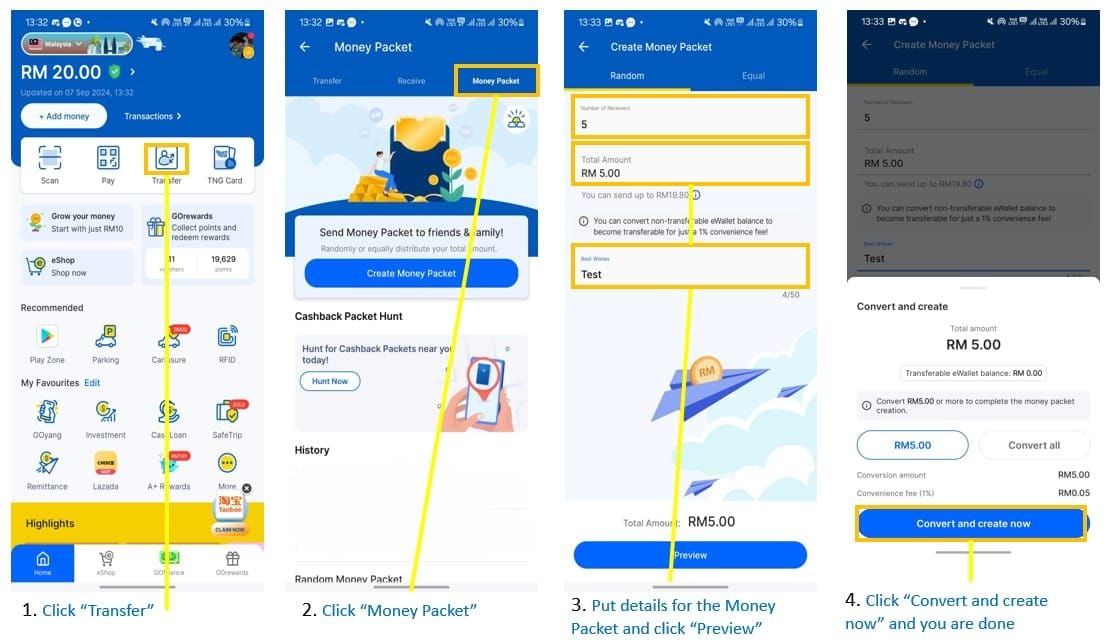
Both Android and iOS follow this identical flow. If your interface looks different, update the app — outdated versions are a documented source of activation failures in 2026.
Common Input Mistakes to Avoid
- Confusing digit 0 with letter O on printed PINs
- Missing the leading zero on PINs that appear as 9 digits
- Entering spaces between digit groups (field requires unbroken 10-digit input)
- Copy-pasting with hidden whitespace from SMS or email
When you buy TNG reload pin instantly online through BitTopup, digital PINs are delivered directly to your account — eliminating transcription errors common with physical scratch cards.
Allow a minimum 1-minute interval between reload attempts. Rapid successive entries are flagged as suspicious activity.
Success vs. Pending — What You'll See
- Success: Immediate on-screen notification, balance updated in real time
- Pending: Processing status shown, no balance change
If you see pending, don't re-enter the PIN. Proceed to Solution 1.
Solution 1 — Wait Strategically and Monitor Transaction History
Check Pending vs. Failed Status
Go to your transaction history immediately after submission:
- Pending entry visible: System received your PIN, balance update is queued
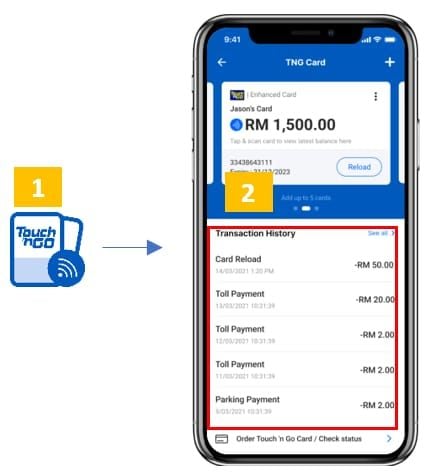
- No entry or explicit failure: PIN entry failed silently
If a reload fails, the credited amount returns automatically to your originating bank or eWallet — it's not lost, though reversal timing varies.
The 2-Hour Rule
Wait the full 120 minutes before escalating. If your balance hasn't updated after 2 hours and transaction history shows a pending entry, escalate. If no transaction entry exists after 2 hours, your PIN entry likely failed — proceed to Solutions 3–5.
Solution 2 — Force-Refresh the App and Clear Cache
Corrupted cache is an underestimated culprit. Your reload may have credited while the app still shows the old balance.
Android
- Go to Settings → Apps → Touch 'n Go eWallet
- Tap Storage → Clear Cache (don't clear data — that logs you out)
- Relaunch and check balance
iOS
- Swipe up to access the app switcher
- Swipe the TNG eWallet card upward to force-close
- Wait 30 seconds, relaunch
- Pull down on the dashboard to trigger a manual balance refresh
When to Reinstall
Only reinstall if the app crashes on launch, fails to connect entirely, or shows persistent UI errors after cache clearing. Your balance and transaction history are stored server-side — reinstalling won't affect them. You'll need your 6-digit PIN, fingerprint, or Face ID to log back in.
Solution 3 — Check and Resolve Your Wallet Cap or KYC Status
The Wallet Cap Problem
The standard verified eWallet holds a maximum of RM20,000. If your balance is at or near this cap, incoming reload PIN credits are rejected — even with a perfectly valid PIN. The system can't credit funds beyond the ceiling.
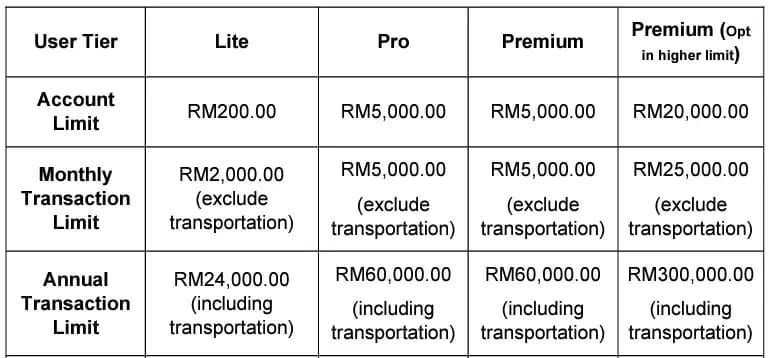
Premium eWallet tiers reach RM120,000 monthly transaction limits (excluding transport, RFID, and PayDirect), but the base wallet balance cap still applies.
How KYC Status Affects Your Reload Limit
- Unverified accounts: Monthly PIN reload cap of RM1,500 (promotional tier)
- Verified accounts: Full RM8,000 monthly PIN reload limit
If you've been reloading frequently this month, you may have hit your monthly ceiling without realizing it.
Complete KYC Fast — In-App Steps
- Tap your profile icon in the TNG eWallet app
- Enter personal details or scan your MyKad using the in-app scanner
- Submit and await confirmation
KYC approval typically processes within one business day. Once verified, your monthly reload limit increases immediately.
Solution 4 — Buy a Fresh Digital TNG Reload Pin via BitTopup
Why Digital Beats Physical During Delay Periods
When your existing PIN is stuck in a delay loop or showing unresolvable errors, the fastest fix is a fresh PIN with a clean redemption status. Physical scratch cards introduce extra variables: potential damage, transcription errors, and retail stock issues — all worse during March 2026 high-demand periods.
You can top up Touch n Go ewallet with reload pin purchased through BitTopup, which delivers digital PIN codes directly to your account with competitive pricing, secure transactions, and fast delivery. The entire purchase-to-redemption flow completes in minutes.
How to Buy and Redeem on BitTopup
- Visit BitTopup and go to the TNG Reload Pin product page
- Select your required RM denomination
- Complete secure checkout
- Receive your digital 10-digit PIN code
- Enter the PIN in your TNG eWallet app using the steps in Section 2
Choosing the Right Denomination
Available denominations: RM10, RM20, RM30, RM50, RM100, RM150, RM200, RM500
- Daily toll and transit use: RM50 or RM100 provides a practical buffer
- Near monthly limit: Calculate your remaining headroom before purchasing (RM8,000 cap for verified accounts) to avoid a second blocked transaction
Solution 5 — Escalate to TNG Support With the Right Documentation
What to Prepare Before Contacting Support
- Exact 10-digit PIN code (or last 4 digits if security-conscious)
- Screenshot of transaction history showing pending or failed entry
- Date and time of your reload attempt
- Registered eWallet phone number and NRIC
- Screenshot of any error message displayed
Fastest Contact Channel
Call +603-5022 3888, available Monday–Sunday, 7am–10pm. Live agents can access your account redemption logs in real time and escalate server-side issues immediately — this remains the fastest resolution channel for PIN-specific disputes.
What to Request
Ask explicitly for one of two outcomes:
- PIN replacement: New valid code issued in exchange for the failed one
- Credit reversal: Reload amount returned to your originating payment source
Both are standard procedures. Having your transaction history screenshot ready significantly speeds up resolution.
Error Messages Decoded
'Invalid PIN'
Causes: transcription errors (missing leading zero), expired PIN, or compromised code from unverified sources. Fix: verify your PIN source, recheck digit accuracy, confirm 10-digit format with leading zero.
'PIN Already Used'
The PIN was previously redeemed — either in a session you don't recall, or by an unauthorized party. Check transaction history for a matching credit. If no credit appears, the PIN was redeemed on a different account. Escalate to TNG support immediately with proof of purchase.
'Reload Unsuccessful' / 'Server Error'
During March 2026 peak periods, these are frequently temporary. Wait 15 minutes and retry once (with the mandatory 1-minute interval between attempts). If the error persists, the issue is likely account-specific — wallet cap or KYC status — and Solutions 3 or 5 apply.
How to Prevent Future Delays
Best Times to Reload
Server load is consistently lowest during:
- Weekday mornings: 7am–9am
- Late evenings: after 9pm
Avoid: lunch hours (12pm–2pm), post-work peaks (6pm–8pm), Fridays, and the first week of each month when bill payment activity surges.
Keep Your App Updated
Outdated versions use deprecated API calls that fail against updated backend servers. Enable automatic updates on Android and iOS. Running an old version during a backend migration window is a documented source of activation failures.
Proactive Top-Up Strategy
Maintain a minimum buffer of RM100–RM200 at all times. Top up proactively, not reactively. Set a personal low-balance alert and reload before hitting it — especially heading into high-demand periods like March 2026.
Frequently Asked Questions
Do TNG Reload Pins expire if not activated quickly? Yes — valid for 60 days from purchase date. A PIN stuck in a processing delay doesn't consume this window; the clock applies to unused PINs sitting unactivated.
Can I use multiple Reload Pins in one day? Yes, with restrictions. Allow a minimum 1-minute interval between attempts. Each reload counts toward your monthly cap: RM8,000 (verified accounts) or RM1,500 (promotional tier).
Is it safe to buy TNG Reload Pins online during delay periods? Yes, from reputable platforms. BitTopup offers secure transactions with verified digital PIN delivery — reliable when physical retail availability is inconsistent or you need a fresh PIN immediately.
Why does my balance show unchanged after the app confirmed success? Display cache issue. Force-close the app, wait 30 seconds, relaunch, and pull down to refresh. If balance still doesn't update after 2 hours, check transaction history for a pending entry and contact support if none exists.
Can I use a Reload Pin with incomplete KYC? You can attempt it, but unverified accounts hit the RM1,500 monthly cap much faster. Completing KYC raises your limit to RM8,000 monthly and removes the primary restriction blocking activation.
My PIN shows 'already used' but I never redeemed it — what now? The PIN was compromised before reaching you. Contact TNG support immediately at +603-5022 3888 with proof of purchase. Support can investigate the redemption log and initiate a replacement or refund.
Recommended News



Recommend products

Table of Contents
- Why TNG Reload Pin Delays Spike in March 2026
- How Activation Normally Works
- What's Driving Delays Right Now
- Delay vs. Error — Know the Difference Before Acting
- How to Enter Your TNG Reload Pin Correctly
- Step-by-Step (Android & iOS)
- Common Input Mistakes to Avoid
- Success vs. Pending — What You'll See
- Solution 1 — Wait Strategically and Monitor Transaction History
- Check Pending vs. Failed Status
- The 2-Hour Rule
- Solution 2 — Force-Refresh the App and Clear Cache
- Android
- iOS
- When to Reinstall
- Solution 3 — Check and Resolve Your Wallet Cap or KYC Status
- The Wallet Cap Problem
- How KYC Status Affects Your Reload Limit
- Complete KYC Fast — In-App Steps
- Solution 4 — Buy a Fresh Digital TNG Reload Pin via BitTopup
- Why Digital Beats Physical During Delay Periods
- How to Buy and Redeem on BitTopup
- Choosing the Right Denomination
- Solution 5 — Escalate to TNG Support With the Right Documentation
- What to Prepare Before Contacting Support
- Fastest Contact Channel
- What to Request
- Error Messages Decoded
- 'Invalid PIN'
- 'PIN Already Used'
- 'Reload Unsuccessful' / 'Server Error'
- How to Prevent Future Delays
- Best Times to Reload
- Keep Your App Updated
- Proactive Top-Up Strategy
- Frequently Asked Questions
Recommend products

Recommended News
MyCard App Notification Settings for Instant Transaction Alerts

How to Change Auto Pause Sensitivity in Keep App Running Mode
Cannot Log Into MyCard Account Outside Taiwan: Fix Guide

Tokyo Beast Event Guide: Championship Arena Meta & Rewards
CS2 Premier vs Competitive 2026: Rating Guide & Match Meta

How to Change Keybinds in Lineage W PC: Client Setup Guide
How to Link LifeAfter Mobile Account to PC Step by Step
How to Top Up PSN Indonesia Wallet and Redeem Codes (2026)


































































































