What Are Uplive Diamonds?
Uplive runs on two separate currencies. Diamonds are what viewers purchase and spend. uCoins are what streamers receive and withdraw as cash. Confusing them is the first mistake most new streamers make.

If you're starting on Uplive in 2026 and wondering how the Diamond economy actually works — here's the honest answer. Viewers buy Diamonds to send virtual gifts, which convert 1:1 into uCoins in your wallet. After Uplive's 30–50% platform commission (plus any agency cut), new streamers realistically earn $5–150/month in their first three months, growing to $200–800/month after six-plus months of consistent effort.
Uplive runs on two separate currencies. Diamonds are what viewers purchase and spend. uCoins are what streamers receive and withdraw as cash. Confusing them is the first mistake most new streamers make.
They're not interchangeable — they serve opposite ends of the same transaction. Viewers buy Diamonds, spend them on gifts during your stream, and you receive the equivalent value as uCoins in your Host Wallet. The 1:1 transfer happens instantly, but what you net after fees is a different story.
Conversion rates vary by server region:
| Server | Rate |
|---|---|
| S2 / S4 | 100 uCoins = $1 USD |
| S1 / S3 | 160 uCoins = $1 USD |
This matters enormously. A streamer on S1/S3 receiving 10,000 Diamonds in gifts earns significantly less per Diamond than one on S2/S4 — before fees even enter the picture.
Officially: 10,000 Diamonds received translates to roughly $31–70 USD depending on server and commission tier.
One thing to be clear on: you cannot purchase Diamonds yourself and convert them to cash. Diamonds flow one direction — from viewer wallets into gifts, which become your uCoins.
Most content about Uplive earnings either quotes top-tier streamers or stays too vague to be useful. Here are the actual numbers by growth stage.
$5–150/month is the realistic range. Most new streamers land closer to $10–25. A typical early stream generates 2,000–5,000 Diamonds in gifts per month, which after platform fees yields roughly $10–25 before hitting withdrawal thresholds.
Many new streamers don't reach the minimum withdrawal threshold in their first month. That's normal. The platform's algorithm needs time to surface your content, and viewers need time to trust you enough to spend Diamonds.
Community data consistently shows a meaningful jump at the three-month mark for streamers who've maintained a consistent schedule. The range here is $50–300/month, with the upper end achievable for streamers who actively participate in events and have started building Silver or Gold VIP viewers.
What changes between month one and month four isn't luck — it's compounding. Regular viewers who've spent Diamonds before are more likely to spend again. Your algorithm ranking improves with consistent hours. And you start to understand which content moments trigger gifting.
| Stage | Timeframe | Monthly Earnings |
|---|---|---|
| Beginner | Month 1–3 | $5–150 |
| Growing | Month 3–6 | $50–300 |
| Established | Month 6–12+ | $200–800 |
| Optimized | 12+ months | $500+ consistently |
These figures assume 15–20 streaming hours per week. Drop below that, and the numbers drop proportionally.
Consistency builds momentum; inconsistency bleeds it. Think of the algorithm less like a punishment system and more like a flywheel.
The Uplive Spring Gifting Event launched March 1, 2026 — the most significant earnings multiplier available in Q1. Understanding how to position yourself for it is what separates streamers who benefit from those who watch others climb the leaderboard.
Ranking/Leaderboard Events — Reward streamers who accumulate the most gift points within a set window. High upside, but competitive. Without an established VIP viewer base, new streamers can't realistically compete.
Gifting Marathons — Milestone-based events where hitting cumulative gift thresholds unlocks rewards. More accessible for newer streamers because you're competing against a threshold, not other accounts.
Themed Festival Events — The Spring 2026 event falls here. Only spring-themed gifts count toward milestones and leaderboards, so educating your audience on which gifts qualify is part of your strategy.
For new streamers: gifting marathons and themed milestone events offer better ROI than pure leaderboard competition.
The Spring 2026 event offers 1.5x leaderboard points on qualifying spring-themed gifts. That multiplier stacks with viewer VIP tiers:
| Viewer VIP Tier | Diamonds Spent | Base Multiplier | With Spring 1.5x |
|---|---|---|---|
| Bronze | 580–2,899 | 1x | 1.5x |
| Silver | 3,200–6,499 | 2–2.5x | 3–3.75x |
| Gold | 6,500–11,999 | 3–5x | 4.5–7.5x |
| Professional | 12,000+ | 5x | 7.5x |
A Professional VIP viewer sending spring-themed gifts generates 7.5x leaderboard impact compared to a non-VIP viewer outside the event. Cultivating even one or two high-VIP viewers before a major event window can dramatically shift your ranking.
Don't wait until the event starts. In the two weeks before:
Probably not in your first three months. Leaderboard competition is dominated by streamers with established Professional VIP viewers generating 7.5x multiplied points. Competing against that without the viewer base to match is an effort drain.
Better approach: focus on milestone rewards, use the event to encourage first-time gifters (the 1.5x multiplier makes their gifts feel more impactful), and treat the event as an audience-building moment rather than a competition.
Before diving in: you're withdrawing uCoins, not Diamonds. The terminology gets blurry, but your Creator Dashboard shows your uCoin balance — that's what converts to cash.
This is why many new streamers don't withdraw in month one. Focus on accumulation first. Your first withdrawal realistically takes two to three months to become possible.
Complete verification before you need it. Verification delays are the most common reason first withdrawals take longer than expected.
| Method | Fee | Processing Time (Established) | Processing Time (New) |
|---|---|---|---|
| PayPal | $1–5 domestic / $15–40 international | 3–5 days | 7–10 days |
| Bank Transfer | $1–5 domestic / $15–40 international | 3–5 days | 7–10 days |
International transfers add 1–3 additional days. A new streamer making their first international withdrawal should plan for up to two weeks from submission to receipt.
Here's the math most guides skip:
Scenario A — Independent streamer on S2/S4, 10,000 Diamonds received:
Scenario B — Agency streamer on S1/S3, 10,000 Diamonds received:
Same 10,000 Diamonds. Wildly different outcomes. Knowing your server and commission tier isn't optional — it's fundamental. After all fees, streamers officially receive 50–70% of Diamond value as cash. Agency streamers on less favorable servers can land well below that range.
This is one of the most consequential decisions a new streamer makes, and most make it without fully understanding the trade-offs.
| Factor | Agency | Independent |
|---|---|---|
| Coaching & support | Yes | No |
| Promotion & discovery | Yes | Self-managed |
| Extra commission cut | ~15% additional | None |
| Net earnings on $500/month gifts | ~$75 less | Full share |
| Best for | First 6 months, no audience | 6+ months, established base |
Agencies provide real value early — coaching, promotion, structured onboarding. But that value costs roughly 15% of your earnings on top of Uplive's platform fee. Community experience suggests agencies are worth it for the first six months if you're starting from zero. Once you have an established viewer base, going independent keeps significantly more of your Diamond earnings.
Critical warning: read agency contracts carefully before signing. Some include penalty clauses for early termination. This is one of the most commonly cited mistakes among new streamers who later regret their agency arrangement.
New streamers in 2026 are being actively targeted by scams that didn't exist at this scale two years ago.
The most common scam promises "Diamond multipliers" or "boosted withdrawal rates" through unofficial third-party services, typically asking for your login credentials or a small "processing fee."
None of these are legitimate. Uplive does not partner with external services to offer enhanced withdrawal rates. Other red flags:
Every legitimate Uplive transaction runs through the official Creator Dashboard and Diamond Withdrawal Portal. If a withdrawal isn't initiated through your Host Dashboard → Wallet, it's not real.
First, confirm your verification is complete — incomplete ID or payment details are the most common cause. If everything checks out and your withdrawal is delayed beyond the stated window, contact Uplive support through the official app with screenshots of your transaction history.
If Diamonds don't appear in your wallet after a viewer top-up, restart the app and wait 15–20 minutes before contacting support. Most delivery delays resolve within that window.
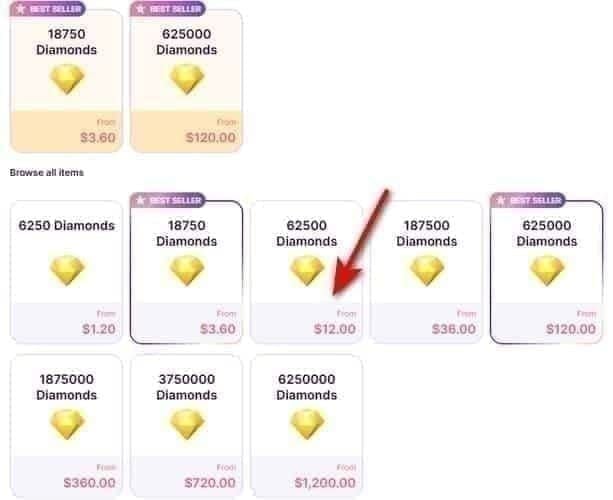
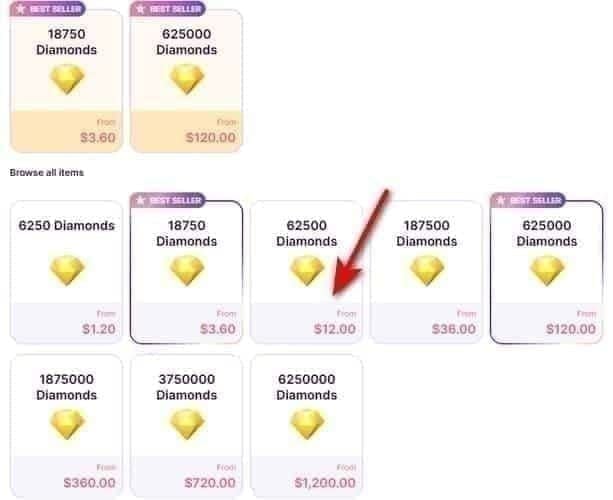
Your earnings are directly tied to how easily your viewers can purchase Diamonds. Friction in the top-up process means fewer gifts.
The first-recharge bonus is one of the most powerful tools in your viewer education arsenal. First-time Diamond purchasers who buy the largest package receive double Diamonds — 12,000 becomes 24,000, for example. That can push a viewer from Bronze to Professional VIP in a single purchase, unlocking the 5x multiplier that makes their future gifts dramatically more impactful for your leaderboard position. Educate new viewers about this bonus explicitly. Many don't know it exists.
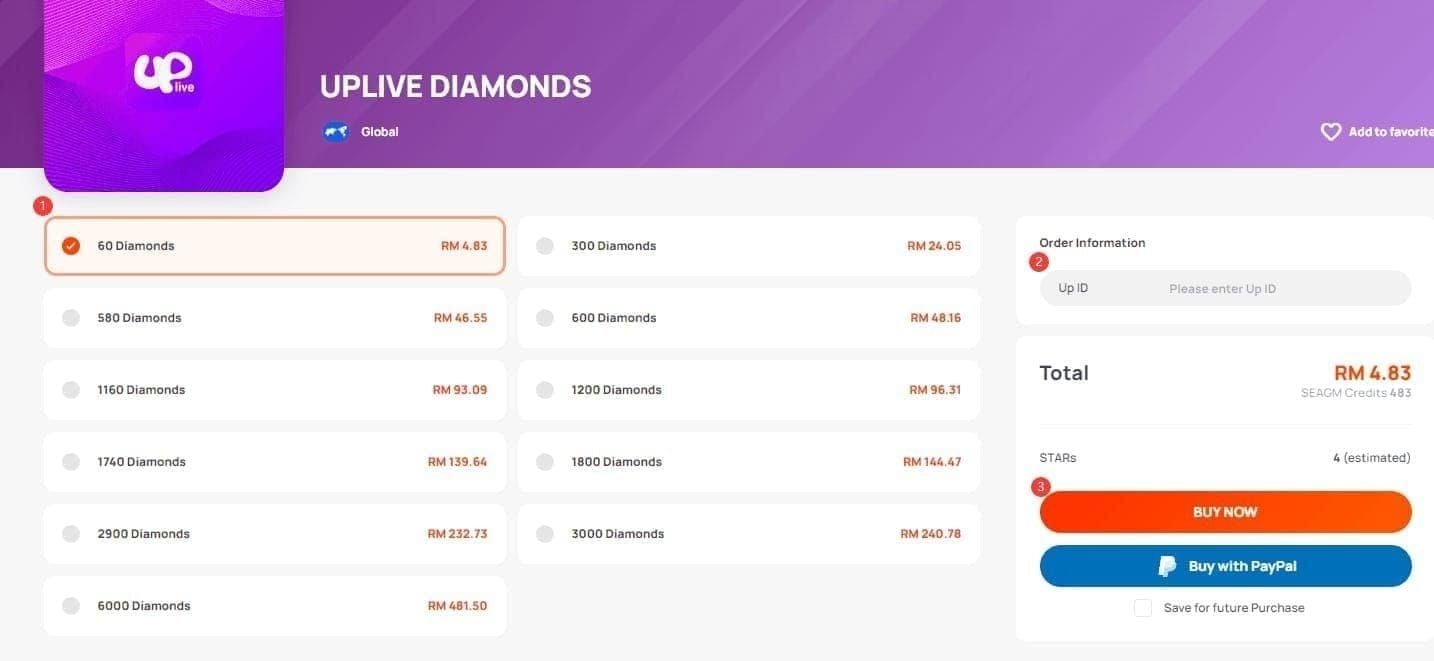
For viewers looking to maximize their Diamond budget, cheap Uplive Diamonds coins top up through BitTopup offers competitive rates — community experience suggests savings of 15–20% compared to in-app pricing, with rates around 57–65 Diamonds per USD depending on the package. A viewer who saves 15% on their Diamond purchase can send 15% more gifts for the same spend, which directly increases your uCoin balance.
Share the top-up option with your audience during streams, especially before major events like the Spring 2026 gifting window.
How much is 1 Uplive Diamond worth in USD? After Uplive's 30–50% commission, 1 Diamond received translates to roughly $0.005–0.007 on S2/S4 servers. On S1/S3, the rate is less favorable. In practice, 10,000 Diamonds received nets $31–70 depending on server and commission tier.
How many Diamonds do I need before my first withdrawal? New hosts typically need 10,000–50,000 uCoins depending on region and verification status. Established streamers can withdraw at 5,000 uCoins. Complete verification early — it's the single biggest factor in unlocking the lower threshold.
Does Uplive take a percentage of my Diamond earnings? Yes — 30–50% platform commission. Add another ~15% if you're in an agency. After all deductions, streamers receive 50–70% of Diamond value as cash.
Can I earn Diamonds without being in an agency? Absolutely. Independent streamers keep their full share after Uplive's platform fee. The trade-off is losing coaching and promotion support, which matters most in the first six months.
What's the difference between Uplive Coins and Uplive Diamonds? Diamonds are the viewer-side currency. uCoins are the streamer-side currency. Only uCoins can be withdrawn as cash. The flow is strictly one-directional: viewer spending → gifts → your uCoin balance.
What happens to my uCoins if I stop streaming? Your accumulated balance remains in your wallet and can still be withdrawn as long as you meet the minimum threshold and your account is in good standing. No expiration on earned uCoins — but your algorithm visibility drops with inactivity, making it harder to earn new ones when you return.
The streamers who succeed on Uplive aren't chasing viral moments. They understand the fee structure, show up consistently for 15–20 hours a week, treat events like the Spring 2026 gifting window as strategic opportunities, and build genuine relationships with the viewers who become their highest-VIP gifters.
The earnings are real. The timeline is longer than most people expect. And the math, once you understand it, is completely transparent.
For viewers who want to maximize their support, pointing them toward Uplive Diamonds recharge cheapest price options means their Diamond budget goes further — and your uCoin balance grows faster as a result.








Accepted Payment Methods