Event Schedule & Critical Deadlines
Event opens: March 1, 2026
Season 3 20% discount window closes: February 28, 2026 — one day before the Spring Event begins.
Top up by February 25. That 72-hour buffer before the Season 3 deadline ensures delivery is confirmed and your balance is active before Phase 1 opens. Waiting until March 1 risks missing early leaderboard positioning — the first hours of a new phase typically see the least competition.
Phase Structure
Full phase-by-phase details weren't published at time of writing. Based on community patterns from prior seasonal events:
- Phase 1 (Early Spring): 1.5x event gift multiplier active; milestone progress accumulates cumulatively
- Phase 2 (Mid-Event): Potential bonus multiplier windows or limited-time gift combos, typically lasting 24–48 hours
- Final Phase: Leaderboard rankings lock — concentrate gifting in the final 2–3 hours before reset for maximum per-Diamond impact
Uplive event timers display in UTC. Convert your local deadline and set a phone reminder 3 hours before cutoff.
VIP Tiers & Effective Multipliers
| VIP Tier | Cumulative Diamonds Spent | Base Multiplier | Spring Event Stack | Effective Multiplier |
|---|
| No VIP / Bronze | Below 3,200 | 1x | 1.5x | 1.5x |
| Silver | 3,200–6,499 | 2–2.5x | 1.5x | 3–3.75x |
| Gold | 6,500–11,999 | 3–5x | 1.5x | 4.5–7.5x |
| Professional | 12,000+ | 5x | 1.5x | 7.5x |
VIP multiplier values are community-validated. Spring Event 1.5x stack is officially confirmed.
The practical gap here is enormous. A Professional VIP gifter sending 1,000 Diamonds generates the same leaderboard impact as a non-VIP gifter sending 7,500. That's not a marginal edge — it's the difference between hitting a milestone and missing it at the same dollar spend.
Official milestone thresholds are published inside the app's event tab on March 1. The raw Diamond amounts you see are what's required — your multiplier determines how efficiently you reach them.
Milestone Thresholds: What Most Guides Get Wrong
Three things competing guides consistently miss:
1. Cumulative counting, not per-phase resets. Your total Diamond spend accumulates across the entire event from March 1 through the final deadline. Diamonds gifted in Phase 1 count toward Phase 2 milestones. Players who assume progress resets between phases often panic-spend unnecessarily.
2. The wasted threshold zone. If Tier 3 ends at 5,000 Diamonds and Tier 4 starts at 7,500, gifting 6,000 Diamonds puts you 1,000 Diamonds into dead space — you've cleared Tier 3 but haven't unlocked Tier 4. Those 1,000 Diamonds generated leaderboard points and zero additional milestone rewards. Plan your total budget to land at or just above a threshold, never between two tiers.
3. Gift type matters. Only spring-themed event gifts advance your milestone counter. Standard gifts sent during the event generate leaderboard points but don't touch your milestone progress. This is the most common reason players report missing credit.
Spring Event Rewards
Rewards split into two tracks: gifter rewards and host rewards. Coordinating with a host close to their host-side milestone creates mutual benefit — your gifting advances both tracks simultaneously.
Gifter Rewards (community-validated from prior seasonal events)
- Exclusive animated avatar frames — spring-themed, unavailable outside the event window
- Limited title badges displayed on profile and in chat
- Animated profile effects tied to specific milestone tiers
- Leaderboard rank rewards for top-N gifters by total event spend
Milestone-based rewards (frames, badges) are generally permanent once unlocked. Leaderboard position rewards may carry expiration conditions. Verify permanence status inside the app's event reward preview before targeting a tier.
Leaderboard vs. Milestone: Two Separate Systems
Milestone rewards unlock when you hit a Diamond threshold. Leaderboard rewards go to top-ranked gifters by total spend. You can earn all milestone rewards without appearing on the leaderboard. Chasing leaderboard position requires significantly more Diamonds than completing the milestone track — budget accordingly.
Gift Allocation Strategy
Timing Your Surge
Hold 30–40% of your event Diamond budget for the final 2–3 hours before leaderboard reset. Community experience consistently shows that early spending gets overtaken by late surges. Spreading gifts evenly across the event is the least efficient approach.
Splitting vs. Concentrating
For milestone progress (personal, not host-specific), splitting gifts across multiple hosts doesn't hurt you. For leaderboard ranking on a specific stream, concentration wins. Decide which objective matters more before allocating.
High-Efficiency Gift Types
Send spring-themed event gifts exclusively — they carry the 1.5x multiplier that standard gifts don't. Animated combo gifts typically offer the best milestone credit per Diamond in Uplive's event structure, based on community observation across prior seasonal events.
Solo vs. Fan Club: Which Is Actually Better?
Fan club collaborative gifting beats solo at every budget tier — but only if your group is coordinated.
During the Spring Event, fan club members gifting on the same host stream contribute to shared fan club milestone tracks alongside individual gifter milestones. Five members each spending 2,000 Diamonds can collectively generate the milestone impact of a single 10,000+ Diamond spend, reaching tiers none of them could hit individually. Bonus Diamonds from events also count toward VIP cumulative spend, so coordination advances everyone's VIP tier simultaneously.
Solo gifting wins when your fan club is inactive, uncoordinated, or spread across multiple hosts. A disorganized group gifting at random times to different streams produces no pooling benefit.
| Your Situation | Recommended Approach |
|---|
| Active fan club, same host focus | Collaborative — coordinate surge windows |
| Small budget (<2,900 Diamonds) | Solo — hit Bronze VIP threshold cleanly |
| Large budget (12,000+ Diamonds) | Solo viable — Professional VIP multiplier is sufficient |
| Mid-budget, inactive fan club | Solo on one host for leaderboard focus |
| Mid-budget, active fan club | Collaborative for milestone tier access |
For coordinated groups: set a shared gifting window in the final 2 hours before leaderboard reset, use external group chats to signal surges, and track individual contributions so members know how close the group is to the next tier.
Budget Planning: Three Tiers
Casual (~$50): Entry Rewards
Target: 2,900 Diamonds — clears Bronze VIP entirely.
Don't round down here. Buying 2,800 Diamonds instead of 2,900 misses the Bronze VIP threshold and costs you the multiplier on all future spending. The 100-Diamond difference matters more than the dollar saved.
Committed (~$102–$110): Best Efficiency
Target: 6,000–6,500 Diamonds — Silver VIP range.
Silver VIP's 2–2.5x multiplier combined with the Spring Event 1.5x stack puts you at 3–3.75x effective multiplier — roughly triple the milestone progress per Diamond versus a non-VIP gifter. This is the efficiency sweet spot for serious but non-whale participants.
Whale (~$205+): Full Milestone Sweep
Target: 12,000+ Diamonds — Professional VIP.
The 5x multiplier stacked with 1.5x hits 7.5x effective — the highest achievable during this event. Community data shows effective cost per leaderboard impact drops from $0.017 to $0.0034 per Diamond at this tier. For anyone spending $200+ on Uplive events regularly, Professional VIP pays for itself within two to three events.
First-recharge bonus: If you haven't made your first Diamond purchase yet, use it on the 12,000 Diamond package. The first-recharge bonus doubles your Diamonds — yielding 24,000 Diamonds and immediately unlocking Professional VIP. Wasting it on a 60 or 300 Diamond package yields 120 or 600 Diamonds and nothing else. This cannot be undone.
| Budget Tier | Diamond Target | Approx. Cost | VIP Unlocked | Effective Multiplier |
|---|
| Casual | 2,900 | ~$50 | Bronze | 1.5x |
| Committed | 6,000–6,500 | ~$102–$110 | Silver | 3–3.75x |
| Whale | 12,000+ | ~$205+ | Professional | 7.5x |
| First-Recharge Whale | 12,000 package | ~$205 | Professional | 7.5x + 24,000 Diamonds |
How to Top Up Before the Event
Third-party platforms charge 1–3% transaction fees versus the App Store's 30% cut. That difference is real money: $200 in-app yields roughly 11,600 Diamonds; the same $200 through a low-fee platform yields 13,000+.
For Spring Event top-ups, Uplive Diamonds cheap top up April 2026 spring event through BitTopup offers competitive rates with fast delivery — important when you're working against a pre-event deadline.
Step 1: Open Uplive, tap your profile avatar, and copy your 8–10 digit Up ID exactly as displayed.
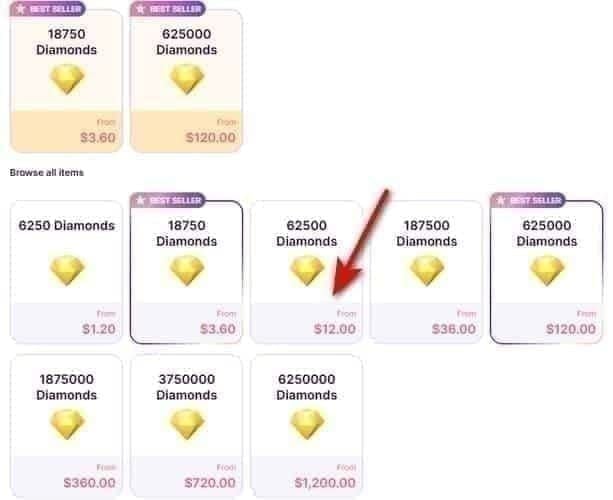
Step 2: Select your target package (6,000+ recommended), enter your Up ID, and pay via digital wallet or bank transfer for 0–2% fees.
Step 3: Diamonds typically deliver instantly or within 15 minutes. If your balance hasn't updated after 15 minutes, restart the app. Still missing after 30 minutes? Contact support with your transaction confirmation.
Legitimate top-ups require only your Up ID — never your password. If any platform asks for your Uplive password, stop immediately. A wrong Up ID sends Diamonds to another account with no recovery option, so copy-paste rather than typing manually.
Package Sizing
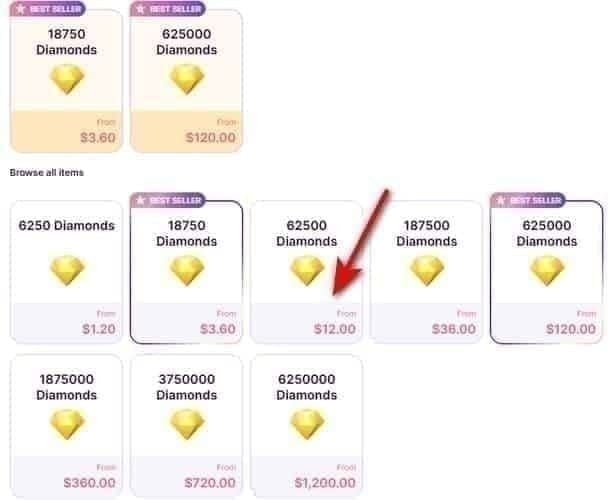
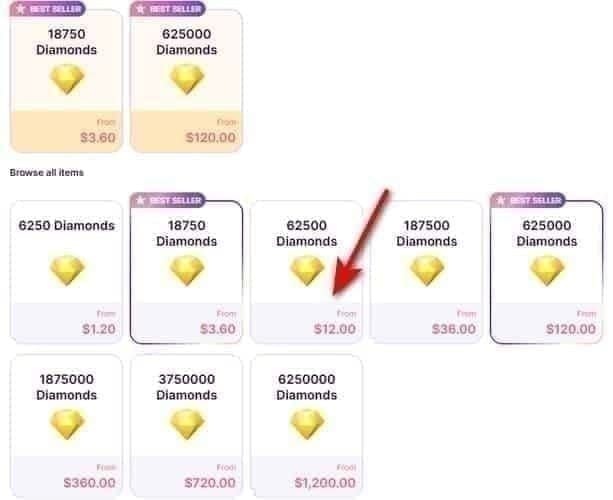
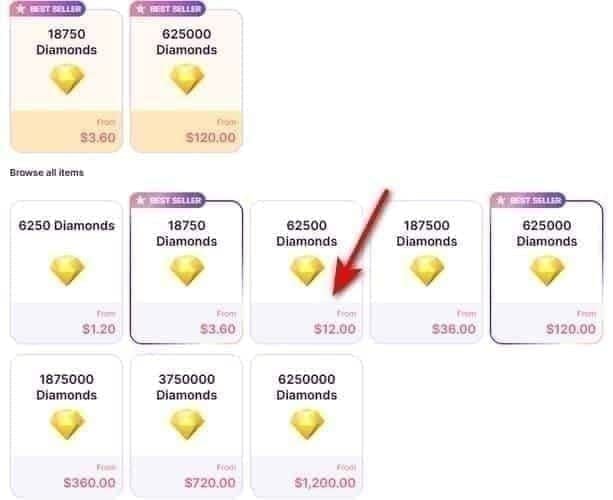
Match your package to your target milestone tier, not a round dollar amount. Buying 5,800 Diamonds when your target requires 6,000 forces a second transaction with additional fees and delays. Bulk rates in the 6,000+ range run ~58–61 D/USD; during promotional windows, up to ~65 D/USD. Any rate above 65 D/USD outside a confirmed promo is a scam signal.
Referral discounts stack with promotional rates: one referral yields 8% off up to $5, five referrals yield 12% off up to $20.
Tracking Progress & Troubleshooting
Your milestone tracker lives inside the Spring Event tab — accessible from the main screen during the event window. It shows cumulative Diamond spend on qualifying gifts, current tier, and the next threshold.
Delay in reflection: Transactions typically update within minutes. During high-traffic periods (event launch, final hours), delays up to 15–20 minutes have been reported. Wait before assuming a transaction failed.
Missing credit: Almost always caused by sending standard gifts instead of spring-themed event gifts. Check your gift type first.
If credit is genuinely missing after 30 minutes, contact Uplive support with: your Up ID, transaction timestamp, gift type sent, and screenshots of your milestone tracker before and after. Screenshots aren't optional for serious event participants — they're your only evidence in a dispute.
FAQ
What are the exact milestone thresholds?
Published inside the app's event tab when the event opens March 1. VIP tier thresholds (580 Bronze, 3,200 Silver, 6,500 Gold, 12,000 Professional) are community-validated and govern your multiplier — event-specific milestone requirements are set separately per event.
Do standard gifts count toward Spring Event milestones?
No. Only spring-themed event gifts advance your milestone counter. Standard gifts generate leaderboard points only.
Are Spring Event rewards permanent?
Milestone rewards (avatar frames, title badges) are generally permanent. Leaderboard position rewards may expire. Verify each reward's status in the app's event preview before targeting a tier.
When should I top up?
By February 25, 2026. Gives a 72-hour buffer before the Season 3 discount deadline (February 28) and confirms your balance before Phase 1 opens March 1.
What's the maximum effective multiplier?
7.5x — Professional VIP (5x) stacked with the Spring Event 1.5x. Effective cost per leaderboard impact at this tier: $0.0034 per Diamond.
Fan club or solo?
Fan club if your group is coordinated and focused on the same host. Solo if your fan club is inactive or scattered. See the decision table above.
Final Summary
Top up by February 25. Target packages that land at or just above a VIP threshold — never between tiers. Use only spring-themed event gifts for milestone progress. Hold 30–40% of your budget for the final 2–3 hour surge before leaderboard reset.
If you haven't made your first Diamond purchase, the Spring Event is the moment to do it. First-recharge bonus on the 12,000 Diamond package delivers 24,000 Diamonds and immediate Professional VIP — 7.5x combined multiplier for the entire event window.
Ready to lock in your balance before Phase 1 opens? Buy Uplive Diamonds discount recharge for spring event rewards through BitTopup for competitive rates and fast delivery.