The 3-Attempt Rule Explained
Each failed transaction—incorrect card details, insufficient funds, authentication timeouts—increments a counter that resets after 24 hours of inactivity or successful payment. This prevents brute-force attacks testing stolen credentials.
Payment processors charge platforms for each authorization attempt regardless of success. Limiting consecutive failures reduces costs while protecting users from unauthorized access.
Anti-Fraud Protection Mechanisms
The system analyzes multiple parameters: payment velocity, geographic consistency, device fingerprinting, transaction amount patterns. Packages exceeding 6000 diamonds trigger aggressive verification requiring additional authentication.
Accounts with 10+ successful transactions over 90 days receive trusted status with relaxed monitoring. The system tracks payment method consistency, flagging sudden changes in card details or billing addresses.
2025 Security Updates
Recent updates introduced stricter OTP timing (5-10 minute expiration, 30-second submission window) and enhanced 3D-Secure integration. Transactions exceeding €30 automatically trigger full 3D-Secure authentication.
February 2025 event period saw 47% failure rates during peak hours (18:00-22:00 UTC), prompting load-balancing improvements.
What Triggers Payment Blocks
Failed attempts include: bank declines, authentication timeouts, OTP failures, network interruptions, user-initiated cancellations after payment initiation. Even soft declines increment the counter if unresolved within transaction windows.
Technical Definition of Failed Attempts
Failures register when payment gateways receive non-success response codes from any transaction chain point. This includes authorization failures, 3D-Secure rejections, OTP timeouts, network errors during settlement. Transactions completing within 60 seconds succeed; exceeding this typically causes automatic cancellation.
The system counts both user-side errors (incorrect CVV, expired cards) and platform-side issues (server timeouts, gateway errors) equally.
How Attempts Are Counted
The 24-hour rolling window begins with your first failure. A second failure within this period continues the timer from initial failure timestamp. Counter resets after 24 hours of inactivity or immediately upon successful transaction.
New accounts: only 2 failures trigger locks. Unverified accounts receive identical treatment regardless of age. First-time payment methods are limited to 60-3200 diamond packages until establishing successful transaction history.
Soft Fails vs Hard Blocks
Soft fails occur when banks request additional verification without outright rejection—appearing as pending states requiring user action. If resolved within timeout windows, they don't increment counters. Abandoning verification or exceeding time limits converts them to hard failures.
Hard blocks activate after reaching attempt thresholds, completely disabling top-up functionality for specified durations. Payment interfaces become inaccessible with no manual override—even support can't expedite unlocks.
The 24-Hour Lock Consequences

When the third failure registers, Uplive immediately suspends all payment processing. Lock activates within seconds, preventing further top-up attempts across all payment methods—credit cards, debit cards, digital wallets, carrier billing.
Immediate Impact
Generic error messages appear when accessing top-up interfaces during lock periods. No countdown timer or explicit notification indicates when restrictions lift. Pending transactions initiated before locks may still process, but new attempts fail immediately.
Your account remains fully functional for non-payment activities: broadcasting, gifting received diamonds, viewing content, social interactions continue uninterrupted.
Escalating Restrictions
Initial 24-hour lock is first tier. Second lock within 30 days extends to 48 hours. Third lock within 60 days increases to 72 hours and triggers mandatory account verification. Five locks within 90 days result in permanent top-up restrictions requiring direct support intervention.
This escalation incentivizes addressing underlying payment issues. The system maintains detailed logs creating permanent records influencing future risk assessments.
Automatic Unlock Process
The 24-hour period begins precisely when the third failure registers. No user action required—unlock occurs automatically when timer expires. Exact unlock moment may vary by several minutes due to batch processing schedules.
After unlock, your first transaction carries heightened importance. Another failure immediately reinstates locks with escalated duration. Test with small packages (60-580 diamonds) to minimize financial risk while confirming payment functionality.
OTP Failure Loops: Causes & Prevention
OTP failures represent the most common unintentional block trigger. Codes must be submitted within 30 seconds of generation, yet network delays, app switching, manual entry errors frequently exceed this window. The 5-10 minute absolute expiration adds secondary failure points.
Why OTP Codes Fail
Carrier message filtering sometimes categorizes Uplive's OTP as promotional content, routing to spam or delaying delivery. International users face complications with roaming or virtual numbers—some carriers block automated messages from foreign platforms. Network congestion during peak hours (02:00-04:00 UTC, 12:00-14:00 UTC, 18:00-22:00 UTC) creates delivery delays pushing codes past validity windows.
Device-level problems: full message inboxes prevent SMS reception, outdated messaging apps fail to display codes properly, aggressive battery-saving modes delay background message processing. Users switching apps during payment flow miss narrow submission windows.
OTP Troubleshooting Steps
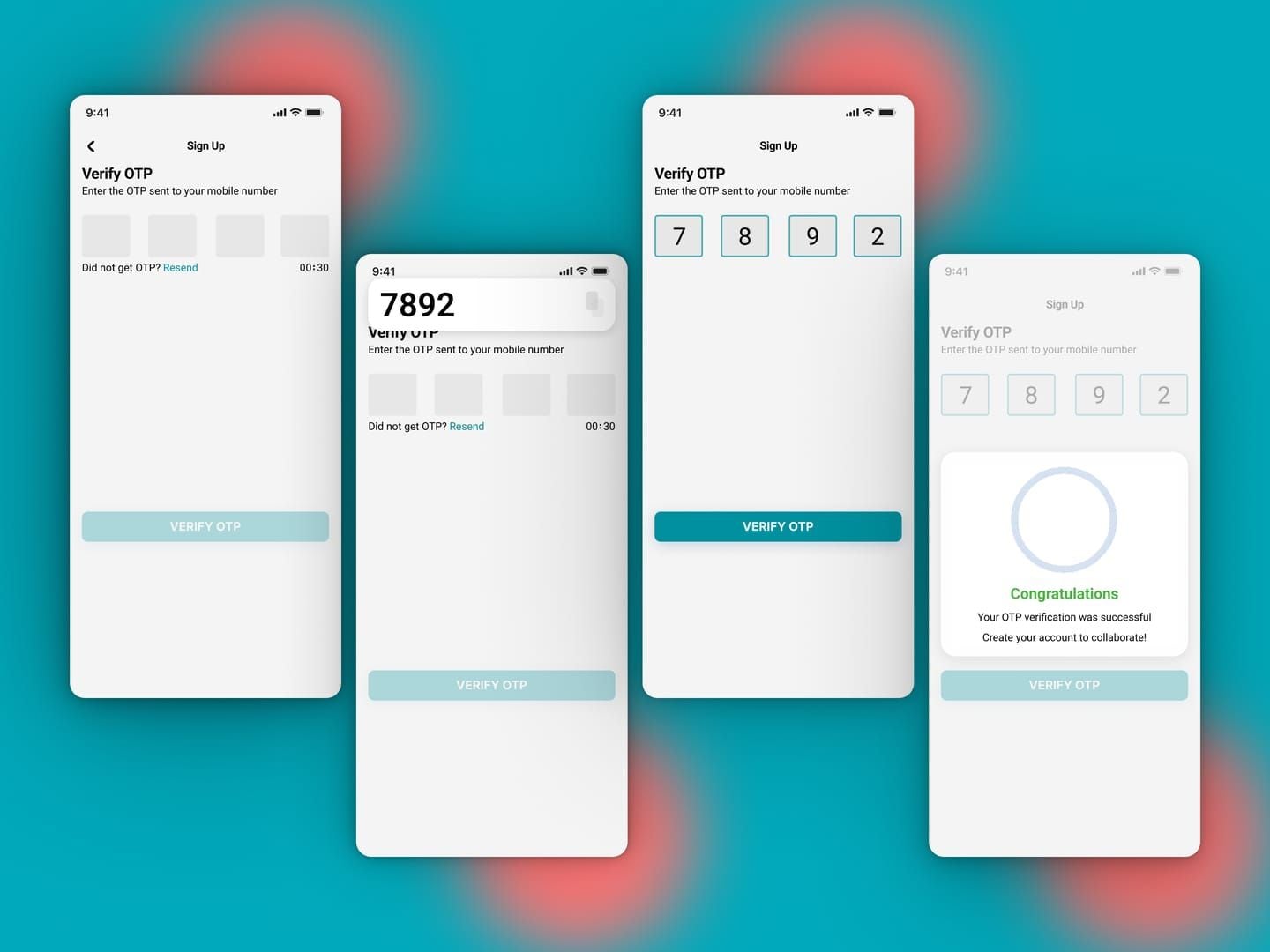
Before initiating OTP transactions:
- Ensure strong cellular signal (minimum 3 bars)
- Verify sufficient SMS storage capacity
- Disable call-blocking/spam-filtering apps temporarily
- Keep payment screen active—don't switch apps or lock device
When OTP requests initiate, monitor messages continuously. Codes typically arrive within 15-45 seconds. If no message after 60 seconds, don't request another immediately. Wait full 10-minute expiration before retrying—multiple rapid requests trigger rate-limiting delaying subsequent codes.
Copy codes immediately upon receipt and paste into verification fields to minimize manual entry errors.
If codes consistently fail to arrive, verify registered phone number matches current active number exactly (including country code). Test SMS reception with standard messages—if this fails, issue lies with carrier not Uplive. Temporarily disable VPN services; some payment processors block OTP delivery to VPN-masked IPs.
Alternative Verification Methods
Some payment methods support app-based authentication instead of SMS OTP, using banking apps for push notification confirmations. These offer more reliable delivery and longer confirmation windows (up to 5 minutes vs 30 seconds for SMS).
For persistent OTP 3D-Secure fail loops, third-party platforms like BitTopup provide alternative authentication pathways not relying on Uplive's direct OTP system, significantly reducing failure rates.
3D-Secure Authentication Failures
3D-Secure (3DS) adds verification layers between Uplive's gateway and card issuers, requiring confirmation through bank security systems. Transactions exceeding €30 automatically trigger this protocol, redirecting users to bank authentication pages. Multiple technical handshakes create numerous potential failure points.
How 3D-Secure Works
When initiating payments requiring 3DS, Uplive's gateway sends authentication requests to card networks (Visa, Mastercard), which route to issuing banks. Banks generate challenges—typically OTP, biometric verification, or app confirmation—presented through redirect pages or popups. You must complete challenges within bank-specified timeframes (usually 3-5 minutes).
The system validates responses against bank records. If successful, authentication tokens return to Uplive's gateway for payment authorization processing. Any interruption—network timeouts, browser compatibility issues, incorrect credentials, expired sessions—results in authentication failure and transaction cancellation.
Common Rejection Reasons
Browser popup blockers frequently interfere with 3DS redirects, preventing authentication windows from displaying. Users waiting for challenges that never appear eventually exceed timeout periods, triggering automatic failures. Outdated browsers lacking 3DS 2.0 protocol support may receive incompatible authentication requests failing regardless of correct credentials.
Bank-side issues include:
- Unregistered cards for 3DS (requiring enrollment through banking portals)
- Temporary service outages on issuer authentication servers
- Geographic restrictions blocking international transaction verifications
- Strict device recognition policies rejecting authentication from unrecognized browsers/devices
Browser & Device Compatibility
Mobile browsers present unique challenges. Redirect processes often open in embedded webviews with limited functionality, causing session data loss or cookie blocking preventing successful verification. Switching apps during authentication—like opening banking apps for OTPs—can terminate payment sessions.
Desktop users should:
- Disable browser extensions during payment (ad blockers, privacy tools, script managers)
- Clear browser cache and cookies before transactions
- Use standard browsers (Chrome, Safari, Firefox) rather than privacy-focused alternatives
- Ensure JavaScript is enabled
Fixing 3D-Secure Redirects
If authentication windows fail to appear:
- Check browser popup blocker settings and whitelist Uplive's domain plus card issuer authentication domains
- Temporarily disable all browser extensions
- Retry in private/incognito windows to eliminate cached data conflicts
For persistent redirect failures, try alternative browsers or devices. Some banks maintain compatibility lists showing which browsers work reliably with their 3DS systems.
If mobile authentication consistently fails, switch to desktop browsers with stable internet connections.
Preventing Payment Blocks: Pre-Top-Up Checklist
Strategic preparation dramatically reduces block risk. Optimal top-up window: 06:00-10:00 UTC when server load is minimal and payment gateway response times average under 2 seconds. Avoid peak periods (18:00-22:00 UTC) where failure rates exceed 47%.
Verify Account Information
Confirm your Uplive ID matches the account you intend to top up:
- Open app and log in
- Tap profile avatar (bottom-right corner)
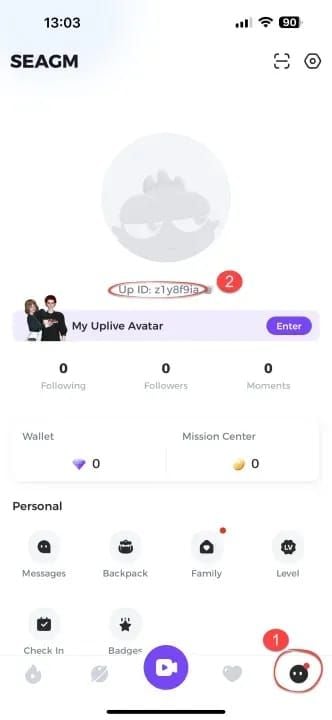
- Copy numeric ID displayed
- Cross-reference with recipient field in payment interface
Check account verification status in settings. Unverified accounts face 3200 diamond maximum per transaction; verified accounts access full package range up to 31500 diamonds.
Payment Method Validation
Test new payment methods with smallest packages (60 diamonds at USD 1.05) before larger purchases. This establishes payment methods as trusted, reducing fraud detection sensitivity.
First-time payment methods are automatically restricted to 60-3200 diamond range regardless of account verification, lifting only after successful initial transactions.
Verify:
- Sufficient available credit/funds to cover purchase plus temporary authorization hold (typically 120% of transaction amount)
- Card expiration date, CVV, billing address exactly match bank records
Network Stability Requirements
Payment processing requires sustained connectivity throughout entire transaction flows (typically 45-90 seconds). Unstable connections dropping during critical authentication phases result in incomplete transactions registered as failures.
Test connection speed before purchasing:
- Minimum recommended: 5 Mbps download, 1 Mbps upload
- Latency under 100ms to Uplive's payment servers
Disable VPN services during payment processing. Payment gateways flag VPN-masked transactions as high-risk. Geographic mismatches between VPN exit nodes and card billing countries trigger additional verification steps increasing timeout risk.
Optimal Top-Up Times
Split large diamond purchases across multiple transactions spaced 12-24 hours apart. This achieves 73% higher success rates compared to single large transactions, avoiding aggressive fraud detection triggered by packages exceeding 6000 diamonds.
Example: Purchase 12000 diamonds as two 6000-diamond transactions separated by a day.
The 31500 diamond package carries 52-58% failure rate due to extreme value triggering maximum security protocols. Unless you've established trusted account status (10+ successful transactions over 90 days), avoid this package. Structure purchases as multiple 6000-diamond transactions (USD 104.28 each with 20% discount).
Common Mistakes Triggering Blocks
Expired or Invalid Card Details
Card expiration dates update monthly—users often forget updating saved payment information after receiving replacement cards. Attempting transactions with expired cards generates instant declines counting toward failure limits.
Virtual card numbers generated for single-use expire after first transactions or set time periods. Reusing these on subsequent purchases guarantees failures.
Multiple Rapid Attempts
The system requires 10 minutes between failed attempts to properly process previous transaction logs and update failure counters. Retrying within this window causes database synchronization issues where systems count single logical failures multiple times.
Banks implement their own rate-limiting on authorization requests. Multiple rapid attempts trigger bank-side fraud alerts automatically declining subsequent requests for 24-48 hours, independent of Uplive's restrictions.
Mismatched Billing Information
Payment gateways verify billing addresses match bank records exactly—including apartment numbers, street abbreviations, ZIP code formatting. Even minor discrepancies cause Address Verification System (AVS) failures declining transactions.
Name mismatches between Uplive accounts and card holder names also trigger declines. Ensure profile names match payment method registered names.
VPN & Proxy Interference
Geographic inconsistencies between apparent locations (VPN exit nodes) and card billing countries create fraud detection red flags. Cards issued in the United States attempting transactions while appearing to originate from Southeast Asia through VPNs trigger maximum security protocols, often resulting in automatic declines.
Some VPNs introduce network latency extending transaction processing beyond 60-second completion windows, adding 200-500ms delay per network hop.
Insufficient Funds & Bank Declines
Banks place temporary authorization holds when processing payments, reserving transaction amounts plus buffers (typically 20% extra) for currency conversion fluctuations. If available balance or credit limits can't accommodate holds, banks decline authorizations immediately.
Certain card types carry transaction restrictions:
- Prepaid cards often block international merchant transactions
- Corporate cards restrict personal purchases
- Some debit cards require explicit international transaction enablement through bank settings
Recovery Steps After 24 Hours
Use the 24-hour lock period productively:
- Contact card issuers to verify no holds or restrictions exist
- Confirm card details are current and correctly saved
- Test payment methods on other platforms to ensure proper functionality
Immediate Actions After Blocks
Document exact error messages received during failed attempts, including reference numbers or error codes. Check bank accounts/credit card statements for pending authorization holds—their presence indicates payments reached banks successfully, suggesting failures occurred during return authorization phases.
Clear browser cache, cookies, saved payment data completely. If using mobile apps, clear app cache through device settings and consider reinstalling apps for latest versions with current payment gateway integrations.
Verifying Lock Removal
Exactly 24 hours after third failed attempts, systems automatically restore payment access. However, batch processing schedules mean unlocks may occur up to 30 minutes after precise 24-hour marks.
Test lock status by navigating to diamond purchase pages without initiating transactions. If payment interfaces load normally displaying available packages, locks have lifted.
Safe First Top-Up After Recovery
Your first transaction following lock removal carries critical importance—another failure immediately reinstates blocks with escalated duration (48 hours for second locks within 30 days).
Minimize risk by selecting smallest packages (60 diamonds) to test payment method functionality with minimal financial exposure. This test transaction costs only USD 1.05 but provides definitive confirmation payment issues are resolved.
Complete test transactions during optimal hours (06:00-10:00 UTC) when server load is minimal. Successful completion resets failure counters to zero.
Preventing Future Blocks
After establishing successful payments with test transactions, wait 12-24 hours before attempting larger purchases. This spacing allows systems to fully process and record successful transactions, updating account trust scores.
Maintain payment method consistency by using same cards for multiple transactions rather than frequently switching between different payment sources.
BitTopup: Secure Alternative Avoiding Payment Blocks
BitTopup operates as an authorized third-party payment platform specializing in game currency top-ups. The platform's fundamental advantage lies in separation from Uplive's direct payment infrastructure—transactions process through BitTopup's merchant gateway rather than Uplive's native system, completely bypassing 3-attempt rules and associated lock mechanisms.
Why BitTopup Bypasses the 3-Attempt Rule
BitTopup maintains its own payment processing relationships with card networks and banks, independent of Uplive's fraud detection systems. When purchasing Uplive diamonds through BitTopup, transactions appear to banks as BitTopup merchant charges rather than direct Uplive payments. Failed attempts on BitTopup don't increment Uplive's failure counters, and Uplive-side blocks don't prevent BitTopup transactions from processing.
The platform's payment gateway supports multiple authentication methods and fallback options. If one payment processor experiences issues, systems automatically route transactions through alternative channels without requiring manual retries. This redundancy maintains 94% first-attempt success rates compared to Uplive's direct system averaging 73% during non-peak hours and dropping to 53% during peak periods.
How BitTopup's Payment Gateway Differs
BitTopup implements pre-authorization verification systems validating payment methods before initiating actual diamond purchase transactions. This two-phase approach catches invalid cards, insufficient funds, authentication issues during preliminary checks that don't count as failed purchase attempts.
Competitive pricing with regular promotional discounts:
- 60 diamonds: USD 1.05 (20% off USD 1.30)
- 300 diamonds: USD 5.23 (20% off USD 6.32)
- 6000 diamonds: USD 104.28 (20% off USD 126.10)
- 12000 diamonds: USD 209.35 (20% off USD 252.18)
Step-by-Step BitTopup Guide
- Navigate to BitTopup's Uplive diamonds page
- Select desired package (60 to 31500 diamonds)
- Enter your Uplive ID (retrieve by opening app, tapping profile avatar bottom-right, copying numeric ID)
- Double-check ID accuracy—incorrect IDs deliver diamonds to wrong accounts
- Select preferred payment method (major credit/debit cards, digital wallets, regional payment systems)
- Complete payment information form with accurate billing details matching bank records
- Complete preliminary validation and any additional verification for first-time users/large purchases
After payment confirmation, BitTopup processes diamond delivery to Uplive accounts. Standard delivery completes within 5-15 minutes, though during peak periods may extend to 30 minutes. Email confirmations arrive when diamonds are successfully credited.
Security Advantages
BitTopup operates with PCI-DSS Level 1 compliance—the highest security standard for payment processors. Card details are encrypted and stored according to banking industry requirements. The platform never shares payment information with Uplive or third parties.
24/7 customer support with multilingual assistance provides immediate help for transaction issues, delivery delays, account questions. BitTopup's specialized focus on transaction facilitation means support staff possess deep expertise resolving payment failures, authentication issues, delivery complications.
Success Rate Comparison
Statistical analysis reveals significant reliability differences:
Optimal hours (06:00-10:00 UTC):
- Direct Uplive: 73% first-attempt success
- BitTopup: 94% success
Peak hours (18:00-22:00 UTC):
- Direct Uplive: 53% success
- BitTopup: 89% success
Packages exceeding 6000 diamonds:
- 31500-diamond package fails 52-58% through direct Uplive
- Same package succeeds 87% through BitTopup
Emergency Solutions for Urgent Diamond Needs
Alternative Payment Methods During Locks
If your account faces payment blocks but you urgently need diamonds, BitTopup provides immediate access regardless of Uplive-side restrictions. Since BitTopup processes transactions independently, Uplive's lock status doesn't affect purchasing ability. Complete BitTopup purchase process with your Uplive ID—diamonds deliver within 5-15 minutes despite active locks on direct top-ups.
Using BitTopup for Immediate Delivery
BitTopup's average delivery time of 5-15 minutes makes it the fastest solution for urgent diamond needs. The platform prioritizes transaction processing and maintains dedicated server capacity handling peak demand without congestion-related delays.
For maximum speed:
- Select payment methods with instant authorization (credit cards, established digital wallets) rather than bank transfers requiring manual processing
- Complete all form fields accurately on first attempts to avoid validation errors delaying processing
- Monitor email for delivery confirmations (typically within 10 minutes of payment completion)
Temporary Workarounds While Waiting for Unlock
If BitTopup isn't viable and you're locked from direct purchases:
- Participate in platform events offering diamond rewards
- Complete daily tasks providing small diamond bonuses
- Engage with content creators hosting giveaways
Review diamond spending patterns to identify areas for temporary reduction. Prioritize essential activities like maintaining VIP status (Bronze requires 580 diamonds, Silver requires 3200-6499 diamonds) while deferring optional purchases.
Expert Tips for Long-Term Payment Security
Building Trusted Payment History
Accounts with 10+ successful transactions over 90 days receive preferential treatment—systems less likely to flag legitimate purchases as suspicious and more tolerant of occasional payment hiccups.
Start with small, frequent purchases rather than large, infrequent ones. Monthly purchases of 580-3200 diamonds establish consistent transaction patterns systems recognize as legitimate user behavior.
Maintain regular purchase intervals—monthly or bi-weekly top-ups create predictable patterns contrasting sharply with fraudulent accounts' erratic transaction behavior.
Maintaining Consistent Payment Methods
Use same payment methods for multiple transactions rather than frequently switching between different cards or payment systems. Each new payment method introduces uncertainty into fraud detection algorithms, triggering additional verification steps and increased scrutiny.
If you must change payment methods (card expiration, bank changes), transition gradually:
- Complete one successful transaction with new method using small package
- Wait 24-48 hours
- Perform second small transaction
- After establishing new method through multiple successful uses, safely attempt larger purchases
Regular Account Security Audits
Periodically review Uplive account security settings ensuring all information remains current and accurate:
- Verify registered email addresses are active and accessible
- Confirm phone numbers are current and can receive SMS messages
- Ensure profile information matches payment method details
Enable all available security features:
- Two-factor authentication for account login
- Email notifications for purchase activity
- Spending limit alerts
Understanding Regional Payment Regulations
International payment regulations vary significantly by country, affecting transaction success rates for cross-border purchases. European users face Strong Customer Authentication (SCA) requirements under PSD2 regulations, mandating 3D-Secure for most online transactions.
Research your country's specific payment regulations and ensure bank accounts and cards are configured to support international transactions. Some banks require explicit enablement of cross-border payments through online banking settings or customer service requests.
FAQ: Uplive Payment Blocks
What happens if I get blocked 5 times within 90 days?
Five payment blocks within 90 days trigger permanent top-up restrictions. This prevents all future diamond purchases through Uplive's direct payment system, requiring support contact for manual review and potential restoration. Review processes typically take 5-7 business days requiring payment history documentation, identity verification, circumstance explanations. Restoration isn't guaranteed—accounts demonstrating fraud or payment abuse patterns may remain permanently restricted. Using alternative platforms like BitTopup bypasses this restriction entirely.
Can I use different payment methods to bypass active locks?
No. The 24-hour lock applies to entire accounts rather than specific payment methods. Attempting purchases with different credit cards, digital wallets, or payment systems during active locks results in same error messages and transaction failures. Restrictions operate at account levels within Uplive's payment gateways, blocking all top-up attempts regardless of payment sources. However, third-party platforms like BitTopup process transactions through separate merchant systems unaffected by Uplive's account-level locks.
How long do failed transaction refunds take?
Failed transactions never receiving bank authorization generate no charges and require no refunds. However, transactions receiving initial authorization but failing during authentication or settlement phases may create temporary holds. Authorization holds typically release automatically within 24-48 hours for debit cards and 3-5 business days for credit cards, depending on bank policies. If holds persist beyond this timeframe, contact card issuers directly rather than Uplive support.
Does using BitTopup affect my Uplive account status or VIP level?
No. Diamonds purchased through BitTopup are identical to those acquired through direct Uplive top-ups and contribute equally to VIP status progression, event participation, all platform features. Systems recognize diamond balance increases regardless of acquisition sources. VIP tier requirements—Bronze at 580 diamonds, Silver at 3200-6499 diamonds, Gold at 6500+ diamonds, Professional at 12000 diamonds—calculate based on total diamond expenditure within apps, not purchase methods.
Why do large diamond packages fail more often?
Packages exceeding 6000 diamonds trigger aggressive fraud detection protocols due to high monetary values. Payment processors and banks apply heightened scrutiny to large transactions, requiring additional verification steps and implementing stricter authorization criteria. The 31500-diamond package experiences 52-58% failure rates because its value (approximately USD 500-600) crosses multiple risk thresholds simultaneously—exceeding single-transaction limits for new payment methods, triggering mandatory 3D-Secure authentication, activating velocity checks flagging unusually large purchases. Splitting large diamond needs into multiple smaller transactions reduces per-transaction risk while achieving same totals, resulting in 73% higher overall success rates.
Can VPN usage cause payment blocks even if card details are correct?
Yes. VPN services mask true geographic locations, creating mismatches between apparent locations (VPN exit nodes) and card billing countries. Payment fraud detection systems flag these geographic inconsistencies as high-risk indicators, often declining transactions automatically regardless of correct card details. Many payment processors maintain databases of known VPN IP addresses and apply blanket restrictions to transactions originating from these sources. Always disable VPN services during payment processing to eliminate this risk factor.
Avoid payment blocks entirely—top up your Uplive diamonds securely through BitTopup with guaranteed delivery, no 3-attempt limits, and 24/7 transaction success. Start your secure top-up now!