



How to Recharge and Redeem Walmart Gift Card (CA) on Walmart.ca
A Walmart Gift Card (CA) recharge provides a fast and secure way to add spending balance to your Canadian Walmart shopping account. When you purchase a digital gift card from BitTopup, you receive a 16-digit card number and a 4-digit security PIN. You can use these credentials immediately to purchase groceries, electronics, home essentials, and apparel on Walmart.ca or at physical Walmart store locations across Canada.
Step-by-Step Online Redemption on Walmart.ca
- Visit Walmart.ca on your desktop or mobile browser and log in to your account.
- Add your desired products to your shopping cart and click Checkout.
- Enter your Canadian shipping address or select an in-store pickup locker location.
- Proceed to the Payment section of the checkout page.
- Under payment methods, select Gift Card.
- Enter your 16-digit Walmart Canada gift card number and the corresponding 4-digit PIN.
- Click Apply Card. The card balance will automatically deduct from your order total.
- If your order exceeds the gift card balance, add a secondary payment method (such as a credit card or PayPal) to cover the remainder, then confirm your purchase.
Redeeming via the Walmart Canada Mobile App
- Open the Walmart Canada App on your iOS or Android device.
- Tap the account icon in the bottom menu and log in.
- Place eligible items into your cart and proceed to checkout.
- In the payment selection screen, tap Add a Gift Card.
- Type in the 16-digit code and 4-digit PIN provided in your BitTopup order details.
- Tap Save and Apply to complete your payment.
Canada Region Lock: Important Usage and Currency Guidelines
Walmart digital gift cards are strictly region-locked and currency-specific. A Walmart Gift Card (CA) is issued in Canadian Dollars (CAD) and operates exclusively within the Canadian retail ecosystem.
| Feature | Walmart Gift Card (CA) Details |
|---|---|
| Issuing Currency | Canadian Dollar ($ CAD) |
| Online Usability | Walmart.ca and Walmart Canada Mobile App |
| In-Store Usability | All physical Walmart retail stores across Canadian provinces |
| Cross-Border Usability | Not valid on Walmart.com (US), Sam's Club, or international sites |
| Account Requirement | Canadian billing/shipping address recommended for online orders |
| Expiration & Fees | No expiration date; zero maintenance or dormancy fees |
Because of regional payment processing restrictions, Canadian digital cards cannot be converted, transferred, or applied to US accounts on Walmart.com. Always ensure your delivery address and platform location are set to Canada before applying your code.
Step-by-Step Guide to Check Your Walmart Canada Gift Card Balance
Checking your remaining balance before placing an order prevents checkout interruptions and helps you manage multi-card balances efficiently.
Method 1: Check Balance Online via Walmart.ca
- Go to the official balance lookup portal at
walmart.ca/en/gift-cards. - Scroll down to the Check Card Balance tool.
- Input your 16-digit card number followed by your 4-digit PIN.
- Complete the security verification prompt and click Check Balance.
- Your live Canadian dollar balance will display on screen immediately.
Method 2: Check Balance by Phone
- Call Walmart Canada customer assistance at 1-888-537-5503.
- Select the automated prompts for Gift Card Services.
- Enter your card number and PIN using your phone keypad to hear your remaining funds.
Method 3: In-Cart Verification
During checkout on Walmart.ca, applying your card displays the exact available balance before you finalize the order. If you do not submit the order, the full balance remains intact on the card.
Instant Digital Delivery and Safe Code Activation Process
When purchasing a digital voucher on BitTopup, you never need to share sensitive login credentials. Delivery occurs entirely via digital code assignment.
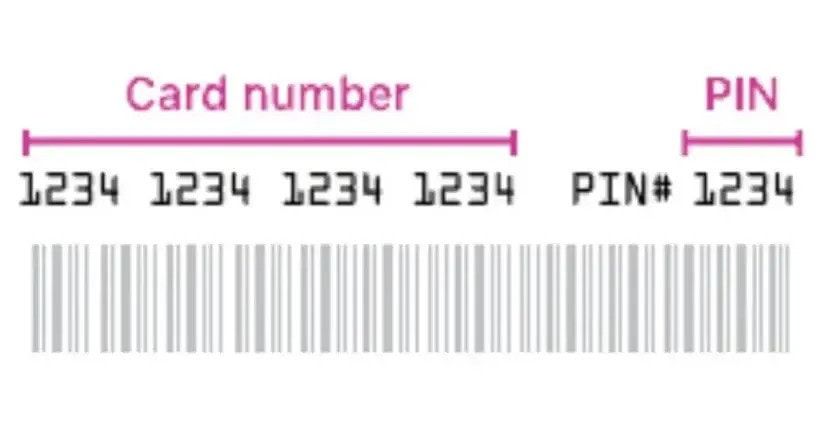
Locating Your Card Credentials
- Card Number: A 16-digit numeric sequence identifying your digital card.
- PIN (Security Code): A 4-digit numeric code required alongside the card number for online authorization.
- Accessing Your Order: After completing your payment, access your BitTopup order history page or open your confirmation email to copy your code credentials.
Security Standards
- Zero Account Sharing: BitTopup will never ask for your Walmart.ca account password, email login, or two-factor authentication tokens.
- Verified Codes: All digital codes are generated through authorized distribution channels to ensure immediate activation upon receipt.
- Safe Storage: Keep your PIN confidential. Anyone with access to both the 16-digit card number and the 4-digit PIN can redeem the balance.
Walmart Canada Gift Card Rules: Expiration, Fees, and Stacking Limits
Understanding Walmart Canada's terms of service ensures a smooth shopping experience:
- No Expiry Dates: Under Canadian consumer protection regulations, Walmart Canada gift cards do not expire. Your balance remains valid indefinitely until spent.
- Zero Maintenance Fees: There are no administrative deductions, non-usage penalties, or monthly account maintenance charges.
- Stacking Limits: Walmart.ca allows you to apply up to 5 gift cards per transaction during checkout. If the combined total does not cover the purchase, you can pay the remaining balance using an accepted credit card, debit card, or PayPal.
- Non-Refundable: Gift cards cannot be returned, exchanged for cash (unless required by provincial law), or used to purchase other gift cards.
Troubleshooting Common Walmart CA Gift Card and PIN Errors
If you experience an issue while redeeming your card on Walmart.ca, review these standard troubleshooting steps:
1. Invalid Card Number or PIN Error
- Double-check for typing errors or accidental spaces copied before or after the numbers.
- Ensure you are entering the 16-digit card number into the Card Number box and the separate 4-digit code into the PIN box.
2. Currency or Regional Rejection
- Confirm you are checking out on Walmart.ca, not the US portal (Walmart.com).
- Confirm your shopping cart currency is set to Canadian Dollars (CAD).
3. Balance Not Applying to Total
- Verify that your cart does not contain restricted items such as third-party financial services or certain digital gift card products that restrict gift card payment methods.
- Clear your browser cache or open an incognito window if the site payment module encounters a session loop.
4. Order Cancellations and Refunds
- If an order paid with a gift card is canceled or returned, the refunded funds are credited directly back to the original digital gift card. Retain your card number and PIN until your order is delivered and completed.
Why Buy Your Walmart Gift Card on BitTopup
BitTopup provides a direct, dependable solution for digital shopping credit in Canada.
- Instant Digital Delivery: Receive your 16-digit code and PIN directly in your account dashboard and email inbox without delay.
- Competitive Pricing: Transparent, real-time rates displayed directly at checkout without hidden processing add-ons.
- Flexible Payment Options: Support for global and regional payment solutions to match your preference.
- Reliable Customer Care: Dedicated 24/7 customer support available to resolve redemption questions or verify code details.
- Account Safety First: We process all digital card deliveries without ever requesting your personal store passwords or sensitive account details.
Check the live pricing on the BitTopup checkout screen and select your desired Canadian Dollar denomination to start shopping on Walmart.ca today.
Frequently Asked Questions
Can I use a Walmart CA gift card on Walmart.com US?
No. Walmart Gift Cards issued for Canada are valid only on Walmart.ca, the Walmart Canada mobile app, and at Canadian physical store locations. They cannot be used on the US website (Walmart.com) or at US Walmart stores.
How do I redeem my Walmart Gift Card (CA) online?
Select Gift Card as your payment method during checkout on Walmart.ca or the Walmart Canada App. Enter your 16-digit card number and 4-digit PIN, then click Apply Card to subtract the balance from your order total.
Can a Walmart Canada gift card be recharged or reloaded?
Physical Walmart gift cards can be reloaded at physical store registers in Canada. Digital gift card codes are issued with a fixed denomination. To add more spending power online, purchase an additional digital card on BitTopup and apply it during checkout.
How can I check the balance of my Walmart Canada gift card?
You can check your balance online at walmart.ca/en/gift-cards by entering your card number and PIN, by calling customer support at 1-888-537-5503, or by applying the card to your cart during online checkout.
Do Walmart Gift Cards (CA) expire or have maintenance fees?
No. Walmart Canada gift cards do not have an expiration date and carry no dormancy or maintenance fees.
How many gift cards can I use per purchase on Walmart.ca?
Walmart.ca allows you to combine up to 5 gift cards on a single online order. Any remaining balance beyond your gift card total can be covered using a credit card or other supported payment method.