

Arena Breakout Pass & Packages Top Up: Overview & Available Tiers
Surviving and extracting in the Dark Zone requires tactical preparation, optimal storage, and reliable gear. Purchasing Arena Breakout passes and packages equips your operator with premium rewards, expanded secure storage, and vital supply packs that keep you competitive throughout each season.
BitTopup provides direct Player ID top-ups for every active pass and package tier available in Arena Breakout. Current options include:
- Standard Battle Pass: Unlocks the premium seasonal progression track, giving you access to exclusive operator skins, weapon blueprints, Koen payouts, and tactical supply crates as you gain season points.
- Premium Battle Pass Bundle: Grants all benefits of the standard pass along with immediate tier skips and exclusive seasonal tokens to redeem high-end cosmetic items early.
- Secure Container Subscriptions: Monthly cards that grant temporary access to 2x2 or 2x3 secure containers (such as the Composite Case), ensuring your most valuable extracted loot remains protected even if you fail to extract.
- Special Tactical Bundles: Limited-time equipment packages containing curated loadouts, high-tier armor, medical supplies, and weapon cases to jumpstart your raids.
| Package / Pass Type | Included Items & Tactical Benefits | Delivery Method |
|---|---|---|
| Standard Battle Pass | Unlocks premium seasonal track, bonus Koen, cosmetics, and seasonal tokens | In-game Mail / Direct System Card |
| Premium Battle Pass Bundle | Premium track access, instant level skips, bonus tokens, exclusive cosmetics | In-game Mail / Direct System Card |
| Secure Container Card | 30-day access to 2x2 or 2x3 secure lockboxes that protect gear on defeat | Direct Account Activation / Mail |
| Tactical Supply Packages | Bundled armaments, medical crates, ammunition packs, and storage items | In-game Mailbox |
All real-time pricing, bundle contents, and available regional packages are displayed directly on the live BitTopup checkout catalog.
Key Rewards & Value of the Arena Breakout Season Battle Pass in 2026
The 2026 season battle pass structure rewards active operators with substantial loot multipliers and progression milestones:
- Seasonal Points & Token Exchange: Complete weekly combat missions and extraction trials to earn tokens redeemable for season-exclusive weapon skins, charms, and tactical outfits.
- Secure Container Utility: Gaining access to enhanced secure cases eliminates the financial sting of missing an extraction, keeping high-tier keys and rare barter items safe.
- Koen & Supply Boosts: Premium milestones award substantial amounts of in-game Koen and supply boxes containing Class 4+ body armor, high-penetration ammunition, and elite medical kits.
- Stash Expansion Vouchers: Select tiers award inventory expansion vouchers, allowing you to store more weapons, rigs, and trade goods in your main warehouse.
Because battle pass progression resets at the end of each competitive season, activate your pass early in the cycle to maximize the return on your completed missions.
How to Locate Your Arena Breakout Player ID
Recharging on BitTopup only requires your numerical Player ID. Follow these steps to find your ID inside the game client:
- Launch Arena Breakout on your mobile device or PC client.
- In the main lobby screen, tap your Profile Avatar located in the top-left corner.
- Navigate to the Basic Info or Profile Overview tab.
- Locate your numerical Player ID displayed under your operator nickname.
- Tap the small Copy icon next to the number to copy your ID directly to your clipboard.
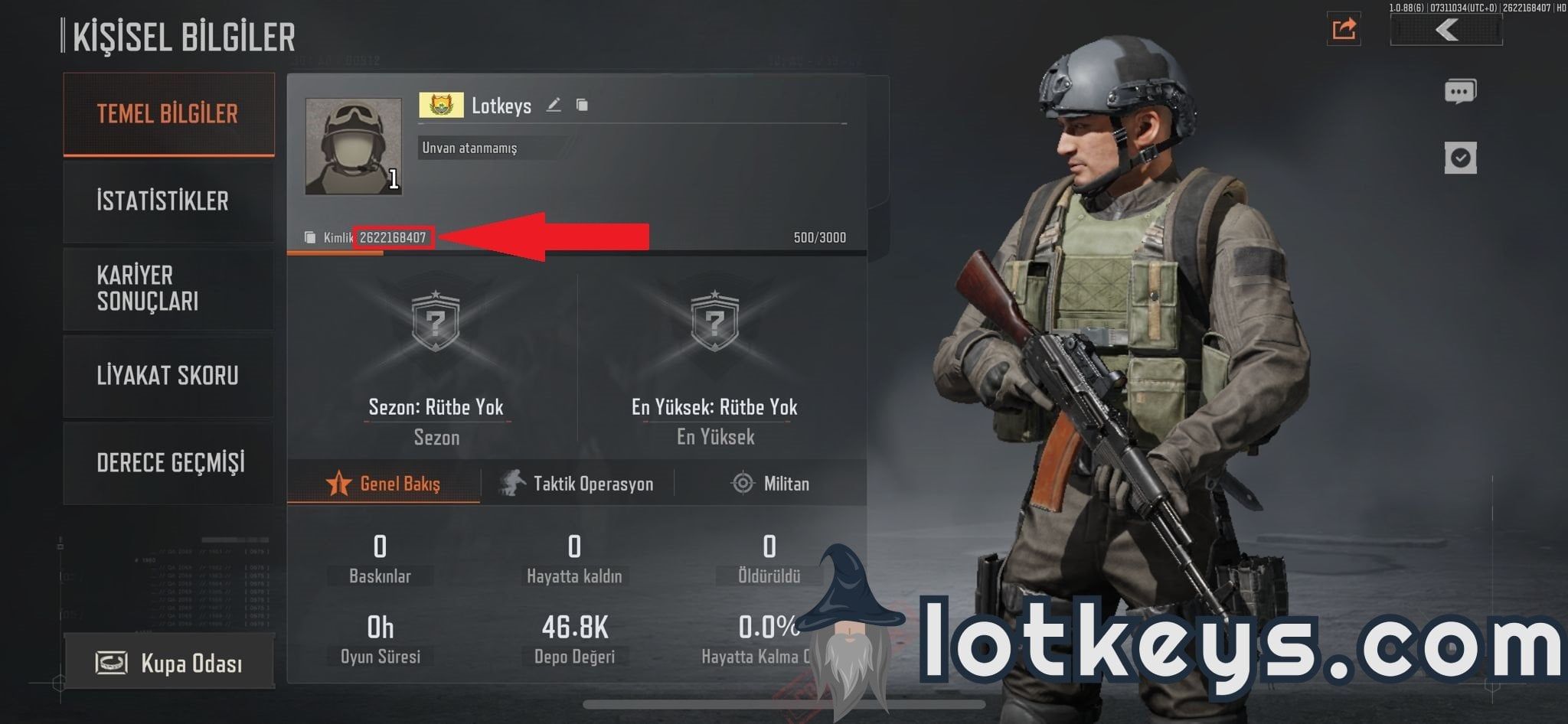
Double-check that the copied number matches your in-game profile exactly before placing your order.
Step-by-Step Guide: How to Recharge Arena Breakout Pass & Packages
Follow this straightforward process to complete your top-up on BitTopup:
- Select Your Item: Browse the product options on this page and choose your desired Battle Pass tier, monthly card, or package bundle.
- Enter Your Account Information: Paste your numerical Player ID into the designated input field.
- Review Order Details: Confirm that the selected package and Player ID match your target account.
- Proceed to Checkout: Select your preferred localized payment method and complete the payment through our secure checkout system.
- Receive Your Items: Once the order is confirmed, the package or pass activation item is credited directly to your Arena Breakout account or in-game mailbox.
Safety & Security: Player ID-Only Direct Delivery Without Account Sharing
Account safety is critical in high-stakes extraction games. BitTopup processes all pass and package recharges using only your public numerical Player ID.
- No Passwords Required: You never need to provide your game password, Google account, Apple ID, or third-party social logins.
- No Account Sharing: Your account remains completely in your hands. You do not need to share credentials with third parties or risk unauthorized logins.
- Direct System Integration: Transactions are processed securely through direct account identifiers, preventing account flaggings, bans, or unauthorized account access.
How In-Game Delivery Works and Claiming Pass Items via Mail
After your top-up is processed successfully on BitTopup, delivery occurs via the Arena Breakout internal server system:
- Direct Mailbox Delivery: In most cases, your purchased pass activation voucher, monthly card token, or tactical bundle will arrive in your in-game System Mail.
- Claiming the Attachment: Open your in-game mailbox from the lobby menu, locate the system delivery message, and tap Claim All or select the attached item.
- Pass Activation: If you purchased a Battle Pass voucher card, navigate to the Season Pass tab in the main menu and use the card to unlock the premium reward track immediately.
- Storage Checks: Ensure your in-game stash has adequate free slots before opening large physical gear bundles to prevent temporary inventory overflow.
Troubleshooting Common Top-Up & Activation Issues
If you encounter any unexpected issues after placing an order, review these common troubleshooting steps:
- Item Has Not Appeared Yet: Refresh your game client by closing it completely and logging back in. Server synchronization can occasionally take a short moment during peak hours.
- Check In-Game Mailbox Limits: If your mailbox is cluttered with expired trade notices and raid summaries, clear old messages to ensure new delivery mail displays properly.
- Incorrect Player ID Entered: If you entered an incorrect Player ID during checkout, contact the BitTopup 24/7 customer support team immediately with your order number. Corrections can be made if the order has not yet been processed by the automated fulfillment system.
- Season Expiration Timing: If a season is concluding within hours, ensure you activate your battle pass voucher before the scheduled maintenance window to avoid losing uncollected seasonal progression.
Frequently Asked Questions
How do I recharge Arena Breakout Pass & Packages on BitTopup?
Select your required battle pass tier or package from the product list, enter your numerical Player ID in the designated field, proceed to checkout, and complete the transaction using your preferred payment method.
Where can I find my Arena Breakout Player ID?
Open Arena Breakout, tap your profile avatar in the upper-left corner of the lobby screen, and locate the numerical ID shown below your nickname on the profile overview page. Use the copy button next to the ID to avoid input errors.
Do I need to provide my account password to recharge the Battle Pass?
No. BitTopup requires only your public Player ID to send pass vouchers and package bundles to your account. Never share your password or login verification codes with anyone.
How long does it take for the Pass or Package to arrive in my account?
Orders are dispatched automatically upon payment confirmation. Items typically appear in your in-game mailbox or account status within moments of a completed transaction.
How do I activate my Battle Pass once the purchase is complete?
Open your in-game mailbox to claim the Battle Pass activation voucher. Once claimed into your inventory, open the Season Pass interface from the main menu and select Activate using your voucher card.
Can I buy the Battle Pass for a friend using their Player ID?
Yes. Because the recharge process only requires a Player ID, you can enter your friend's Player ID at checkout to send passes or package bundles directly to their in-game account as a gift.