

Epic War: Thrones Seal Top Up: What Are Seals and How Are They Used
Seals are the primary premium currency in Epic War: Thrones, the grand strategy Three Kingdoms title powered by Unreal Engine 4. In this large-scale tactical war game, commanding historic generals like Guan Yu, Lu Bu, Cao Cao, and Zhuge Liang requires targeted resource allocation and continuous military development.
Acquiring Seals allows you to secure strategic advantages across seasonal campaigns:
- Summoning High-Tier Generals: Exchange Seals for Beads or direct recruitment tokens to draw 5-star generals from limited-time faction banners and season-exclusive gacha pools.
- Purchasing Exclusive Bundles: Unlock high-value progression packages containing skill points, expansion speed-ups, and rare forging materials.
- Accelerating City Development: Instantly complete crucial upgrades for your Main City, military academies, and fortification lines when competing for territory.
- Stamina and March Recovery: Refresh general stamina and march capabilities during critical alliance siege operations and border skirmishes.
- Skill Point Conversion: Rapidly convert surplus generals or premium currency into skill points to unlock masteries and tactical abilities for your main march formations.
BitTopup provides a direct channel to complete your Epic War: Thrones Seal top up without sharing private login credentials, keeping your account protected while strengthening your kingdom.
Epic War: Thrones Currencies Explained: Seals vs. Beads vs. Copper
Managing your economy efficiently requires understanding how the different in-game currencies interact. Epic War: Thrones operates on a three-tier economy:
| Currency | How to Obtain | Primary In-Game Use Cases | Tradeability |
|---|---|---|---|
| Seals | Direct top-up via BitTopup / Official store | Purchasing premium gift boxes, direct general bundles, converting to Beads | Paid / Premium only |
| Beads | Converted 1:1 from Seals, seasonal ranking rewards, quest completions | General recruitments (gacha), building queue unlocks, stamina refills | Semi-premium |
| Copper | Tax collection, territory resource generation, in-game events | Basic general recruitment, skill point extraction, regular technology upgrades | Free in-game resource |
The Relationship Between Seals and Beads
Seals represent paid currency, whereas Beads serve as both a freemium reward and the operational currency for banner pulls. When you buy Epic War: Thrones Seals, you can convert them directly into Beads at a 1:1 ratio whenever a targeted general recruitment event opens. Certain high-tier gift packs and seasonal passes can only be activated directly with Seals, making Seals the most flexible resource in the game.
Strategic Benefits of Seals for Kingdom Expansion and General Recruitment
Every season in Epic War: Thrones resets territory control, placing alliances in an intense race for resource nodes and regional passes. Having an available reserve of Seals gives you decisive tactical advantages:
1. Opening Day Territory Rushing
The initial 48 hours of any season determine your alliance's standing. By using Seals to instantly complete warehouse and barracks expansions, you can deploy higher-tier military units ahead of rival alliances, allowing you to secure Level 5 and Level 6 resource lands with minimal troop losses.
2. Optimizing Faction Synergy and Skill Trees
A 5-star general without awakened skills cannot perform at maximum combat capacity. Seals allow you to convert resources into skill points rapidly, enabling you to level up core combat skills like Crowd Control, Direct Burst, and Tactical Recovery before engaging in major alliance battles.
3. Sustaining Extended War Campaigns
During protracted siege wars over central capitals, general stamina and troop replenishment determine victory. Seals give you the flexibility to buy emergency march recalls, morale boosters, and stamina potions to keep your frontline forces fighting continuously.
How to Find Your Epic War: Thrones Player ID and Server Info
To ensure your Epic War: Thrones Seal recharge is delivered directly to your character, you must provide your correct User ID (UID) and Server Name during checkout. Follow these steps to find them in the game client:
- Launch Epic War: Thrones on your mobile device or emulator.
- Tap your Avatar / Character Profile icon located in the top-left corner of the main city screen.
- Your Character Name, User ID (UID), and current Server will be visible on the profile summary card.
- Tap the copy icon next to your UID to copy the exact numeric identifier to your clipboard.
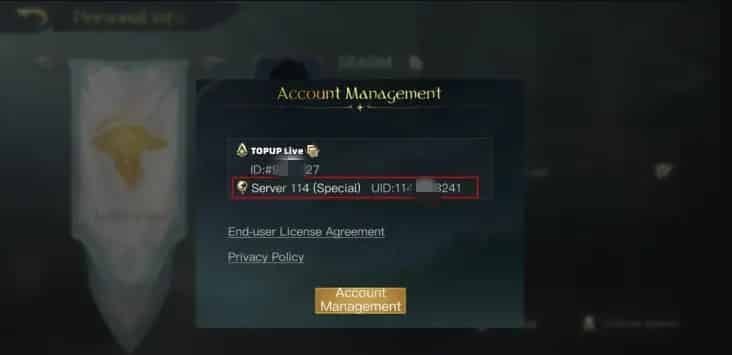
Double-check your server selection before submitting your order on BitTopup, as characters on different regional servers have unique IDs.
Step-by-Step Guide: How to Recharge Epic War: Thrones Seals on BitTopup
Recharging your account on BitTopup is straightforward and requires only your public account information:
- Select Product: Navigate to the Epic War: Thrones Seal product page on BitTopup.
- Choose Denomination: Select the Seal pack or bundle size you want to purchase. Live prices are displayed directly on the selection panel.
- Enter Account Details: Paste your Character ID (UID) and select your game server from the dropdown menu.
- Review Order: Confirm that the entered ID matches your desired character profile.
- Complete Payment: Select your preferred checkout option and complete the transaction through our secure payment gateway.
- Receive Seals: Open Epic War: Thrones. Your purchased Seals will be automatically credited to your in-game balance.
Safe and Secure Recharge Methods Without Sharing Account Passwords
Account safety is a critical priority for strategy gamers who have invested months into seasonal progression and roster building. BitTopup uses direct UID crediting, which sets a high standard for account security:
- Zero Password Requirement: You never need to provide your game password, Google account, Apple ID, or third-party login details. Only your public User ID and Server are required.
- No Account Sharing: Your profile remains entirely in your hands. There is no risk of unauthorized device logins, unauthorized resource spending, or personal data exposure.
- Full Compliance with Game Standards: Orders are processed through standard top-up APIs, preventing unauthorized chargebacks or third-party credential exploitation that could lead to account bans.
- Encrypted Checkout: Every transaction on BitTopup is protected with industry-standard SSL encryption to secure your payment information at all times.
Troubleshooting and Support for Epic War: Thrones Top-Ups
If you experience any delays or issues with your order, use the following troubleshooting steps:
- Restart the Game Client: Completely close Epic War: Thrones and relaunch the app. This forces the client to sync with the server database and refresh your balance.
- Check the In-Game Mailbox: Some promotional bundles and bonus items attached to Seal purchases are delivered via the in-game system mail rather than direct balance updates.
- Verify Server Selection: Confirm that the server selected during checkout matches the server your active character resides on.
- Contact BitTopup Customer Support: If your Seals do not reflect after a few minutes, reach out to the BitTopup 24/7 customer service team with your Order ID and Character UID for swift verification and resolution.
Frequently Asked Questions
What are Seals used for in Epic War: Thrones?
Seals are the primary premium currency used to acquire high-value item bundles, convert to Beads for general recruitment, accelerate building construction, upgrade military technologies, and purchase stamina restoration items during critical war operations.
What is the difference between Seals and Beads in Epic War: Thrones?
Seals are the paid currency acquired through direct top-up. Beads are a secondary premium currency that can be earned through gameplay or converted 1:1 from Seals. While Beads handle standard recruitment draws and building queue expansions, certain limited-time packages and seasonal passes require direct Seal payments.
How do I recharge Epic War: Thrones Seals on BitTopup?
Select the desired Seal package on the BitTopup page, enter your Epic War: Thrones Character UID and Server, and complete the payment using your chosen checkout method. Your Seals are delivered directly to your account in-game.
Do I need to provide my game password to buy Epic War: Thrones Seals?
No. BitTopup only requires your public User ID (UID) and Server Name to credit your Seals. You should never share your account password or login credentials.
How long does it take for Epic War: Thrones Seals to be credited after recharge?
Orders placed on BitTopup are processed automatically. Once payment is confirmed, Seals are credited to your character balance almost immediately. A quick restart of the game client helps refresh your balance.
What should I do if my Epic War: Thrones Seal order is delayed?
First, verify your transaction status on BitTopup and restart your game client to refresh the account balance. If the Seals have not appeared, check your in-game mailbox for delivery notifications. If you still need help, contact BitTopup 24/7 live support with your order number for immediate assistance.