Higo Top Up: What is Higo and What are Higo Coins Used For?
Higo is an interactive global live streaming and voice party platform that connects communities through multi-guest audio rooms, talent broadcasts, and real-time social entertainment. Within the app, Higo coins serve as the central virtual currency used to interact with hosts, participate in community events, and personalize your profile presence.
Unlike static casual gaming apps that share similar naming, the Higo live voice platform relies on an active virtual economy. When you top up Higo coins, your balance enables direct support for creators and unlocks premium interactive features across all active rooms.
Primary Uses of Higo Coins
- Live Virtual Gifting: Send dynamic animated gifts, luxury vehicle animations, and special event tokens to your favorite streamers and room hosts during live broadcasts.
- Voice Party Room Interactions: Activate special microphone effects, soundboards, and exclusive minigames inside multi-user audio chat rooms.
- VIP Status and Badges: Purchase VIP tier memberships that display exclusive badge icons next to your username in public chat lists.
- Custom Entrance Animations: Announce your presence when entering high-traffic party rooms with customized vehicle, banner, or particle entrance effects.
- Leaderboard Support: Help creators climb hourly, daily, and weekly popularity rankings during broadcast competitions.
| Feature / Benefit | Description | In-App Coin Utility |
|---|---|---|
| Virtual Gifts | Animated digital stickers and luxury assets | Direct tipping to broadcasters and party hosts |
| VIP Tiers | Profile rank badges and unique chat colors | Unlocks status display in rooms and member lists |
| Room Entrance Effects | High-impact visual entrance banners | Displayed automatically upon entering voice rooms |
| Audio Room Games | In-room interactive mini-activities | Coin stakes for group entertainment during audio sessions |
| Direct Messaging Assets | Special emoticons and priority message highlights | Increases visibility when reaching out to creators |
How to Find Your Higo Player ID in the App
To ensure your recharge reaches the correct account, you only need to provide your unique Higo Player ID. You do not need to share sensitive account login details. Follow these steps on your mobile device to copy your ID:
- Launch the Higo app on your iOS or Android device.
- Log in to your personal account.
- Tap the Profile or Me icon located in the bottom-right corner of the navigation bar.
- Look directly below your profile picture and display nickname to locate your numeric Player ID (or UID).
- Tap the Copy icon next to the number to copy the ID directly to your clipboard.
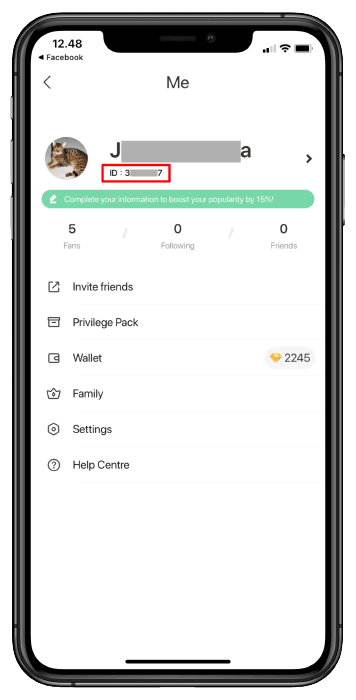
Double-check that you have copied the numeric ID rather than your display nickname, as display names can be changed and cannot be used for direct automated delivery.
Step-by-Step Guide to Recharge Higo Coins on BitTopup
Recharging your coin balance on BitTopup takes only a few simple steps. The system processes orders directly through your Player ID for fast delivery.
- Select Your Coin Package: Browse the available Higo coin denominations on the BitTopup product page and select the amount you want to purchase.
- Input Your Player ID: Paste your copied Higo Player ID into the required account field.
- Verify Your Details: Confirm that the entered ID matches your in-app profile to avoid sending coins to an unintended account.
- Choose Payment and Checkout: Select your preferred regional or international payment option from the live checkout interface and finalize the payment.
- Check In-App Balance: Open Higo, pull down on your profile or wallet screen to refresh, and verify your updated coin balance.
Player ID Direct Recharge Safety: Why No Password is Ever Needed
Account safety is a top priority when purchasing digital currencies online. Direct ID recharge eliminates the risks associated with manual account handling.
- Zero Password Sharing: BitTopup never asks for your Higo login password, linked email passwords, social media logins, or one-time verification codes (OTP).
- No Account Access Required: Orders are credited straight to your public Player ID via direct system integration. Your chats, friend lists, and personal data remain completely private.
- Protection from Phishing: Legitimate top-up services only require the numeric ID visible on your public profile. Avoid any service that asks to log into your account to perform a recharge.
- Safe for Third Parties: Because only a public Player ID is required, you can safely send coin gifts directly to friends, team members, or streamers without needing access to their devices.
Supported Payment Methods and Delivery Process on BitTopup
BitTopup provides a straightforward purchasing experience tailored to users worldwide. The checkout system adapts to show available local, regional, and international payment options based on your location.
Order Delivery Flow
- Real-Time Order Processing: Once your payment is verified, the order enters the automated queue immediately.
- Direct Balance Update: Coins are credited directly to your Higo wallet. There is no need to redeem gift card codes or enter secondary PINs.
- Transparent Pricing: All package prices, fees, and currency conversions are displayed on the live checkout screen before you confirm the transaction. There are no hidden back-end surcharges.
If you experience high network latency during regional broadcast events, your app client may take a moment to update the display. Simply restart the Higo application to pull the latest balance from the server.
Common Higo Recharge Mistakes and How to Avoid Them
Avoid these frequent errors to ensure your coin balance updates without delay:
- Submitting a Nickname Instead of Numeric ID: Display names can be duplicated and changed at any time. Always submit the unique numeric Player ID shown under your profile picture.
- Accidental Typographical Errors: Manually typing numbers often leads to transposed digits. Always use the in-app copy button and paste the ID directly into the input field on BitTopup.
- Selecting the Wrong Product: Ensure you are purchasing coins for the Higo live voice and party platform, rather than similarly named casual games or third-party tools.
- App Cache Lag: If the checkout shows complete but your coins do not display right away, force-close the Higo app from your device task manager and reopen it to force a wallet data refresh.
Frequently Asked Questions About Higo Coin Recharge
What is a Higo Player ID and where do I find it?
Your Higo Player ID is a unique numeric identifier tied to your account. You can find it by tapping the Me / Profile tab in the bottom right corner of the Higo app. The number is displayed directly under your profile avatar and display name.
Do I need to provide my Higo account password to recharge coins?
No. You never need to share your password, linked phone number, or verification codes. BitTopup only requires your public Player ID to process your coin order securely.
How long does it take for Higo coins to reflect in my balance?
Recharges are processed automatically upon successful payment. In most cases, coins reflect in your in-app wallet within minutes. If your balance does not update immediately, restart the Higo app to refresh server data.
Can I recharge Higo coins for a friend using their Player ID?
Yes. You can send coins to any user by entering their specific Higo Player ID in the input field on BitTopup. Verify with your friend that the ID numbers are exact before completing the transaction.
What should I do if I entered the wrong Higo Player ID at checkout?
Because digital coin top-ups are processed automatically to the ID submitted, orders fulfilled to an existing, valid Player ID cannot be reversed. If you notice an error before the payment completes, cancel the checkout and re-enter the correct ID. If an order fails or delays due to an invalid ID, contact BitTopup customer support with your order number for assistance.
What in-app perks can I unlock with Higo coins?
Higo coins allow you to send visual gifts to broadcasters, join premium voice room activities, purchase VIP badges, activate entrance animations, and participate in special community events across the platform.