

Nintendo Switch Online Membership Top Up: Plans and Benefits
A Nintendo Switch Online membership unlocks essential network features across your entire Nintendo Switch library. Whether you are racing friends in Mario Kart 8 Deluxe, battling in Super Smash Bros. Ultimate, or trading Pokemon, an active subscription is required for online cooperative and competitive play.
Two subscription tiers are available to match your gaming preferences:
Standard Nintendo Switch Online
The standard tier provides core online functionality:* Online Multiplayer: Connect with players worldwide across supported Nintendo Switch titles.* Save Data Cloud Backup: Automatically back up your game save data to secure Nintendo servers. If your console is lost, damaged, or upgraded, your progress remains safe.* Classic Game Libraries: Instant access to curated, expanding catalogs of NES, SNES, and Game Boy games with added online multiplayer support.* Nintendo Switch Online Smartphone App: Voice chat with friends during compatible online sessions and access game-specific services (such as SplatNet 3).* Exclusive Member Offers: Access to member-exclusive controllers (such as the wireless NES and SNES controllers) and digital game trials.
Nintendo Switch Online + Expansion Pack
The Expansion Pack tier includes all standard benefits plus high-tier legacy platforms and select downloadable content (DLC):* Nintendo 64 Library: Play classic N64 titles with 4-player online functionality and high-definition rendering.* Game Boy Advance Library: Access iconic handheld games with local and online wireless play.* SEGA Genesis / Mega Drive Library: Access classic SEGA titles directly on your console.* Included DLC Expansions: Play premium expansions at no extra cost while your membership remains active, including the Mario Kart 8 Deluxe Booster Course Pass, Animal Crossing: New Horizons - Happy Home Paradise, and the Splatoon 2: Octo Expansion.
| Plan Feature | Standard Individual | Standard Family | Expansion Pack Individual | Expansion Pack Family |
|---|---|---|---|---|
| Account Coverage | 1 Nintendo Account | Up to 8 Accounts | 1 Nintendo Account | Up to 8 Accounts |
| Online Multiplayer | Yes | Yes | Yes | Yes |
| Cloud Save Backup | Yes | Yes | Yes | Yes |
| NES / SNES / Game Boy | Yes | Yes | Yes | Yes |
| N64 / GBA / SEGA Genesis | No | No | Yes | Yes |
| Included First-Party DLCs | No | No | Yes | Yes |
| Available Terms | 3 Months / 12 Months | 12 Months | 12 Months | 12 Months |
Region Compatibility Rules: Matching Account Regions with Digital Codes
Nintendo eShop digital membership codes are region-locked. A digital voucher purchased for one region cannot be redeemed on an account set to a different country or currency.
Major Region Guidelines
- United States (US): US dollar ($) codes only redeem on Nintendo Accounts set to the United States.
- European Union (EU): Euro (€) codes work across European eShop regions that share the Euro currency.
- United Kingdom (UK): GBP (£) codes require a UK-registered Nintendo Account.
- Japan (JP): JPY (¥) codes must be redeemed on a Japan-region Nintendo Account.
- Hong Kong (HK): HKD ($) codes must be redeemed via the Hong Kong Nintendo eShop.
Important: You can check or adjust your account region by visiting account.nintendo.com. If your account has a remaining Nintendo eShop balance, Nintendo will restrict region switching until that balance is spent. Ensure the code you purchase matches your active account profile region.
How to Check Your Nintendo Account Region and Profile Details
Before you complete your purchase, verify the country registered to your Nintendo Account to ensure code compatibility.
Finding Your Account Region on the Web
- Go to
account.nintendo.comand log in with your credentials. - Select User Info from the left navigation menu.
- Click Profile.
- Check the Country/region of residence field.
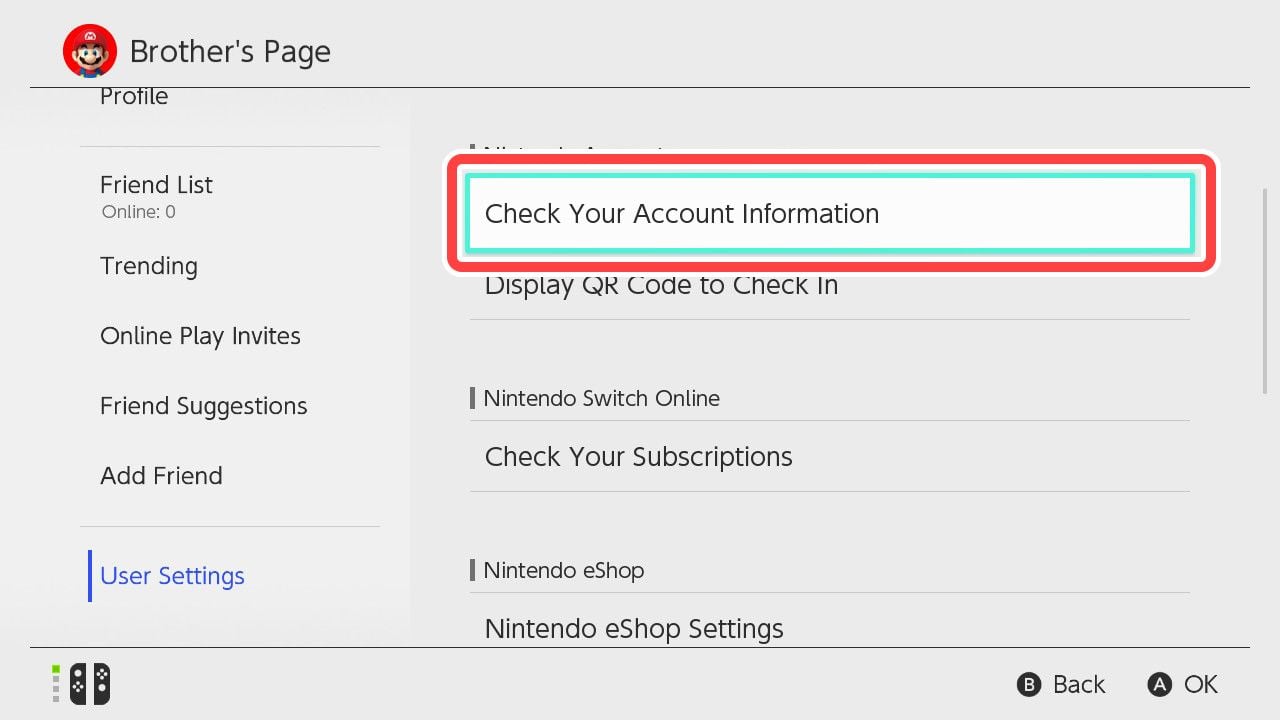
Finding Your Profile on the Nintendo Switch Console
- Select your User Icon (Page) in the top-left corner of the Nintendo Switch HOME Menu.
- View your User Profile, Friend Code, and registered Nintendo Network ID details.
How to Recharge and Redeem Nintendo Switch Online Membership Codes
Once you receive your 16-character digital activation key from BitTopup, redeem it through either your console or a desktop browser.
Method 1: Redeem on Nintendo Switch Console
- Power on your Nintendo Switch and select Nintendo eShop from the HOME Menu.
- Select the specific user profile you want to apply the membership to.
- Scroll down the left-hand sidebar and select Enter Code (or Redeem Code).
- Enter the 16-character digital code provided by BitTopup.
- Select Confirm or OK. Your membership activates immediately.
Method 2: Redeem via Web Browser
- Open your browser and navigate to
ec.nintendo.com/redeem. - Sign in with the target Nintendo Account.
- Type or paste your 16-character code into the box.
- Click Next, review the plan details, and confirm redemption.
Membership Stacking and Auto-Renewal Rules
Understanding how stacking and renewals operate ensures you get the full duration of your subscription without unwanted credit card billing.
Code Stacking Rules
- Identical Plans: If you have an active 12-month Individual Standard membership and redeem another 12-month Individual Standard code, the new 365 days add directly onto your existing expiration date. Nintendo accounts allow stacking up to a maximum total duration of 36 months (3 years).
- Plan Upgrades (Standard to Expansion Pack): If you hold an active Standard membership and redeem an Expansion Pack code, your account upgrades immediately. Nintendo adjusts the remaining time on your standard plan based on its remaining value.
- Individual to Family Conversions: Family memberships cannot stack time on top of an individual plan; activating a family membership overrides the individual tier, enabling access for all linked accounts in your Nintendo Family Group.
Turning Off Automatic Renewal
When you redeem a code, the Nintendo eShop may automatically configure auto-renewal using a linked credit card or PayPal account upon plan expiration. To avoid unexpected credit card deductions:1. Open the Nintendo eShop on your console.2. Select your User Profile Icon in the upper-right corner.3. Scroll to Nintendo Switch Online.4. Select Terminate Automatic Renewal.5. Your prepaid code duration remains 100% intact, and access will end naturally at the prepaid expiration date.
Troubleshooting Nintendo eShop Activation and Membership Errors
If you experience an issue while redeeming your membership voucher, check these standard error codes:
- Error Code 2813-0055: The code you entered does not match your Nintendo Account's region. Confirm that your account country aligns with the digital code's regional specification.
- Error Code 2813-6561: This error indicates that the code has already been redeemed or the server experienced a momentary synchronization delay. Check your active subscriptions in eShop Account Settings before attempting re-entry.
- Error Code 2813-0119: Occurs if you attempt to redeem an Individual code while currently part of an active Family group where you are not the admin. Family group members already share the group's active subscription.
Why Buy Nintendo Switch Online Membership on BitTopup
BitTopup provides a direct, secure alternative for gamers needing flexible payment methods or prepaid subscription vouchers.
- No Password Sharing: You receive an unredeemed digital voucher code directly to your email or order page. We never ask for your Nintendo account password or login credentials.
- Total Spending Control: Prepaid vouchers provide a set subscription duration without binding your personal bank card to recurring annual auto-renewals.
- Global Regional Selection: Choose from US, EU, UK, JP, and other regional voucher formats to match your specific account setup.
- Transparent Checkout: All live pricing, available denomination terms (3-month, 12-month, Expansion Pack, Family), and local currency conversions are listed directly on the checkout module above.
Frequently Asked Questions
How much does a 12 month Nintendo Switch Online membership cost in 2026?
Prepaid prices vary based on plan tier (Standard Individual, Family, or Expansion Pack) and regional currency. Check the live selection options at the top of this BitTopup page for current rates and terms.
Do Nintendo Switch Online memberships stack if I redeem multiple codes?
Yes. If you redeem multiple codes of the same plan tier, the durations stack sequentially up to a maximum account limit of 36 months (3 years).
How do I redeem my Nintendo Switch Online membership code?
You can redeem your 16-digit code directly in the Nintendo eShop on your console under "Enter Code", or online via browser at ec.nintendo.com/redeem while signed into your account.
Can I use a US Nintendo Switch Online code on a different region account?
No. Nintendo digital codes are region-locked. A US code requires an account set to the United States. Ensure your account country matches the purchased code region prior to activation.
What is the difference between standard Nintendo Switch Online and Expansion Pack?
The standard tier includes online play, cloud backups, and NES/SNES/Game Boy retro libraries. The Expansion Pack tier adds Nintendo 64, Game Boy Advance, and SEGA Genesis libraries, along with access to specific first-party DLCs like the Mario Kart 8 Deluxe Booster Course Pass.
How do I stop Nintendo Switch Online automatic renewal charges?
Open the Nintendo eShop on your console, select your User Profile icon in the top right, go to the Nintendo Switch Online tab, and click Terminate Automatic Renewal.