

YoHo: Group Voice Chat Top Up and In-App Coin Utility
YoHo: Group Voice Chat is an interactive social audio platform where users create live voice rooms, meet people worldwide, and participate in real-time group activities. From casual conversation rooms to competitive game hubs, communication on YoHo is driven by live interaction and community support.
YoHo coins are the core in-app currency used across the platform. With coins in your balance, you can purchase premium virtual gifts, unlock room entrance animations, support your favorite room hosts, and participate in in-app mini-games. Topping up coins directly to your account ensures uninterrupted participation during live events and room parties.
BitTopup provides a direct recharge system for YoHo coins using only your numeric Player ID. You do not need to link third-party social accounts or submit private login credentials to credit your wallet.
Benefits of Topping Up YoHo Coins: Gifts, Rooms, and Mini-Games
Having an active coin balance allows you to access the complete set of interactive tools built into YoHo voice rooms.
Virtual Gifting and Creator Support
Sending virtual gifts is the primary way to interact with speakers and room hosts on YoHo. Gifts range from simple emoji reactions to full-screen animated special effects. Sending gifts increases your profile charm score, ranks you on room contribution leaderboards, and builds community connections.
Room Customization and Social Prestige
Coins allow room creators and active members to access exclusive room perks. These include custom room backgrounds, themed microphone frames, unique entrance vehicles, and VIP profile badges that signal status whenever you enter a public voice channel.
Interactive Mini-Games: Ludo, Dominoes, and More
YoHo integrates multiplayer casual games directly inside voice rooms. You can play popular board games such as Ludo and Dominoes with friends while chatting over voice. Coins are used to join specific game modes, wager in social matches, and collect seasonal rewards.
| Feature Category | In-App Utility | Primary Coin Requirement |
|---|---|---|
| Virtual Gifts | Support hosts, boost room popularity, trigger screen animations | Low to High tiers available |
| Room Upgrades | Themed mic seats, animated entrance banners, audio effects | Mid-tier coin bundles |
| Social Games | Join Ludo and Domino tables, enter party competitions | Variable per match stakes |
| Profile Badges | Display VIP rank, customize chat bubble themes | Monthly or tier-based packs |
How to Find Your YoHo Player ID in the App
Every YoHo account has a unique numeric Player ID assigned upon registration. You must provide this exact ID to receive your coin top up on BitTopup.
Follow these steps to find and copy your YoHo Player ID:
- Open the YoHo: Group Voice Chat app on your mobile device.
- Tap the Profile icon (labeled Me) located in the bottom-right corner of the main screen.
- Look directly beneath your profile avatar and username at the top of the profile page.
- Locate the numeric string labeled ID: (e.g.,
ID: 12345678). - Tap the Copy icon next to the numbers to copy the ID directly to your clipboard.
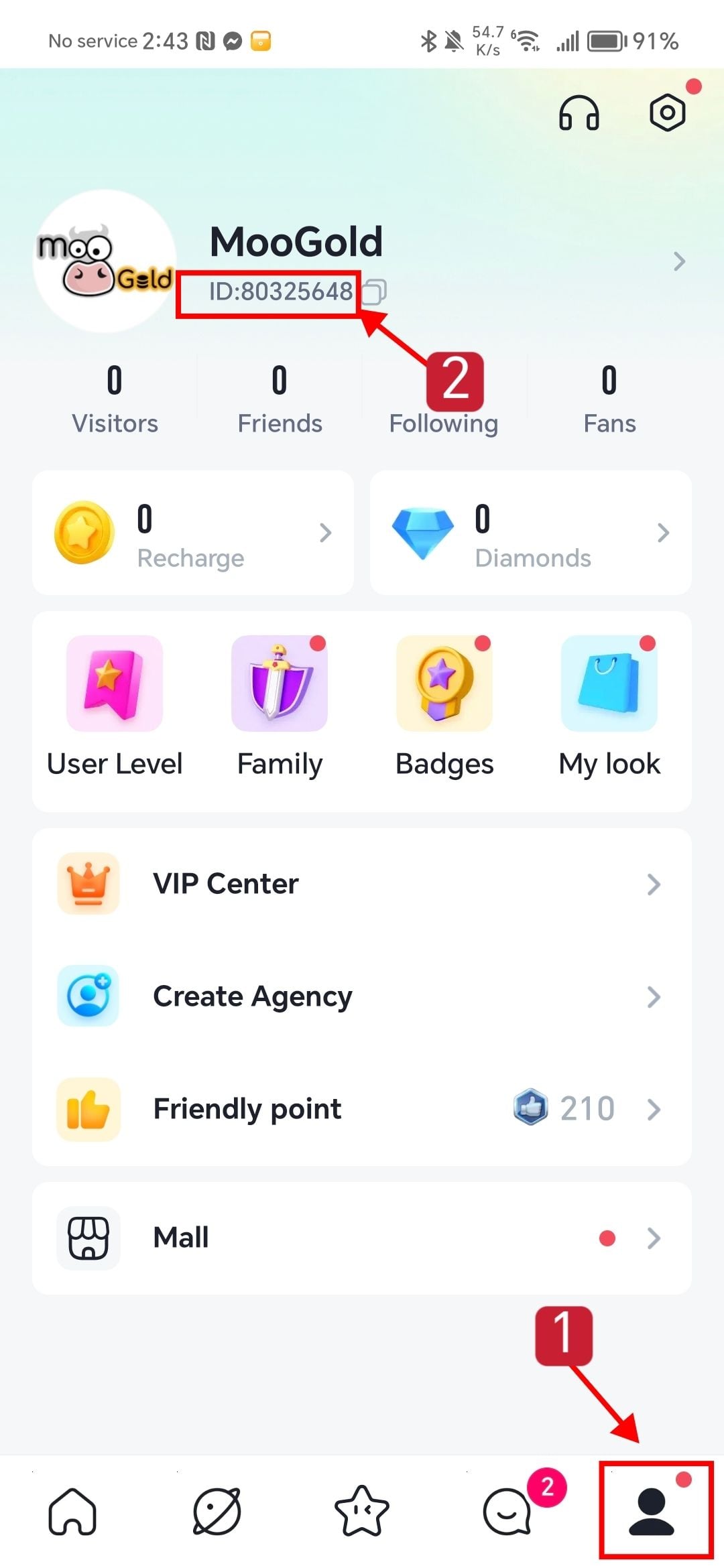
Always verify that you copied the complete numeric ID without any extra spaces or missing digits before submitting your order.
How to Recharge YoHo Coins Online via Player ID on BitTopup
Recharging YoHo coins on BitTopup takes only a few simple steps:
- Select Coin Denomination: Choose the YoHo coin package you want to purchase from the product selection catalog above.
- Enter Player ID: Paste your numeric YoHo Player ID into the playerid field on the order page.
- Check Pricing: Review your package selection and check current pricing and regional payment methods on the live checkout screen.
- Complete Payment: Select your preferred payment channel and confirm the transaction.
- Receive Coins: Once payment completes, the coins are sent directly to your in-app YoHo account balance.
Open your YoHo app, navigate to your wallet, and verify your updated balance.
Account Security: Password-Free Top Ups on BitTopup
Account safety is essential when buying digital currency online. BitTopup uses a direct Player ID delivery system that keeps your private data fully secure.
- Zero Passwords Required: You never need to provide your YoHo account password, phone number, email login, or verification codes.
- No Account Sharing: The entire transaction happens externally through your public Player ID, eliminating the risks associated with account-sharing services.
- Protected Payment Channels: All payment processing uses secure, encrypted checkout gateways designed to keep your billing information safe.
Never share your login credentials or one-time verification codes with anyone offering top-up services. Legitimate recharges only require your public Player ID.
Troubleshooting Common YoHo Recharge and Delivery Questions
If your coins do not appear in your balance immediately after purchasing, use the following troubleshooting steps:
- Restart the App: Close the YoHo app completely and remove it from your device background tasks. Reopen the app and check your wallet balance again.
- Check Network Connection: Ensure your mobile device has an active Wi-Fi or cellular data connection so your in-app profile can sync with YoHo servers.
- Verify Player ID Accuracy: Check your order confirmation receipt on BitTopup to confirm the Player ID you entered matches your in-app ID.
- Contact BitTopup Customer Support: If your order shows as completed but coins do not reflect after restarting, contact BitTopup customer support with your Order ID and YoHo Player ID for immediate assistance.
Frequently Asked Questions
How do I find my YoHo Player ID to complete a recharge?
Open YoHo, tap the Me tab in the bottom-right corner, and find the numeric ID displayed right under your profile avatar. Tap the copy icon beside it to copy the numbers.
Do I need to share my YoHo password to buy coins on BitTopup?
No. BitTopup only requires your numeric YoHo Player ID. You should never disclose your password, SMS verification codes, or login details to anyone.
What can I use YoHo coins for in the app?
You can use YoHo coins to send animated gifts to room hosts, customize voice rooms with special effects and frames, enter VIP rooms, and join multiplayer mini-games such as Ludo and Dominoes.
How long does it take for YoHo coins to reflect in my account after payment?
Coins are processed immediately after successful payment verification. In most cases, the balance updates in your YoHo wallet right away. If there is a slight network delay, restarting the app will sync your balance.
What should I do if I entered the incorrect Player ID during recharge?
Because top-up deliveries are automated, coins sent to an existing, valid Player ID cannot be reversed once processed. If you notice an error before the order completes, contact BitTopup customer support immediately with your transaction details.
Is the YoHo app free to download and use?
Yes, YoHo: Group Voice Chat is free to download and use for voice chatting and basic room hosting. Topping up coins is optional for users who want to access premium gifts, special room effects, and competitive mini-game features.