Eligible Diamond Packages
- 1,000 diamonds: 25% bonus (250 additional diamonds)
- 5,000+ diamonds: 30% bonus, 24-48 hour review processing
- 33,000 diamonds: 35% bonus ($499.99 base at $0.015 per diamond)
Packages under 5,000 diamonds process instantly. Larger transactions trigger security reviews resolving within 24-48 hours for 95% of orders.
Calculating Your Actual Savings
The 50% maximum combines multiple layers. For a 1,000-diamond purchase:
- Base package: 1,000 diamonds at $19-20
- February bonus: 25% = 250 diamonds
- First-time bonus: 20% = 200 diamonds
- Total received: 1,450 diamonds (45% effective bonus)
For UAE/Saudi regions, the 848-diamond package costs AED 62.49 ($17.01). With stacked bonuses, this delivers ~1,220 diamonds, optimizing cost per diamond to $0.014 vs. standard $0.020.
Promotion Duration (SA/AE)
February 10-14, 2026 operates on GMT+8. For Saudi Arabia (GMT+3) and UAE (GMT+4):
- Start: February 10, 7:00 AM (SA) / 8:00 AM (UAE)
- End: February 14, 7:00 AM (SA) / 8:00 AM (UAE)
PayPal supports all GCC nations: Saudi Arabia, UAE, Qatar, Kuwait, Oman, Bahrain. Regional pricing displays in AED for UAE and converts to SAR for Saudi accounts.
Why Card Payments Get Blocked
International card transactions face a 30% decline rate for digital entertainment purchases, with 68.5% of transactions over $100 triggering fraud prevention systems.
Common Bank Security Triggers
- Cross-border merchant codes: 31% failure rate when routed through Singapore/Hong Kong gateways
- High-value digital goods: Purchases exceeding $100 activate enhanced verification
- Velocity checks: 3+ payment attempts per method within 24 hours trigger automatic blocks with 15-30 minute cooldowns
- Merchant category restrictions: Some banks classify live streaming as high-risk
Regional Payment Restrictions (SA/AE)
GCC banking regulations impose additional verification layers. Saudi banks require 3D Secure authentication for cross-border purchases. UAE institutions apply transaction limits based on card tier and account history.
Enabling 3D Secure reduces decline rates below 10% by adding SMS/app verification codes. Requires compatible card issuers and stable internet (5+ Mbps). VPN usage increases block rates by 10-20% due to IP mismatches.
Identifying Block Types
Error messages indicate different failures:
- Transaction declined by issuer: Bank-side block requiring direct contact
- Payment authentication failed: 3D Secure timeout or incorrect code
- Merchant not supported: Card issuer restricts digital entertainment
- Insufficient funds: Balance below purchase amount plus 5-7% fee buffer
Test with a small $1 (60-diamond) package to diagnose issues without risking large amounts.
PayPal as the Secure Alternative
PayPal achieves 95% success rate vs. 70% for international cards. Processing averages 45 seconds with 98% of orders delivering within 3 minutes.
Why PayPal Works When Cards Fail
- Pre-verified accounts: KYC process satisfies merchant security before purchase
- Domestic routing: Transactions appear as local PayPal payments
- Balance funding: Eliminates real-time card authorization delays
- Established trust scores: Transaction history minimizes fraud screening
The 4.4% international transaction fee plus 1-3% tax applies to cross-border payments vs. 2.9% + $0.30 domestic. For a 660-diamond package ($5-7), this adds ~$0.30-0.50.
PayPal Setup in Saudi Arabia
Requires:
- Valid Saudi mobile number for SMS verification
- Government-issued ID (Iqama or national ID)
- Linked bank account/card from Saudi-licensed institutions
- Confirmed email matching registration
Processing averages 45 seconds during off-peak hours (2-6 AM local) and under 2 minutes standard periods. Peak hours (6-11 PM) add 20-30% delays.
PayPal Setup in UAE
UAE accounts operate with AED currency display and local bank integration. 848-diamond package shows as AED 62.49 with transparent fees.
For those seeking to buy BIGO diamonds recharge EUR price in Germany, BitTopup offers multi-currency support with competitive rates.
UAE requirements:
- Emirates ID verification for accounts exceeding AED 1,000 monthly volume
- Local bank account from UAE-licensed institutions (Emirates NBD, ADCB, FAB)
- Mobile number verification through UAE telecom providers
- Address confirmation matching Emirates ID
Security Advantages
- PCI-DSS compliance: Encrypted data transmission
- HTTPS/SSL encryption: 256-bit protocols
- Two-factor authentication: Enabling 2FA reduces payment delays by 80-95%
- Buyer protection: Dispute resolution for unauthorized transactions
95% pending transactions resolve within 48 hours (80% within 24 hours). Transaction IDs (15-25 characters) provide tracking references.
Step-by-Step: Recharging BIGO Diamonds via PayPal on BitTopup
Requires your BIGO ID, verified PayPal account, and stable internet (5+ Mbps). Disable VPNs before starting.
Locating Your BIGO ID

Your BIGO ID is a 7-12 digit numeric code under your nickname on the Me page (e.g., 901216366 without ID: prefix).
- Open BIGO Live, tap Me icon
- Locate numeric code beneath profile nickname
- Copy only numeric digits, omitting prefix/special characters
Selecting Your Diamond Package
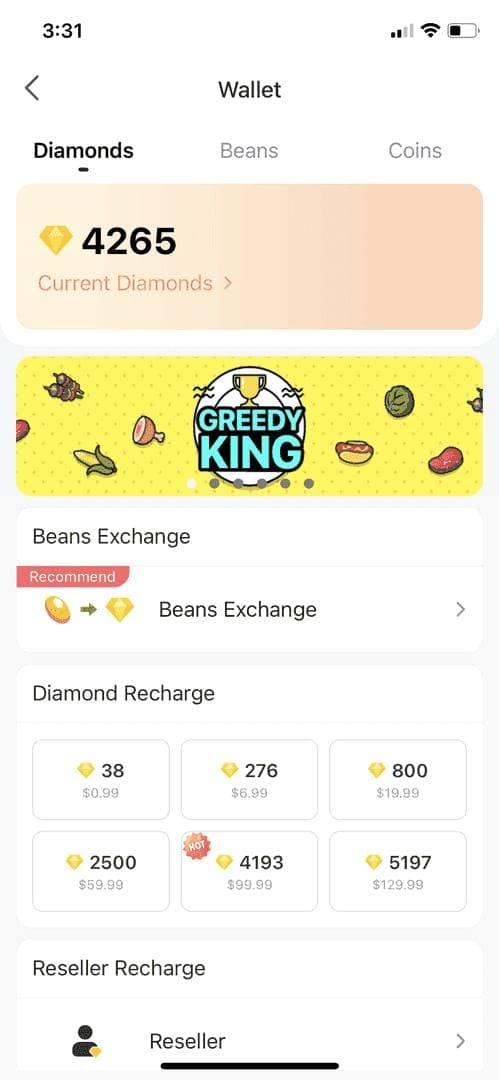
Available packages:
- 60 diamonds: $0.99-$1 (testing/small purchases)
- 660 diamonds: $5-7 (20% first-time bonus eligible)
- 1,000 diamonds: $19-20 (February 25% bonus)
- 5,000+ diamonds: 24-48 hour review required
- 33,000 diamonds: $499.99 (35% February bonus, $5,000 daily cap applies)
Pre-fund PayPal with 5-7% buffer for fees on 660+ diamond packages. For 1,000 diamonds at $20, maintain at least $21.50 balance.
Completing PayPal Payment
- Enter copied BIGO ID, double-check accuracy
- Select desired diamond package, verify auto-rebate percentage
- Choose PayPal as payment method
- Click Complete Payment to redirect to PayPal gateway
- Log in with registered email/password
- Review transaction details (quantity, amount, fees)
- Confirm payment using verification method (password, fingerprint, 2FA)
- Screenshot Transaction ID (15-25 characters) from confirmation screen
Confirming Diamond Delivery

Diamonds appear within 45 seconds to 3 minutes:
- Open BIGO Live, navigate to Me > Wallet
- Pull down to refresh 3-5 times if diamonds don't appear
- Check for base diamonds and bonus diamonds from auto-rebate
For 5,000+ diamond packages, 24-48 hour review begins after payment. You'll receive in-app notifications when credited.
If Payment Processing Fails
If diamonds don't appear within 30 minutes:
- Switch network connection (WiFi/mobile data)
- Clear app cache (Android: Settings > Apps > BIGO Live > Storage > Clear Cache)
- iOS app offload (Settings > General > iPhone Storage > BIGO Live > Offload App)
- Contact support: feedback@bigo.tv with Transaction ID, BIGO ID, payment screenshot
Maximum 3 payment attempts per method per 24 hours. Wait 15-30 minutes between attempts.
Payment Method Comparison
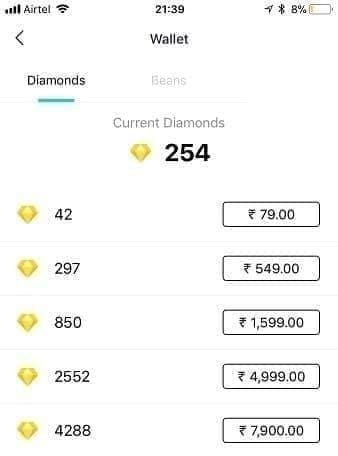
Transaction Speed and Success Rates
PayPal:
- Success rate: 95%
- Average processing: 45 seconds
- Peak hour delay: 20-30% (still under 2 minutes)
- Delivery within 3 minutes: 98%
International Cards:
- Success rate: 70% (30% decline)
- Processing: 1-5 minutes when successful
- High-value flag rate: 68.5% for $100+
- 3D Secure adds 30-90 seconds
Regional Considerations:
- Off-peak (2-6 AM local): Under 2 minutes all methods
- Peak hours (6-11 PM): PayPal maintains speed, cards face increased declines
Security Features
PayPal:
- PCI-DSS Level 1 compliance
- Optional 2FA reduces delays by 80-95%
- HTTPS/SSL encryption
- Buyer protection
- No direct card exposure to merchants
Cards:
- 3D Secure required but not universally supported
- Card details transmitted to gateway
- Limited recourse for digital goods
- Vulnerable to merchant breaches
Fee Structures
PayPal:
- Domestic: 2.9% + $0.30
- International: 4.4% + 1-3% tax
- Currency conversion: 3-4% above mid-market
- Example: 660 diamonds ($6) = $6.56 total
Cards:
- Foreign transaction: 1-3%
- Currency conversion: 2-3% above mid-market
- Potential overdraft fees
- Example: $6 purchase = $6.30-6.48 total
UAE users with AED-funded PayPal eliminate conversion fees. Saudi users with SAR balance benefit similarly.
Ensuring Safe Purchases
Verifying BitTopup as Trusted Platform
Legitimacy indicators:
- Transparent pricing (all fees displayed before payment)
- Secure payment gateways (PCI-DSS compliant, HTTPS/SSL)
- Instant delivery confirmation (98% within 3 minutes)
- Responsive customer support
- User verification with 2FA options
Test small purchases (60-diamond $1 packages) before larger transactions.
Red Flags of Fraudulent Sellers
Avoid platforms with:
- Prices significantly below market ($0.015-0.020 per diamond for bulk)
- No secure payment options
- Requests for account passwords (legitimate services only need BIGO ID)
- Unclear refund policies
- Pressure tactics
210 Beans = $1 USD conversion helps verify pricing. Rates below $0.010 per diamond involve security risks.
Account Security Best Practices
- Never share password (platforms only need numeric BIGO ID)
- Enable 2FA (Settings > Account Security > Two-Factor Authentication)
- Use unique passwords
- Verify URLs display HTTPS and valid certificates
- Monitor Me > Wallet regularly
New accounts under 30 days face stricter limits. Build history with smaller purchases (under 5,000 diamonds).
Transaction Documentation
Maintain records:
- Screenshot Transaction IDs (15-25 characters)
- Save PayPal email receipts
- Document diamond balance (before/after screenshots from Me > Wallet)
- Note timestamps for support inquiries
95% pending transactions resolve within 48 hours with accurate documentation. Support at feedback@bigo.tv or +65 63519330 (GMT+8, 9AM-6PM) requires Transaction IDs.
Maximizing Value: Optimization Strategies
Best Package Sizes for 50% Rebate
For immediate delivery:
- 1,000 diamonds at $19-20 with 25% bonus = 1,250 total
- Effective cost: $0.016 per diamond
- First-time users: 660 diamonds with 20% = 792 total for $5-7
For maximum bonus (24-48 hour review):
- 33,000 diamonds at $499.99 with 35% bonus = 44,550 total
- Effective cost: $0.011 per diamond
- Requires account history, $5,000 daily cap consideration
UAE optimization:
- 848 diamonds at AED 62.49 ($17.01) with stacked bonuses
- Delivers ~1,220 diamonds at $0.014 per diamond
Timing Your Purchase
Optimal windows:
- February 10, 8:00-10:00 AM (UAE): Lowest volume, fastest processing
- Mid-promotion (February 12): Balanced availability, confirmed stability
- Avoid February 14, 10:00 PM onward: Volume spikes, potential delays
Off-peak hours (2-6 AM local) process under 2 minutes. Early morning (6-9 AM) balances speed with convenience.
Combining Auto-Rebate with Other Events
50% maximum stackable bonus combines:
- February promotion: 25-35% by package size
- First-time purchase: 20% on 660+ diamonds (one-time)
- Regional promotions: Occasional GCC-specific offers
Monitor in-app notifications for supplementary events. Some users report additional 5-10% bonuses during regional holidays.
Long-term Diamond Management
For users spending $100+ monthly:
- Bulk purchasing during promotions: 33,000 diamonds at $0.011 vs. $0.020 regular saves $297 per purchase
- Monthly budget allocation: Spread purchases across promotion periods
- Account limit awareness: $5,000 daily cap, 40,000 diamond maximum per transaction
Minimum cashout of 6,700 Beans ($31.90) for creators means purchases should align with gifting strategies.
Regional Considerations (SA/AE)
Currency Conversion Tips
UAE:
- AED pricing eliminates conversion fees when PayPal funded in AED
- 848 diamonds = AED 62.49 (fixed regional pricing)
- USD packages convert at PayPal's rate (3-4% above mid-market)
Saudi:
- SAR-funded PayPal reduces conversion costs
- Monitor SAR/USD rates for optimal timing
- Current: 1 USD = 3.75 SAR (fixed peg reduces volatility)
Pre-fund PayPal in local currency to lock conversion rates.
Local Payment Regulations
GCC requirements:
- Transaction reporting: Purchases over AED 1,000 ($272) may require source documentation
- Monthly limits: Some banks impose AED 5,000-10,000 caps on international digital purchases
- Tax: UAE 5% VAT, Saudi 15% VAT affects total costs
Verify bank policies on digital entertainment. Some classify BIGO as gaming with stricter limits.
Time Zone for Customer Support
- BIGO official: GMT+8 (9AM-6PM) = 4AM-1PM (UAE) / 3AM-12PM (Saudi)
- Peak response: 10AM-4PM GMT+8 = 5AM-11AM UAE
- Email (feedback@bigo.tv): 24-48 hour response window
For urgent issues during SA/AE evening (6PM-midnight), email documentation allows overnight processing.
Language Support
BIGO and BitTopup provide:
- Arabic language support for UAE/Saudi inquiries
- English support for all regions
- Regional payment expertise with GCC banking systems
Specify region (SA/AE) and payment method (PayPal) when contacting support. Include Transaction ID, BIGO ID, timestamp.
Troubleshooting Common Issues
Payment Declined: Immediate Steps
Step 1: Verify PayPal status
- Confirm email verification complete
- Check for account limitations/holds
- Ensure sufficient balance or linked funding
Step 2: Check BIGO ID accuracy
- Re-copy from Me page (7-12 digits only)
- Verify no spaces/special characters
- Confirm ID matches active account
Step 3: Network diagnostics
- Disable VPN (reduces blocks by 10-20%)
- Test internet speed (5+ Mbps required)
- Switch WiFi/mobile data
Step 4: Wait for cooldown
- Maximum 3 attempts per 24 hours per method
- 15-30 minute cooldown between failures
- Try alternative payment if available
Diamonds Not Received
If payment succeeded but no diamonds within 30 minutes:
Immediate actions:
- Pull down to refresh Me > Wallet 3-5 times
- Force close and restart BIGO app
- Clear cache (Android) or offload app (iOS)
- Switch network to trigger sync
For 5,000+ diamond packages:
- 24-48 hour review is normal
- 95% resolve within 48 hours, 80% within 24 hours
- No action needed unless 48 hours pass
Escalation:
- Locate Transaction ID from PayPal (15-25 characters)
- Email feedback@bigo.tv with Transaction ID, BIGO ID, screenshot, timestamp
- Call +65 63519330 during GMT+8 business hours (9AM-6PM)
- Expected response: 24-48 hours email, immediate phone during business hours
Wrong Amount Charged
Verify actual charges:
- Check PayPal transaction history
- Account for fees: 4.4% international + 1-3% tax
- Compare to pre-purchase total
Legitimate fee examples:
- 660 diamonds at $6.00 = $6.56 total
- 1,000 diamonds at $20.00 = $21.18 total
If overcharged:
- Screenshot PayPal transaction and BitTopup order
- Document expected vs. actual amounts
- Contact BitTopup support with evidence
- PayPal dispute available if unresponsive (180-day window)
Account Linking Issues
Common causes:
- BIGO ID entered with ID: prefix (numbers only)
- Account region mismatch
- New accounts under 30 days (stricter verification)
- Outdated app (requires iOS 12+, Android 8+, BIGO 6.37+)
Resolution:
- Update BIGO app to latest version
- Re-copy BIGO ID from Me page
- Verify account region in Settings > Account Information
- For new accounts, start with 60-diamond test purchase
FAQ
Why is my card payment blocked when recharging BIGO Diamonds?
Card payments face 30% international decline rate due to cross-border fraud prevention. Transactions over $100 trigger 68.5% flag rates as banks classify digital entertainment as high-risk. Enabling 3D Secure reduces declines below 10%, but PayPal's 95% success rate makes it more reliable for SA/AE users.
How does the 50% auto-rebate work for BIGO Diamonds in February?
The 50% maximum combines February 10-14 promotion (25-35% bonuses on 1,000+ diamonds) with first-time purchase bonuses (20% on 660+ diamonds). Bonus diamonds credit automatically within 3-5 minutes. Example: buying 1,000 diamonds during promotion with first-time status delivers 1,450 total (1,000 base + 250 February + 200 first-time).
Can I use PayPal to buy BIGO Diamonds in Saudi Arabia and UAE?
Yes, PayPal supports BIGO purchases across all GCC countries. Saudi accounts require valid mobile numbers and government ID verification. UAE accounts display AED pricing (848 diamonds = AED 62.49) and support Emirates ID verification for transactions exceeding AED 1,000 monthly. Processing averages 45 seconds with 98% delivery within 3 minutes.
How long does it take to receive BIGO Diamonds after PayPal payment?
Standard packages under 5,000 diamonds deliver within 45 seconds to 3 minutes for 98% of transactions. Packages over 5,000 diamonds trigger 24-48 hour security reviews, with 95% resolving within 48 hours and 80% within 24 hours. Off-peak hours (2-6 AM) process under 2 minutes.
What should I do if my BIGO Diamond recharge fails?
Verify BIGO ID is correct (7-12 digits from Me page, no ID: prefix). Check PayPal account status for limitations or insufficient balance. Disable VPNs and ensure 5+ Mbps internet. Wait 15-30 minutes between attempts (maximum 3 per 24 hours). If issues persist, contact feedback@bigo.tv with Transaction ID, BIGO ID, and payment screenshot for 24-48 hour resolution.
Is using PayPal for BIGO recharge safe for my account?
PayPal recharges are safe when using legitimate platforms requesting only your numeric BIGO ID. Never share your BIGO password. PayPal's PCI-DSS compliance, HTTPS/SSL encryption, and buyer protection secure transaction data. Enable 2FA in BIGO Settings > Account Security to reduce payment delays by 80-95% and add extra security.
Claim Your 50% Auto-Rebate Now! Recharge BIGO Diamonds Safely with PayPal on BitTopup – Trusted by Thousands of SA/AE Players. Instant Delivery Guaranteed!























































































































