OB52 Update Timeline
- Registration opens: December 19, 2025
- Server launch: December 25, 2025
- Server closes: January 7-9, 2026
- Bug report deadline: January 5, 2026 (1000 diamonds reward)
How Activation Works
After registration, Garena emails activation codes to your provided address. Enter code exactly as received when launching OB52 APK first time. System creates guest account, generates unique ID, prompts Let's Go, then requests code.
Code becomes invalid after first use—no sharing or reuse. This ensures accurate player tracking for bug reports and feedback.
Why Limited Access
Server capacity constraints drive the code system. OB52 infrastructure supports limited concurrent users versus global servers. Controlling access maintains stability while gathering focused feedback.
Linked Facebook/Gmail accounts demonstrate legitimacy and reduce bots. 18+ requirement ensures participants provide constructive feedback.
Code Delivery Timeline
Codes arrive within 24-72 hours after registration. Early registrants typically receive codes faster. Confirmation email displays code prominently for easy copying.
7 Reasons Your Activation Code Isn't Arriving
1. Region Lock
Free Fire assigns servers by IP address at account creation. 16 supported locations: Africa, Bangladesh, Brazil, Europe, India, Indonesia, Malaysia, Mexico, Middle East, Pakistan, Russia, Singapore, Taiwan, Thailand, United States, Vietnam.
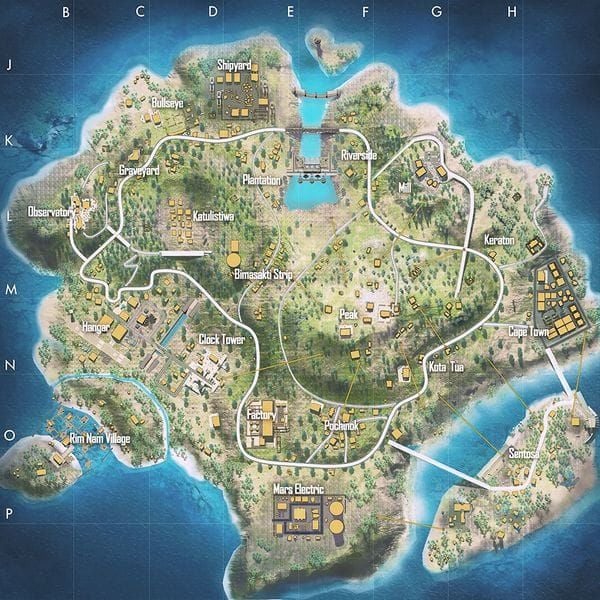
If your account's registered region doesn't match supported territories, registration fails without code delivery. IP during initial installation permanently determines region—even if you now live in supported country.
2. Email Filtering
Email providers misclassify Garena communications. Gmail routes codes to Promotions/Spam. Yahoo and Outlook use similar filtering. Custom domains face institutional firewalls blocking gaming emails entirely.
3. Account Eligibility
Requirements beyond registration:
- Free Fire/FF MAX Player ID bound to Facebook/Google
- Unlinked guest accounts can't receive codes
- Account age and activity influence selection
- System prioritizes active players with consistent engagement
4. Server Capacity Reached
Registration stays open after slots fill. Late registrants complete forms without code delivery. No real-time capacity indicators. First 24-48 hours exhaust slots rapidly.
5. Incorrect Information
Common errors:
- Email typos redirect codes to non-existent addresses
- Mobile number formatting issues (international prefix errors)
- Nickname mismatches between form and actual account
- Special characters causing database lookup failures
6. Multiple Registration Attempts
Repeated submissions trigger anti-spam protections. System flags accounts for manual review, delaying/preventing delivery. Using different emails with same Free Fire ID creates similar flags.
7. Security Verification Pending
Accounts with recent password changes, suspicious logins, or region changes enter verification holds. Unverified email/mobile on Garena profile creates barriers.
Region Lock Solutions
Checking Your Region
Account region appears in Free Fire settings under account information. Server selection screen during login provides indirect confirmation. Currency in shop indicates region (Indian Rupees = India server, Brazilian Real = Brazil).
Region Change Methods
Garena doesn't offer official transfers. Workarounds:
New Account Method:
- Connect VPN to desired supported country
- Launch Free Fire first time during VPN session
- Game assigns region based on initial IP
- Creates permanent server association
Existing Account Method:
- Uninstall Free Fire completely
- Connect VPN to supported country
- Reinstall while maintaining VPN
- Create new account during session
- Sacrifices existing progress
VPN Usage
Connect VPN to supported country before visiting ff-advance.ff.garena.com. Maintain connection throughout registration and initial APK launch.
Use stable Wi-Fi—mobile data causes latency/drops. Download 714 MB APK (or 571.70 MB per sources) on reliable connection. Maintain consistent VPN server throughout OB52 period—switching triggers security flags.
Email Verification Fixes
Pre-Registration Testing
Send test email to verify provider accepts gaming communications. Check spam/promotions folders for routing behavior.
Gmail: Check Promotions tab
Yahoo: Check Other folder
Outlook: Check Junk and Clutter
Gmail Filter Setup
- Access Settings > Filters and Blocked Addresses
- Create filter with garena.com in From field
- Select Never send to Spam + Categorize as Primary
- Add ff-advance.ff.garena.com and noreply@garena.com
- Apply to existing messages
Yahoo/Outlook Solutions
Yahoo: Add Garena addresses to Contacts before registration. Navigate to Contacts, create entries for noreply@garena.com and related domains.
Outlook: Access Settings > Junk Email > Safe Senders. Add garena.com and ff-advance.ff.garena.com.
Alternative Email Strategy
Create dedicated Gmail for gaming registrations if primary fails. Link to Free Fire account through settings before OB52 registration. Gmail maintains high deliverability for bulk senders.
Step-by-Step Fix Guide
Pre-Registration Checklist
- Verify Facebook/Google links through in-game settings
- Test connections by logging out/in with social credentials
- Link guest account with Facebook/Gmail ID if needed
- Clear browser cache before visiting registration site
- Use incognito/private browsing for clean session
Optimal Timing
Registration opens December 19, 2025. First 6-12 hours = peak volume. Off-peak (late evening/early morning) = lower load, faster processing.
Form Completion
- Copy in-game nickname exactly (capitalization, spaces, special characters)
- Screenshot profile for reference
- Copy-paste email from client to eliminate typos
- Verify pasted address matches exactly
- Enter mobile with correct international prefix
Post-Registration Monitoring
Check email every 6-12 hours for 72 hours. Review spam/promotions/junk folders. If 72 hours pass:
- Verify registration submitted (return to site—if says already registered, submission processed)
- Review all seven failure reasons
- Register with alternative email if needed
- Monitor official social media for secondary waves
Account Eligibility Details
Requirements
- Age: 18+ verified through Facebook/Google birthdate
- Account linking: Facebook/Google/VK connected to Free Fire
- Device: Android 5.1+ or 8.0+ with 2 GB free storage
- Account age: Veteran accounts prioritized over new ones
Linked Account Setup
Verify linking through Free Fire settings. Confirm Facebook/Google icons show connected. Test by logging out/in with credentials.
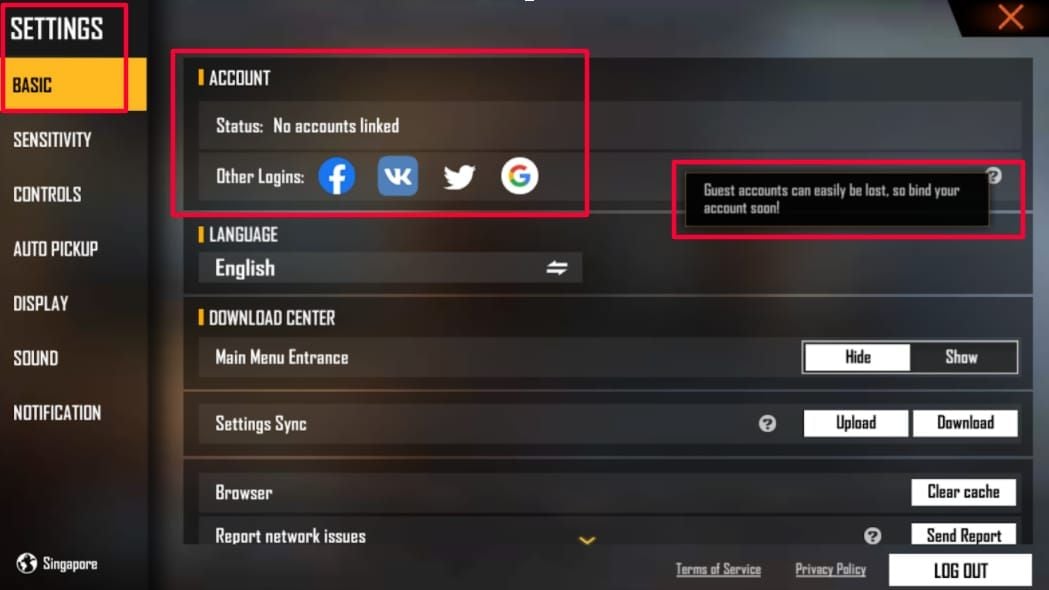
VK users: Check if option appears during ff-advance.ff.garena.com login. May need Facebook/Google instead.
Previous Participation
Past Advance Server testers may receive priority but must complete fresh registration. History doesn't guarantee automatic access.
Common Registration Errors
'Region Not Supported'
Fix:
- Connect VPN to supported country (India, Indonesia, Brazil, US)
- Clear browser cache/cookies
- Access site through incognito with VPN active
- If persists, create new account while on VPN
'Account Not Eligible'
Fix:
- Confirm Facebook/Google links in-game
- Verify social media birthdate shows 18+
- Wait 24-48 hours after birthdate updates
- Complete pending security verifications
- Verify email/mobile in Garena account
'Registration Closed'
Fix:
- Try during off-peak hours (2-6 AM)
- Monitor official announcements for reopening
- Set reminders to check status
- Prepare for global release if closed by December 24
'Invalid Email Format'
Fix:
- Use standard format: username@domain.com
- Stick to Gmail, Yahoo, Outlook for compatibility
- Copy-paste from email client
- Remove extra spaces before/after address
Maximizing Access Chances
Registration Timing Strategy
- Early (0-6 hours): Ahead of capacity but peak traffic
- Mid (12-36 hours): Balanced availability + reduced load
- Late (48+ hours): Risks capacity but minimal congestion
Account Activity Optimization
Increase playtime weeks before December 19. Aim for daily logins and several matches weekly. Complete events/missions to showcase engagement.
Diamond Preparation
While purchases don't guarantee access, they establish account value. Consider top up Free Fire diamonds online through BitTopup for secure transactions before registration.
Community Participation
Engage with official social media, forums, discussions. Comment constructively on announcements. Maintain records of previous bug reports if applicable.
Waiting Period Preparation
Account Security
- Enable two-factor authentication on Facebook/Google
- Update Free Fire password (strong: uppercase, lowercase, numbers, symbols)
- Avoid password reuse from other platforms
Diamond Strategy
OB52 introduces exclusive items, skins, limited offers. Prepare adequate reserves. Major updates feature bundles 500-2000 diamonds, premium items 3000+. BitTopup provides instant delivery with 24/7 support.
Meta Practice
Master current strategies, weapons, character abilities. Practice aim, movement, game sense. Study community speculation about OB52 changes through teasers/leaks.
Monitor Official Channels
Enable notifications for Free Fire Twitter, Facebook, Instagram. Community managers announce surprise registration extensions with limited notice.
Alternative Access Methods
Secondary Registration Rounds
Garena historically opens multiple waves when capacity permits. Monitor announcements December 22-24, 2025 for secondary opportunities targeting players with technical difficulties.
Social Media Giveaways
Regional accounts conduct code giveaways through contests, challenges, events. Follow official accounts, participate in engagement activities.
Content Creator Distributions
Gaming influencers receive code allocations. Engage authentically with Free Fire creators during December 19-25. Participate regularly—creators reward active community members.
Global Launch Backup
If all access fails, focus on global OB52 launch 1-2 weeks after January 7-9 Advance Server closure. Study creator coverage, patch notes, community discussions. Global launch offers stable servers, complete features, synchronized seasons.
FAQ
Why didn't I receive my activation code?
Check spam folder first. Verify account region matches 16 supported territories. Confirm Facebook/Google links properly. Common causes: email filtering, region restrictions, eligibility issues, capacity limits, registration errors.
What regions are supported?
Africa, Bangladesh, Brazil, Europe, India, Indonesia, Malaysia, Mexico, Middle East, Pakistan, Russia, Singapore, Taiwan, Thailand, United States, Vietnam. Region determined by IP during initial installation, not current location.
How long for code delivery?
24-72 hours after December 19 registration. Early registrants receive faster. Check spam/promotions/junk every 6-12 hours.
Can I change account region?
No official transfers. Create new account while on VPN in supported region. Connect VPN before first Free Fire launch for proper assignment. Or uninstall, connect VPN, reinstall, create account during session (sacrifices progress).
What are join requirements?
18+ age via Facebook/Google, Free Fire ID bound to social credentials, region within 16 supported locations, Android 5.1+/8.0+ with 2 GB storage, active email. Register at ff-advance.ff.garena.com starting December 19.
Activation code in spam?
Check spam/junk/promotions/clutter immediately. Create filters adding garena.com to safe senders. Gmail: Settings > Filters > Never send to Spam + Categorize as Primary. Apply to existing messages.
Don't let activation issues stop OB52 prep! Stock your account for January 2026 launch. Top up Free Fire diamonds instantly through BitTopup—secure transactions, competitive rates, 24/7 support. Get diamonds ready to dominate OB52 from day one!