Delivery Failure vs. Normal Processing Delay
Payment gateway issues cause 60% of delays, system errors 25%, network problems 15%.
Normal delays:
- First purchase 2FA: 15-30 minutes
- Credit cards: 3-7 minutes
- Bank transfers: 15-30 minutes minimum
- New account holds: 24-72 hours on purchases over $20
Actual failures:
- No coins after 72 hours
- Payment deducted but no in-app transaction record
- Error codes during completion
- Coins delivered to wrong account (User ID mismatch)
V2.41.0 (Nov 24, 2025) introduced enhanced security increasing processing times. New accounts face strict limits: max 6250 coins per transaction first 30 days, with automatic holds when multiple recharges occur within 15 minutes.
Known v2.42.0 Bugs Affecting CodaPay
Account synchronization errors most commonly affect users who:
- Switch between devices
- Use VPN during purchase (Error E001: VPN Detected)
- Have connections below 3 Mbps download/1 Mbps upload
- Run outdated app versions
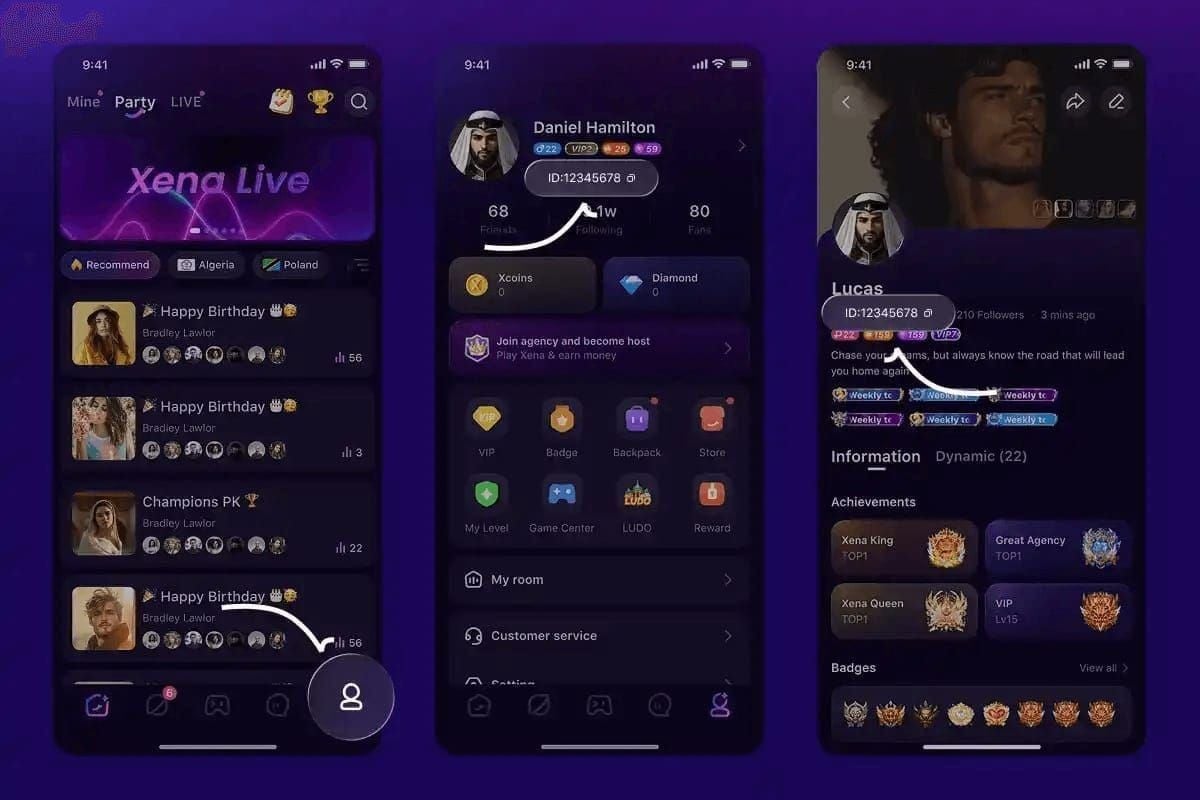
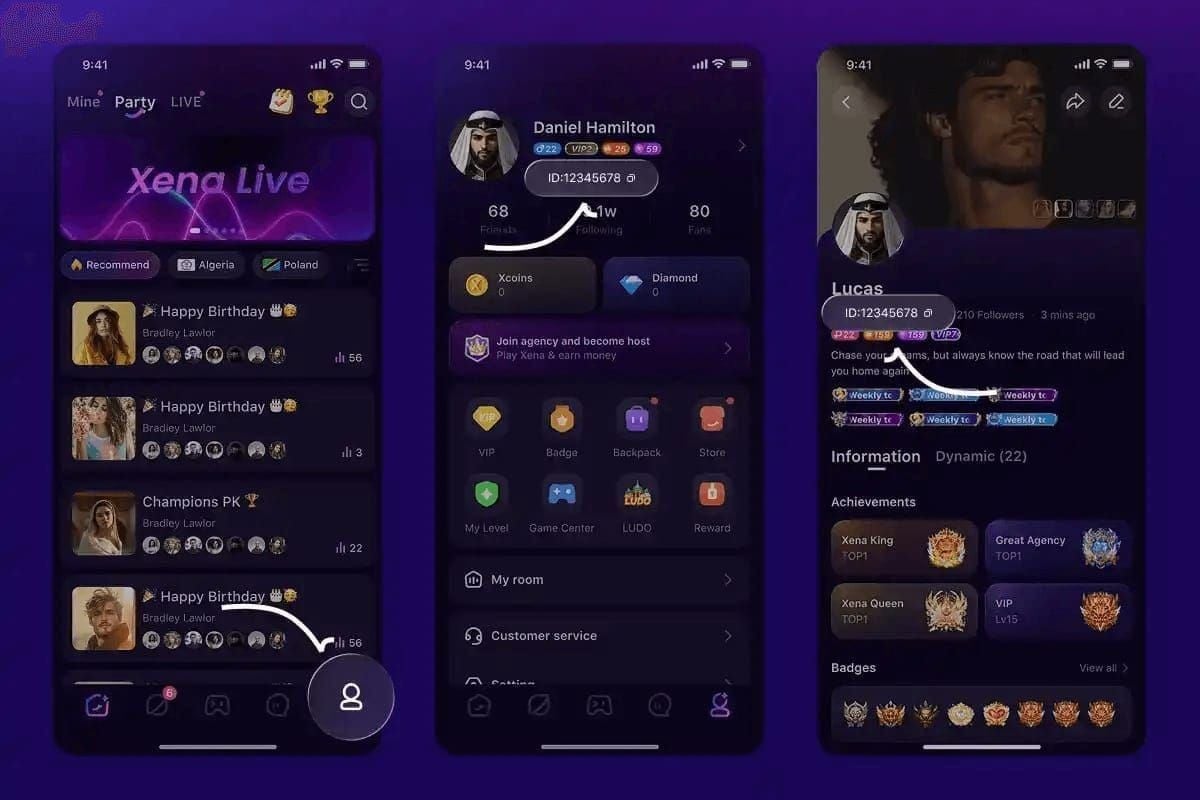
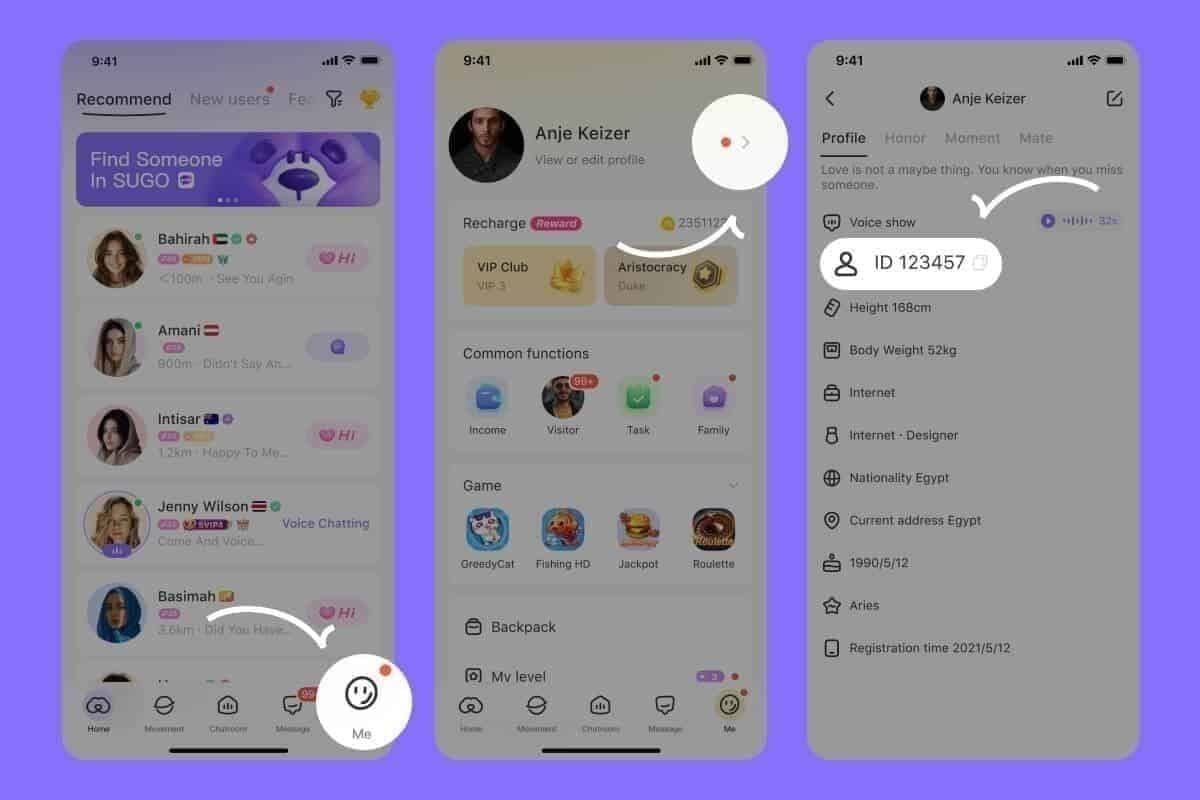
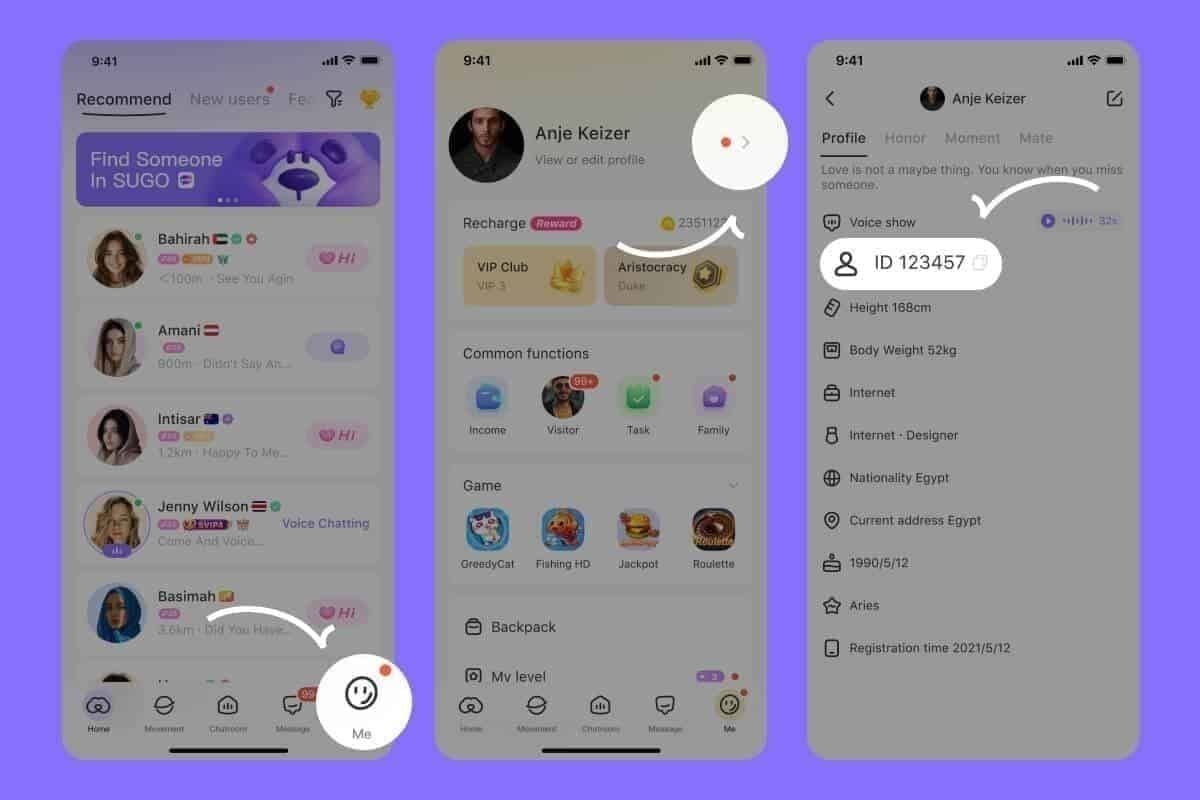
User ID mismatches cause 30% of support cases. This 8-12 digit number must match exactly between payment info and SUGO account. Verify at ME > View/Edit Profile.
Server Maintenance Impact
During maintenance, payment processing continues but coin crediting delays until systems restore. Email confirmations arrive within 5-10 minutes, but balance updates may lag during high traffic.
Transaction reference numbers (TXN- + 12-20 characters) remain valid 90 days, ensuring delayed processing completes without payment loss.
Verify Your CodaPay Transaction Status
Before troubleshooting, confirm payment processed successfully.
Step 1: Locate Transaction Receipt
Check email for CodaPay confirmation (arrives within 5-10 minutes) containing:
- Transaction ID (TXN- reference)
- Purchase timestamp
- Coin package amount (1200, 2400, 6250, 12500, 37500, 65000, 130000)
- Payment method
- Total charged
No email? Check spam or payment method transaction history.
Step 2: Verify Payment Deduction
Confirm money left your account. Test charges of $0.01-$1.00 during verification refund within 24 hours—these aren't purchases.
Compare deducted amount against official pricing. Partial charges indicate incomplete transactions requiring payment provider contact, not SUGO support.
Step 3: Check Transaction ID Details
Access in-app payment history: Settings > Payment History. Compare transaction ID from email against entries. If transaction appears but no coins, you have synchronization error not payment failure.
Missing transactions despite confirmed receipts indicate account binding issues requiring immediate escalation.
7 Proven Solutions
Execute in order for optimal results.
Solution 1: Force Server Synchronization (30 Seconds)
Resolves 80% of minor delays.
- Force-close SUGO completely
- Wait 10 seconds
- Reopen app
- Check coin balance (top-right corner)
Don't repeatedly close/reopen—triggers fraud detection.
Solution 2: Clear Cache Without Losing Progress
Fixes 95% of connection issues. Preserves account data, progress, settings.
Android:
- Settings > Apps > SUGO > Storage
- Tap Clear Cache (NOT Clear Data)
- Force-close 10 seconds
- Reopen and check balance
iOS:
- Settings > General > iPhone Storage
- Find SUGO
- Tap Offload App
- Reinstall from App Store
- Log in and verify
Effective for Error E003: Network Timeout.
Solution 3: Verify Account Binding
Errors occur when payment links to different User ID than active account. Common when:
- Using shared devices
- Switching guest/registered accounts
- Transferring between devices
Verify User ID at ME > View/Edit Profile matches payment receipt. If mismatched, contact support with both IDs and receipt—coins transfer within 48-72 hours.
Solution 4: Network Reset
Resolves 80% of network delays (15% of all issues).
- Disable VPN if active
- Toggle airplane mode on 10 seconds
- Toggle off
- Wait for reconnection
- Force-close SUGO
- Wait 10 seconds
- Reopen and check
Especially effective when switching WiFi/mobile data during purchase.
Solution 5: Update to v2.42.0
Outdated versions lack critical payment processing improvements.
- Open app store
- Search SUGO
- Install updates
- Restart device
- Reopen and verify
V2.41.0 (Nov 24, 2025) addressed CodaPay integration issues.
Solution 6: Review Purchase History
Settings > Payment History. Look for:
- Purchase date/time
- Coin package amount
- Payment method
- Transaction ID
If purchase appears but coins missing, screenshot discrepancy—proves payment reached servers but failed crediting. Missing purchases indicate binding errors requiring escalation.
Solution 7: Wait for 24-Hour Reconciliation
Backend systems auto-reconcile every 24 hours, matching unprocessed payments with accounts. Wait 72 hours before escalating, especially for new accounts with holds on purchases over $20.
Waiting period allows:
- Payment gateway confirmations to process
- Anti-fraud verification completion
- Reconciliation cycles to run
- Bank settlements to complete
Avoid additional purchases during wait—multiple recharges within 15 minutes trigger fraud holds.
Document for Support Escalation
90% of tickets acknowledged within 24 hours. Standard investigations: 48-72 hours. Complex cases: 5-7 business days.
Essential Information
Required:
- User ID (8-12 digits from ME > View/Edit Profile)
- Transaction ID (TXN- reference)
- Purchase date/time
- Coin package purchased
- Payment method
- Amount charged
Supporting docs:
- CodaPay email confirmation
- Payment transaction record
- Screenshots: current coin balance, in-app payment history
Screenshot Requirements
Under 5MB each, max 10 files per ticket.
Critical screenshots:
- CodaPay email receipt with transaction ID
- Payment confirmation (bank app/card statement)
- SUGO coin balance (top-right corner)
- In-app payment history
- User ID from profile
Show full details, timestamps, User ID visible, current balance.
Optimal Submission Timing
Contact: ME > Help & Support > Contact Us > Payment Issues > Coins Not Received After Payment.
Wait full 72 hours for new accounts with holds on purchases over $20. Established accounts: submit after 24 hours if all seven solutions completed.
CodaPay vs. Alternative Payment Methods
Delivery Timeframes by Provider
Credit/Debit Cards: 3-7 minutes established accounts; first-time adds 15-30 minutes for 2FA.
Bank Transfers: 15-30 minutes minimum; hours during non-business times.
Digital Wallets: 1-5 minutes; depends on provider integration.
CodaPay: Varies by region/method; intermediary layer extends times.
Why Some Methods Delay More
Payment gateway issues cause 60% of delays. Multi-step methods like CodaPay face higher failure rates than direct integrations.
Network problems (15% of delays) affect mobile payments more. Connections below 3 Mbps download/1 Mbps upload cause interruptions requiring manual reconciliation.
New account restrictions apply universally but some processors flag accounts more aggressively.
BitTopup Instant Delivery Advantage
Recharge SUGO coins with user ID through direct integration, eliminating intermediary delays.
Advantages:
- Competitive pricing, transparent fees
- Fast delivery via optimized processing
- Secure transactions, buyer protection
- Wide game coverage
- 24/7 support
- High user ratings
Direct vendor relationships enable faster crediting than multi-layered processors.
Refund Process
Eligibility Criteria
Eligible:
- No coins after 72 hours
- Duplicate charges
- Overcharged amount
- Technical errors during completion
- Coins to wrong account (system error)
Ineligible:
- Buyer's remorse after delivery
- Account suspension/ban after purchase
- Coins spent before request
- Purchases over 90 days old
- Terms of service violations
New accounts must wait full 72-hour hold before requesting refunds on purchases over $20.
Request Procedure
Submit via ME > Help & Support > Contact Us > Payment Issues > Coins Not Received After Payment.
Required docs:
- CodaPay receipt
- Bank statement showing charge
- Screenshots proving no coins
- User ID verification
- Explanation and resolution attempts
Subject line: REFUND REQUEST. Include all seven troubleshooting solutions attempted.
Processing Time
Standard cases: 48-72 hours. Complex: 5-7 business days.
Refund timing:
- Credit/debit: 5-10 business days
- Bank transfers: 7-14 business days
- Digital wallets: 3-7 business days
Email confirmation when processing begins and completes.
Prevention Checklist
Pre-Purchase Verification
Before buying:
- Verify User ID matches across devices
- Update to v2.41.0 minimum
- Confirm stable connection (3+ Mbps download, 1+ Mbps upload)
- Disable VPN completely
- Log out/in to refresh session
- Screenshot current balance
New accounts: complete profile before first purchase.
Optimal Purchase Timing
Avoid:
- Late night (maintenance windows)
- After major updates
- Announced special events
- Peak times (evenings/weekends)
Space purchases 15+ minutes apart. Closer timing triggers fraud detection.
Payment Method Best Practices
New accounts (under 30 days):
- Start with packages under 6250 coins
- Use established, verified methods
- Avoid bank transfers for first purchase
- Complete 2FA before attempting
Established accounts:
- Use previously successful methods
- Update expired payment info
- Verify sufficient funds
Set battery optimization unrestricted: Settings > Apps > SUGO > Battery > Unrestricted.
Why BitTopup Offers More Reliability
Technical advantages:
- Direct API integration
- Dedicated gaming payment infrastructure
- Real-time inventory management
- Automated instant crediting
Customer benefits:
- 24/7 support
- Transparent tracking
- Guaranteed delivery or refund
- No new account restrictions
Specialized gaming currency expertise vs. general payment processors.
Expert Tips
Common Misconceptions
Instant means 30 seconds for established accounts, not literally instantaneous. First purchases always take longer. New accounts face mandatory holds regardless of method. Weekend purchases may process slower.
85% processing within 1-5 minutes represents normal circumstances. Your transaction may fall in the 15% requiring extended processing without indicating problems.
Network Requirements
Minimum 3 Mbps download/1 Mbps upload. Optimal:
- Stable WiFi (preferred over mobile)
- 10+ Mbps download
- Under 100ms ping
- No VPN/proxy
Reset DNS to Google's public (8.8.8.8 primary, 8.8.4.4 secondary) if experiencing persistent issues.
Account Security Optimization
- Complete email verification before first purchase
- Enable 2FA but complete setup before buying
- Link one payment method initially
- Never share credentials/User ID
- Regular password updates
Wait 24-48 hours after security changes (password resets, email changes, device additions) before purchasing.
FAQ
How long before contacting support?
Wait 72 hours, especially new accounts with purchases over $20. Established accounts: 24 hours after completing all seven solutions. Premature tickets don't accelerate resolution.
Will I lose my payment?
No. Transaction IDs valid 90 days. Automatic reconciliation matches unprocessed payments. Support recovers payment via transaction ID if reconciliation fails. Keep documentation until coins arrive or refund completes.
Can I purchase while waiting?
No. Multiple recharges within 15 minutes trigger fraud holds extending all pending transactions. New accounts: space purchases 15+ minutes, stay within 6250 coin max first 30 days. Additional purchases complicate investigations.
Does clearing cache delete progress?
No. Removes only temporary files. Account data, progress, items, settings stored on servers. 95% effectiveness makes this safest first step. Use Clear Cache not Clear Data on Android.
Fastest payment method?
Credit/debit cards: 3-7 minutes, most consistent. Digital wallets: 1-5 minutes, depends on provider. Bank transfers: 15-30 minutes minimum, avoid for time-sensitive. BitTopup offers optimized delivery via direct integration, often 30 seconds regardless of method.
How to know if new account restricted?
Accounts under 7 days face 24-72 hour holds on purchases over $20, max 6250 coins per transaction first 30 days. Check creation date: ME > Settings > Account. Restrictions apply universally, can't be bypassed. Start with smaller packages, space 15+ minutes apart.
Tired of delays? Get SUGO Coins instantly with BitTopup's guaranteed delivery. Join thousands who never wait. 24/7 support, competitive pricing, secure transactions, instant crediting!