How UID-Based Delivery Works
Each numeric UID uniquely identifies your SUGO account. When verified payment processes with your UID, SUGO's backend allocates purchased coins to your balance—typically within 30 seconds for established accounts.
Key limitations:
- Taiwan-registered UIDs excluded due to regional regulations
- New accounts limited to 6250 Coins maximum during first 30 days (version 2.41.0.0 restriction)
Why Players Choose UID-Only Transactions
Speed: Complete purchases in under 2 minutes versus 5+ minutes for registered methods.
Privacy: Only requires numeric UID and payment info—no email, phone, or social media linkage.
Accessibility: Simplified workflow removes barriers for casual players who don't want multiple gaming accounts.
Security Considerations
Legitimate platforms use SSL encryption for all transactions. Your UID functions as a delivery address, not authentication—possessing someone's UID alone can't compromise account security.
Primary risk: UID accuracy. Incorrect UIDs deliver coins to wrong accounts with no reversal option once processed.
Payment gateway delays cause 60% of reported issues, not security breaches. Established accounts receive coins within 30 seconds; new accounts may wait 24-72 hours for anti-fraud verification.
Finding and Verifying Your SUGO UID
Your UID is the essential identifier for registration-free top-ups.
Locating Your UID
- Log into SUGO app
- Tap ME icon (bottom-right)
- Tap View/Edit Profile or Personal Information
- Scroll to User ID field
- Note the complete numeric string (8-12 digits)

UID Format
- Purely numeric (0-9 only)
- No letters, spaces, dashes, or symbols
- Different from display name (which may contain letters/characters)
14-Point Verification Checklist
Basic checks:
- Only numeric digits
- No spaces within sequence
- No letters or symbols
- Length matches profile display
Cross-reference:
- Copy directly from app, don't type manually
- Screenshot profile for reference
- Compare screenshot to entered value
- Check clipboard for extra characters
Account status:
- App logged in and functioning
- No suspensions or restrictions
- Recent login within 24 hours
- No pending security issues
Transaction prep:
- Correct package selected
- Payment amount verified
- Screenshot capability ready
GCash Payment Tutorial
GCash is the most widely adopted Philippine e-wallet for SUGO purchases.
Prerequisites
- Fully verified GCash account (ID + selfie verification)
- Sufficient balance (1200 Coins costs ₱48.16-59)
- Stable internet connection
Payment Process
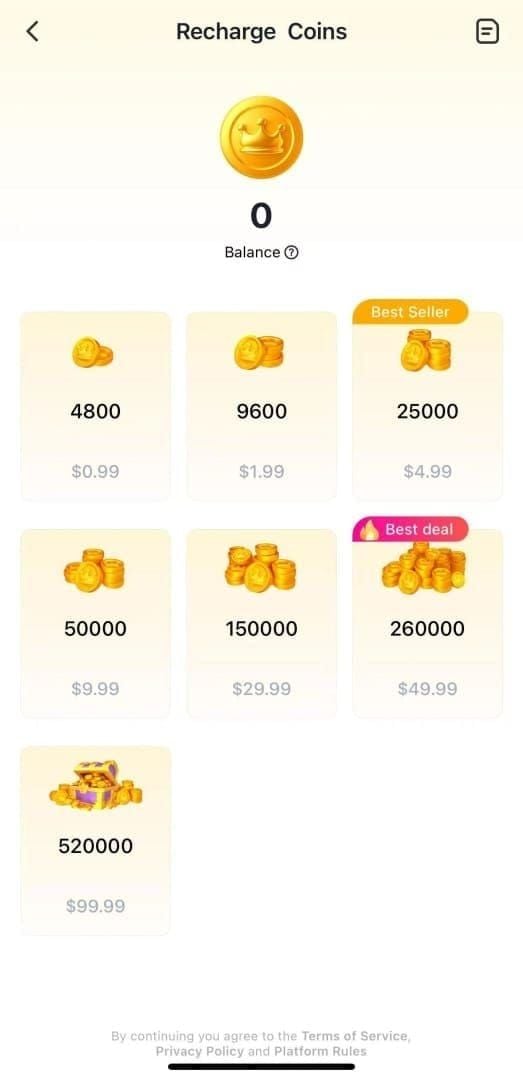
- Select coin denomination (1200/2400/6250/12500/37500/65000/130000)
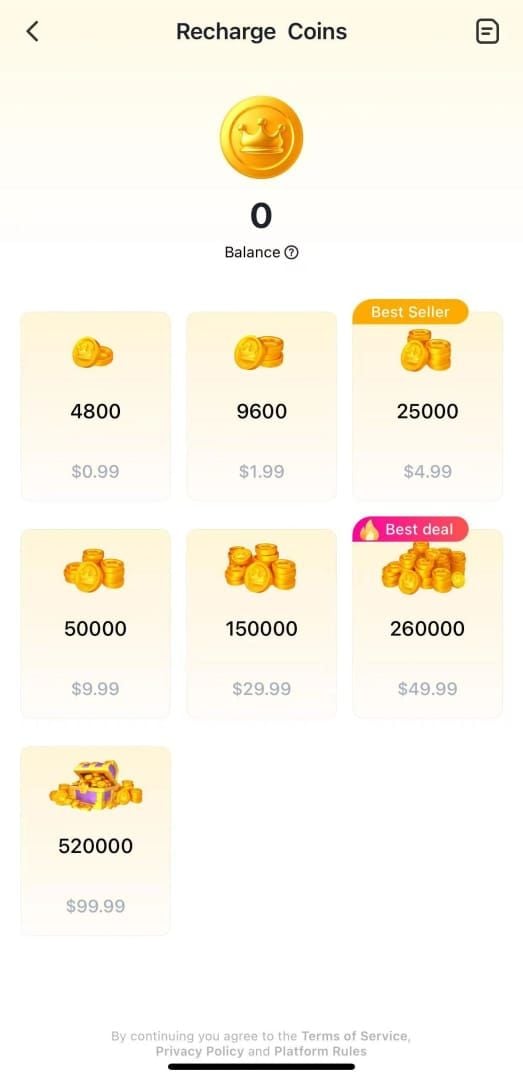
- Enter SUGO UID carefully
- Proceed to checkout
- Select GCash payment method
- Review transaction details
- Authorize via GCash app (MPIN/biometric)
- Save transaction reference number
- Wait for confirmation (1-5 minutes for 85% of transactions)
Transaction Limits
Fully verified accounts support up to ₱100,000 daily—sufficient for largest packages. Some packages have 1 order per day limit regardless of GCash capacity.
Processing factors:
- Established accounts: 30 seconds
- New accounts: 24-72 hours
- Multiple recharges within 15 minutes trigger holds
Troubleshooting GCash Issues
Insufficient balance: Add funds and retry.
Transaction timeout: Network issue—wait 5-10 minutes, ensure stable connection.
Payment declined by issuer: Fraud detection flagged transaction. Contact GCash support for approval.
Payment deducted but no coins:
- Check GCash transaction history for reference number
- Force-close SUGO app, wait 10 seconds, reopen
- Clear SUGO cache: Settings > Apps > SUGO > Storage > Clear Cache
- Wait full 5-minute processing window
Maya (PayMaya) Purchase Guide
Maya offers similar functionality to GCash with multiple funding options.
Maya Setup
- Full KYC verification required for higher limits
- Funding methods: bank transfers (free), over-the-counter deposits (₱10-25 fees), linked cards
- Generates unique transaction ID for tracking
Payment Flow
- Select coin package
- Enter SUGO UID with verification
- Choose Maya payment method
- Review transaction summary
- Authorize via Maya app/web
- Enter PIN or biometric authentication
- Receive Maya transaction reference
- Wait for delivery (1-5 minutes typical)
Fees and Speed
Maya doesn't charge merchant payment fees—displayed price is total cost. Funding fees vary by method (bank transfers free, cash deposits may have charges).
Processing speed matches GCash. Both route through similar infrastructure, so delivery times are equivalent.
Maya Troubleshooting
Insufficient funds: Add balance before retrying.
Transaction declined: Security flagged unusual activity. Contact Maya support to authorize gaming transactions.
Payment deducted, no coins: Follow same steps as GCash—verify Maya history, force-close app, clear cache, wait 5 minutes.
GrabPay Alternative
GrabPay extends beyond transportation to support SUGO purchases.
GrabPay Integration
- Same payment gateway as GCash/Maya
- GrabRewards points may accumulate on purchases
- Full KYC required for higher limits
Transaction Process
- Choose coin package (1200-130000)
- Input verified SUGO UID
- Select GrabPay at checkout
- Review details
- Authorize via GrabPay interface
- Complete PIN/biometric authentication
- Receive transaction reference
Rewards Benefits
GrabRewards points potentially offset future Grab service costs. Monitor promotional calendar for enhanced earning rates on digital purchases.
Processing matches GCash/Maya: 85% complete within 1-5 minutes.
Payment Method Comparison
Processing Speed
All three methods deliver comparable speeds under optimal conditions. Account status determines speed more than payment choice:
- Established accounts: 30 seconds
- New accounts: 24-72 hours
Transaction Fees
Direct fees absorbed by platform. Indirect costs vary:
- Bank transfers: Free for all platforms
- Over-the-counter deposits: ₱10-25 service charges
- 1200 Coins package: ₱48.16-59 (varies by promotions/exchange rates)
Payment Limits
Verified accounts on all platforms support ₱100,000 daily—exceeds largest package cost. Some packages limited to 1 order per day regardless of e-wallet capacity.
Reliability
All three demonstrate high reliability when accounts verified and UIDs correct. Payment gateway delays affect all equally (60% of issues). User familiarity often determines perceived reliability.
For seamless transactions, SUGO coins recharge no login through BitTopup supports all three e-wallets with consistent processing and competitive pricing.
Pre-Purchase Checklist
UID Verification Steps
- Copy UID directly from app
- Paste into notepad to check for extra characters
- Compare character-by-character
- Screenshot profile page
- Verify numeric-only format
- Confirm digit count
Takes under 1 minute but prevents irreversible errors.
Server Region Confirmation
Taiwan-registered UIDs can't use registration-free methods. Philippine, Malaysian, Singaporean accounts fully supported.
Pricing by region:
- Philippines: ₱48.16-59 (1200 Coins)
- Malaysia: RM4.00
- Singapore: S$1.08
Package Verification
Confirm selected package matches intent. Available: 1200/2400/6250/12500/37500/65000/130000 Coins.
New accounts: 6250 Coins maximum first 30 days.
Transaction Records
Save:
- Date/time
- Payment method
- Transaction reference number
- SUGO UID used
- Package and amount paid
- Confirmation screenshot
Delivery Timeline
Expected Timeframes
85% of transactions: 1-5 minutes
Established accounts: 30 seconds (optimal conditions)
New accounts: 24-72 hours (fraud prevention)
Applies uniformly across GCash, Maya, GrabPay.
Checking Coin Balance
- Force-close SUGO app completely
- Wait 10 seconds
- Reopen app to refresh
- Navigate to wallet/coin balance
- Verify new balance
If coins don't appear, clear cache: Settings > Apps > SUGO > Storage > Clear Cache (Android).
Delayed Delivery
Established accounts (5+ minutes):
- Verify payment completed in e-wallet history
- Force-close and reopen app
- Clear cache
- Wait 10 minutes total
- Contact support with transaction reference if persists
New accounts: Wait full 24-72 hours before escalating.
Troubleshooting Common Issues
Payment Successful, No Coins
First steps:
- Wait 5 minutes minimum (15% take longer than standard window)
- Verify correct SUGO account logged in
- Force-close app and clear cache
If persists: Contact support with complete transaction documentation. Payment gateway delays cause 60% of legitimate issues.
Wrong UID Entered
Recovery extremely limited once processed. Coins delivered to specified UID can't be reversed or transferred.
Prevention is only solution: Use comprehensive verification checklist before payment.
If caught immediately (under 60 seconds), contact support urgently—rare cancellation possible before processing.
Transaction Failed
Funds typically return automatically within minutes to hours. Check e-wallet history for refund status.
Common causes:
- Insufficient balance
- Network interruption
- Payment gateway timeout
Address underlying cause before retrying. If funds not returned after 24 hours, contact both platform and e-wallet provider.
Double Charging
First: Check if you received double coins. If both delivered, no refund needed.
If only one delivery: Contact support immediately with both transaction references.
Prevention: Wait 5 minutes before retrying failed transactions. Check e-wallet history before initiating new attempt.
Cost Optimization
Most Cost-Effective Method
Direct transaction fees equivalent across platforms. Indirect costs vary:
- Bank transfers: Most cost-effective (no fees)
- Over-the-counter: ₱10-25 service charges
- GrabPay rewards: Potential value for frequent Grab users
Best Value Packages
Casual players: 1200-2400 Coins (matches sporadic usage)
Regular players: 6250-12500 Coins (meaningful discounts, accessible for monthly purchases)
Heavy users: 37500-130000 Coins (maximum 13-33% volume discounts)
New accounts: 6250 Coins maximum first 30 days.
Purchase Timing
- Monitor promotional periods around holidays/shopping events
- Wait for announced promotions before major updates
- 1 order per day limit encourages spreading purchases across multiple days
Security Best Practices
Protecting Your UID
UID functions as delivery address, not authentication. Someone with your UID can't log in or access personal info—only send coins if they pay.
Treat as semi-private: share only for legitimate top-ups, avoid public posting.
Legitimate Platform Characteristics
BitTopup exemplifies:
- Secure HTTPS connections (SSL certificates)
- 5.00 average rating across 5K reviews (July 2025)
- Transparent pricing
- Responsive support
Never Share
- SUGO account password
- Verification codes sent to phone/email
- E-wallet passwords or banking credentials
- Social media account credentials
Payment info only entered through official GCash/Maya/GrabPay interfaces, never directly to top-up platforms.
FAQ
Can I top up SUGO coins without creating an account?
Yes. Only requires your SUGO UID from ME > Profile. Select package, enter UID, pay via GCash/Maya/GrabPay. Coins deliver within 1-5 minutes for 85% of transactions.
How do I find my SUGO UID?
Open SUGO app > ME icon > View/Edit Profile > scroll to User ID. Copy the 8-12 digit numeric string directly.
How long does Maya delivery take?
1-5 minutes for 85% of purchases. Established accounts: 30 seconds. New accounts: 24-72 hours for fraud verification.
What if I enter wrong UID?
Coins deliver to specified UID with no reversal option. Prevention through careful verification is only solution.
Which payment method is fastest in Philippines?
GCash, Maya, GrabPay all process within same 1-5 minute timeframe. Account status affects speed more than payment choice.
Is registration-free more expensive?
No. Same pricing as traditional methods. 1200 Coins: ₱48.16-59. Larger packages offer 13-33% volume discounts regardless of method.
Ready to top up instantly? Visit BitTopup now—use GCash, Maya, or GrabPay for seamless, registration-free purchases. Just enter your UID and get coins in minutes with competitive pricing and reliable delivery!