



Jaco Top Up: How to Recharge Coins on BitTopup Using Player ID
Recharging your Jaco balance on BitTopup is designed to be fast, secure, and straightforward. BitTopup uses a direct Player ID crediting system, meaning you never have to share your account password, email, or third-party login credentials.
Follow these simple steps to complete your Jaco recharge:
- Select Your Coin Package: Browse the product list on BitTopup and choose the quantity of Jaco coins you want to purchase. Current real-time rates and package tiers are displayed directly on the checkout screen.
- Enter Your Jaco Player ID: Input your exact Jaco Player ID into the designated field. Double-check the digits to prevent sending coins to an unintended account.
- Select Your Preferred Payment Method: Choose from our available global and regional payment channels, including credit/debit cards, digital wallets, and online banking systems.
- Complete Checkout: Review your order summary and finalize the transaction.
- Check Your In-App Balance: Your coins are credited straight to your Jaco wallet upon payment confirmation. Open the Jaco app and refresh your profile to see your updated total.
Step-by-Step Guide to Finding Your Jaco Player ID
To ensure your coins reach your profile without delay, you must provide your exact Jaco Player ID during checkout. Your ID is a unique numeric identifier linked directly to your account.
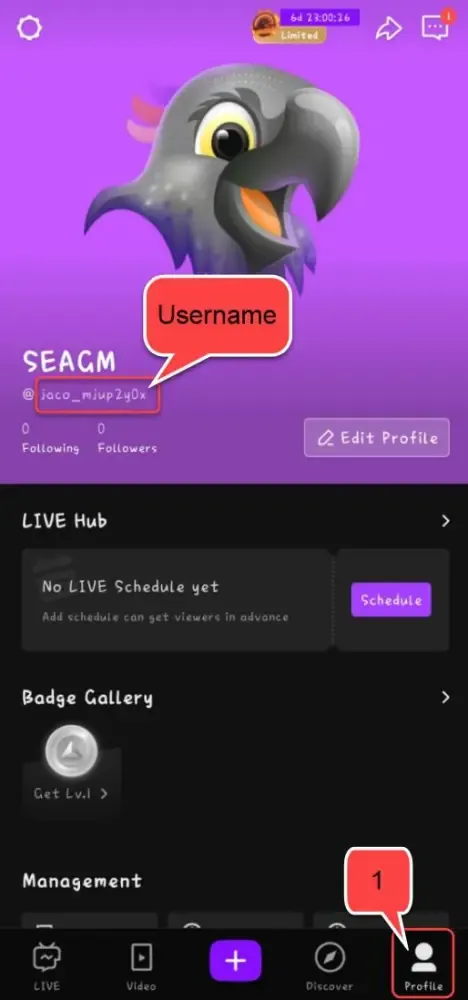
Here is how to locate it in the Jaco app:
- Open the Jaco app on your mobile device.
- Tap the Profile icon located in the bottom-right corner of the main screen.
- Look beneath your avatar image and display name.
- You will see ID: followed by a sequence of numbers.
- Tap the copy icon next to your ID to copy it directly to your clipboard, then paste it directly into the Player ID box on BitTopup.
Tip: Always use the copy button rather than typing numbers manually to avoid accidental typos.
What Are Jaco Coins and How to Use Them in Jaco Live
Jaco coins are the primary virtual currency inside the Jaco Live ecosystem. They allow viewers to interact with their favorite streamers, participate in community events, and unlock exclusive visual features across the platform.
Primary Uses for Jaco Coins
| Feature | Description | In-App Benefit |
|---|---|---|
| Virtual Gifts | Send animated stickers, luxury effects, and badges during live broadcasts | Highlights your message and supports the content creator |
| PK Battle Support | Send boost items during live creator head-to-head battles | Helps your chosen streamer win competitive PK matches |
| Fan Club Membership | Join streamer-specific clubs and unlock subscriber badges | Grants exclusive chat colors and subscriber-only privileges |
| Profile Customization | Acquire premium entry effects and profile frame enhancements | Makes your account stand out in crowded live rooms |
Having an active coin balance ensures you never miss a chance to participate in live interactions, reward top-tier broadcasts, or help your favorite creator top the platform leaderboards.
Benefits of BitTopup Password-Free Jaco Recharges
BitTopup prioritizes security, speed, and transparency for all digital recharges. When topping up your Jaco balance, you get a clean and protected transaction experience.
- Zero Account Risk: BitTopup only requires your public Player ID. We will never ask for your Jaco password, phone verification codes, or linked social media access. Your personal profile remains 100% under your control.
- Transparent Pricing: The price you see during checkout is the final price. All live rates are updated in real time with clear currency displays.
- 24/7 Customer Support: If you ever have a question about an order, our dedicated customer service team is available around the clock to assist you.
- Flexible Global Access: BitTopup caters to international Jaco communities, offering localized payment methods so you can buy Jaco coins wherever you are.
Troubleshooting Jaco Coin Delivery and Verification
Most Jaco coin recharges reflect on your account immediately after payment processing. If your coins do not appear right away, follow these diagnostic steps:
- Restart the Jaco App: Completely close the Jaco application on your phone, swipe it out of background memory, and reopen it to force a wallet balance refresh.
- Check Your In-App Coin History: Navigate to your in-app profile, select your wallet or coin history, and verify if the latest transaction has synced.
- Verify BitTopup Order Status: Log in to your BitTopup account and check your order history. Ensure the transaction status displays as completed.
- Check Player ID Accuracy: Review your order confirmation receipt to confirm that the Player ID you entered matches your current in-app account ID.
- Contact BitTopup Support: If your payment cleared and your coins have not arrived after a short wait, reach out to our 24/7 support team with your BitTopup Order ID and a screenshot of your in-app profile. We will verify the transaction immediately.
Available Payment Methods for Jaco Recharge in 2026
BitTopup supports a wide selection of payment solutions to ensure smooth transactions for users worldwide in 2026. Depending on your region, you can select from:
- Major international credit and debit cards
- Popular regional digital wallets
- Secure local online bank transfer options
To view the exact payment channels, processing details, and available currencies for your location, select your desired coin package and proceed to the BitTopup checkout screen.
Jaco Top Up FAQs
How do I find my Jaco Player ID for recharge?
Open the Jaco app, tap your Profile tab in the bottom right corner, and locate the numeric ID displayed beneath your username. Tap the small copy icon next to the number to copy your exact ID.
Do I need to share my Jaco password to top up coins?
No. BitTopup processes Jaco coin top-ups strictly through your Player ID. We will never ask for your account password, email login, or verification codes.
How fast are Jaco coins credited after completing payment?
Coins are processed automatically once your payment clears. The currency is sent directly to your Jaco account balance in real time.
What should I do if my Jaco coins do not appear in my balance?
First, restart the Jaco application to refresh your account data. If the balance still does not update, check your BitTopup order receipt to ensure the Player ID submitted was correct, then contact our 24/7 customer support team with your order number for quick resolution.
Can I recharge Jaco coins for a friend using their Player ID?
Yes. Because BitTopup only requires a Player ID, you can top up for friends or family by entering their Jaco Player ID in the input box during checkout.
What payment methods are supported for Jaco recharge on BitTopup?
BitTopup supports major international credit/debit cards, regional digital wallets, and local bank transfers. Available options vary by region and are clearly listed on the checkout page.