

Bigo Recharge: Buy Bigo Live Diamonds Up to 42% Off
Skip any BIGO diamonds recharge service that asks for your BIGO password or OTP. BitTopup’s order form asks for the BIGO ID that BIGO displays in the recipient’s profile. Choose a pack, confirm the ID, and use the payment options at checkout. Most orders reach the account within 3 minutes.
Viewers spend BIGO Diamonds on virtual gifts during live streams. A BIGO Live recharge credits the account tied to the ID you enter. You can top up your account or a friend’s account, so check every character before payment.
Last checked: July 2026. Package prices, discounts, payment methods, and gift availability can change. Use the product selector and the BIGO LIVE gift panel as the final price sources.
BitTopup Benefits for a BIGO Recharge
BIGO ID order form: Enter the ID from the recipient’s profile. BitTopup does not ask for the BIGO LIVE password or OTP.
Current package discounts: The product selector shows packs from 100 to 40,000 Diamonds with discounts up to 42% at the time of this update.
Delivery guidance: Most orders reach the account within 3 minutes. Contact support with the order number if 15 minutes pass with no Diamonds.
Checkout choices: Available methods may include Visa, Mastercard, American Express, PayPal, Apple Pay, Google Pay, and local e-wallets. Checkout options vary by region.
Clear refund terms: BitTopup treats delivered virtual items as final. Undelivered or non-functional orders may qualify for review under the Return Policy.
How to Complete a BIGO Diamond Recharge
Select the Diamond package that covers your gift budget.
Copy the BIGO ID from the recipient’s profile.
Paste the ID into the Recharge Information field and check it against the profile.
Choose a payment method and review the currency, package, quantity, and total.
Complete payment and keep the order number until the Diamonds appear.
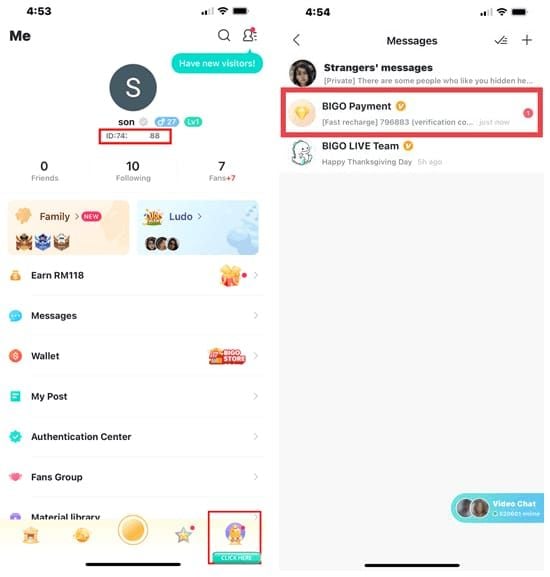
How to Find Your BIGO ID
Open BIGO LIVE and sign in.
Tap Me in the bottom-right corner.
Find the BIGO ID that BIGO displays under the profile name.
Copy the ID and paste it into the recharge form.
Use the profile ID, not the display name. A typo can send Diamonds to another account. BitTopup cannot withdraw or recover a virtual product after delivery, so compare the ID against the profile before you pay.
Choose a BIGO Diamonds Recharge Amount by Gift Goal
Start with the gift you want to send, then choose the smallest package that covers its Diamond cost. The examples below match the package sizes on this page and help you avoid a short balance.
BIGO LIVE gift example | Diamond cost* | Closest recharge choice |
|---|---|---|
Sweet Moment | 2,999 | 3,000 Diamonds |
Sapphire Tiger | 5,000 | 5,000 Diamonds |
Flaming Phoenix | 8,999 | 10,000 Diamonds |
Gala Dragon | 9,999 | 10,000 Diamonds |
LOVE U | 20,000 | 20,000 Diamonds |
Luxury Yacht | 39,999 | 40,000 Diamonds |
Diamond Masquerade | 80,000 | 2 × 40,000 Diamonds |
*BIGO can change gift names, availability, and Diamond costs during events or app updates. Some gifts may require VIP access or appear for a limited event. Open the gift panel in BIGO LIVE and check the price below the gift before recharging.
How to Send a Gift After Your Recharge
Open the host’s live room.
Tap the gift box at the bottom of the screen.
Pick a gift and check its Diamond cost.
Tap Send.
BIGO deducts the gift cost from your Diamond balance. The host receives Beans from eligible gifts under BIGO’s rules.
Payment, Delivery, and Order Help
Checkout shows the payment methods available for your region and currency. Most orders arrive within 3 minutes. If the balance has not changed after 15 minutes, check the BIGO ID on the order and contact BitTopup support with the order number.
Keep your BIGO password and OTP private. Support needs the BitTopup order number and the BIGO ID that you entered for the purchase, not your login credentials.
BitTopup’s Return Policy states that BitTopup cannot revoke, recover, or refund delivered virtual products. The team may review an undelivered or non-functional order under that policy.
BIGO Recharge FAQ
What is a BIGO recharge?
A BIGO recharge adds Diamonds to a BIGO LIVE account. Viewers spend Diamonds on virtual gifts and other eligible items inside BIGO LIVE.
Can I complete a BIGO Live recharge without a password?
Yes. BitTopup’s product form asks for the BIGO ID that BIGO displays on the recipient’s profile. Keep the BIGO LIVE password and OTP private.
How long does a BIGO diamond recharge take?
Most orders reach the account within 3 minutes. Contact support with the order number if 15 minutes pass with no Diamonds.
Can I recharge BIGO Diamonds for a friend?
Yes. Enter the BIGO ID from your friend’s profile and ask them to confirm it before you pay. BitTopup delivers the Diamonds to the ID you submit with the order.
Can I complete a BIGO diamonds recharge on a computer?
Yes. Open this page in a desktop browser, choose a package, enter the BIGO ID, and complete checkout. Use the BIGO LIVE app to find or confirm the profile ID.
What can I send with 10,000 BIGO Diamonds?
A 10,000-Diamond balance can cover gift examples such as Flaming Phoenix at 8,999 Diamonds or Gala Dragon at 9,999 Diamonds when those gifts appear in your gift panel. Check the current in-app cost before recharging.
Are BIGO Diamonds and Beans the same?
Viewers buy and spend Diamonds. Hosts receive Beans from eligible virtual gifts under BIGO’s rules. BIGO does not let viewers exchange Diamonds for cash.
Update and Purchase Notes
BitTopup reviews package availability, displayed discounts, payment coverage, delivery instructions, and the gift examples on this page. Check the date near this guide and the live product selector before each order.
BIGO’s User Agreement limits Diamond and Gift purchases to users aged 18 or the age of majority in their jurisdiction. Diamonds remain inside BIGO LIVE and cannot be exchanged for cash.
Choose your Diamond package above, enter the BIGO ID from the recipient’s profile, and review the total before you pay.
Bigo Recharge Guides
Top Up Other Live Streaming Apps
BitTopup also recharges other live and voice chat apps by user ID: Poppo Live coins, Xena Live recharge, Mango Live diamonds, Tango coins, Chamet diamonds.








 Is BitTopup Bigo Recharge Safe? Honest 2026 Review
 How to Recharge Bigo Live Diamonds at BitTopup: The Complete 2026 Guide