

IMO Diamonds Top Up: Essential Uses and In-App Benefits
IMO Diamonds are the primary digital currency used within the IMO messaging and live broadcasting platform. When you participate in live rooms or interact with content creators, diamonds give you access to premium social features that standard messaging accounts cannot use.
Primary Uses for IMO Diamonds
- Live Stream Gifting: Send interactive virtual gifts such as flowers, luxury cars, supercars, and animated stage effects to live broadcasters. These gifts help your profile stand out at the top of viewer lists and boost the broadcaster's popularity.
- Creator Support and Earnings: Broadcasters convert the gifts they receive into in-app beans, which can be redeemed for real-world income. Topping up diamonds directly supports your favorite creators.
- Exclusive Animated Stickers and Emojis: Purchase specialized premium sticker packs to use during one-on-one chats and group video calls.
- Interactive Voice Room Activities: Use diamonds to activate special audio effects, enter voice room mini-games, and unlock custom room themes.
- Profile Badges and VIP Visibility: Spending diamonds in live broadcast channels unlocks visual badges and entering effects that highlight your presence whenever you join a room.
How to Recharge IMO Diamonds on BitTopup
Recharging your IMO balance on BitTopup takes only a few quick steps without requiring complex logins:
- Select Your Diamond Package: Choose the diamond denomination you need from the list. Live package pricing is shown directly on the checkout screen.
- Enter Your Registered Mobile Number: Type the mobile phone number connected to your IMO account. Always include your international country code (e.g., +1 for USA/Canada, +966 for Saudi Arabia, +971 for UAE, +880 for Bangladesh, +91 for India, +63 for Philippines).
- Verify Your Details: Double-check your country code and phone digits to prevent sending diamonds to an incorrect account.
- Select a Payment Method: Choose your preferred payment option and submit the transaction.
- Check Your In-App Balance: Once payment completes, open the IMO app and go to your wallet to see your updated diamond total. You can also view your order status directly on BitTopup.
How to Find Your IMO Account Mobile Number and IMO ID
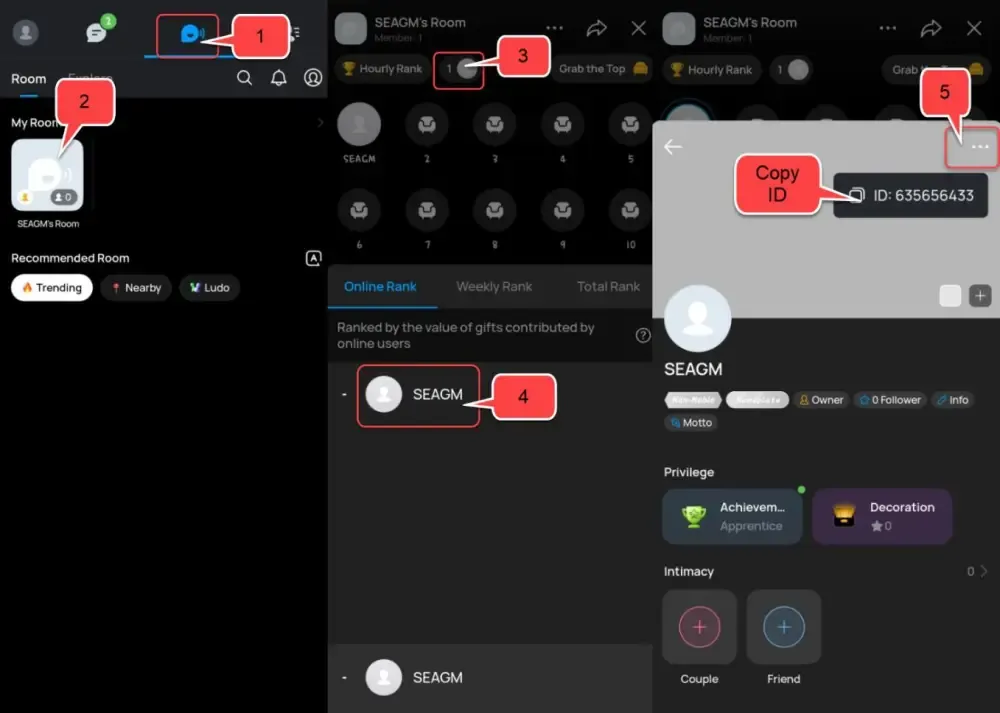
To ensure your recharge delivers to the right account, you must provide your exact registered phone number or IMO ID. Follow these steps to verify your profile details inside the application:
- Open the IMO app on your mobile device.
- Tap your Profile Picture or Avatar located in the top-left corner of the main screen.
- Tap on your name to view your profile card.
- Your registered mobile number is displayed directly below your display name. If you have set an in-app IMO ID, it will appear in the account details section.
- Note the full number along with the country dialing code assigned to your SIM card.
Important Format Rule: Never enter a local prefix like 0 if you are adding an international country code. For example, if your UK number is 07123456789, enter +447123456789.
IMO Diamonds vs. IMO Premium: Feature Comparison
Many users confuse IMO Diamonds with an IMO Premium subscription. Both enhance your experience, but they serve completely different purposes on the platform.
| Feature | IMO Diamonds | IMO Premium Membership |
|---|---|---|
| Primary Purpose | Virtual currency for gifting and interactions | Monthly subscription for utility upgrades |
| Purchase Type | One-time top-up packs | Recurring or timed subscription |
| Live Stream Gifting | Yes (Required to buy and send gifts) | No (Subscription does not include gift currency) |
| Ad-Free Experience | No | Yes (Removes banner and popup ads) |
| Cloud Storage | Standard storage allocation | Up to 25GB expanded cloud chat backup |
| Caller Ringback Tones | Purchased separately | Free access to select premium tones |
| Profile Badges | Top Gifter & VIP Contributor badges | Premium subscriber crown badge |
If your goal is to support live streamers, send special animated effects, or participate in voice room activities, an IMO Diamonds top up is what you need. If you want an ad-free interface and expanded storage, choose IMO Premium.
Safe and Secure Recharge: Zero Password Requirement
Account safety is essential when buying digital items online. BitTopup processes your IMO Diamond recharge through direct system delivery using only your public account identifier—your registered mobile number.
- No Password Ever Required: You will never be asked for your IMO account password, SMS verification codes, or two-factor authentication PINs.
- No Account Sharing: Because delivery uses direct crediting via your mobile phone number, no third party ever needs access to your private chats, contact lists, or media files.
- Anti-Phishing Protection: Avoid websites or users asking for login credentials in exchange for cheap or free diamonds. Official direct-top-up systems process deliveries without accessing your profile backend.
- Encrypted Checkout: All transactions on BitTopup are protected by industry-standard encryption protocols to keep your payment details safe.
Troubleshooting Common IMO Recharge Issues and Delivery Verification
If your diamonds do not appear immediately in your account, follow these troubleshooting steps:
1. Refresh Your In-App Wallet
- Open the IMO app.
- Tap your Profile icon > Me > Wallet (or IMO Wallet).
- Swipe down on the screen to force a balance refresh.
2. Restart the IMO Application
- Completely close the IMO app from your recent apps list.
- Relaunch the app and re-check your diamond balance.
3. Check Entered Phone Number and Country Code
- Review your BitTopup order confirmation receipt.
- Confirm that the country dialing code and mobile number match your active IMO profile.
- If you omitted the country code or mistyped a digit, contact BitTopup Customer Support immediately with your Order ID so the support team can assist you before processing completes.
4. Verify Network Connectivity
- Weak mobile data or unstable Wi-Fi can delay in-app balance updates. Switch network connections and re-open the wallet tab.
Frequently Asked Questions
What are IMO Diamonds used for?
IMO Diamonds are in-app credits used to send virtual gifts to live broadcasters, buy premium sticker packs, unlock interactive audio room features, and enter live community activities.
How do I recharge IMO Diamonds with my mobile number?
Select your preferred diamond package on BitTopup, input your registered IMO mobile phone number including the international country code, choose a payment method, and complete the order. Your diamonds are delivered directly to your account.
Where can I find my IMO ID or registered number?
Open IMO, tap your profile avatar in the upper-left corner, and select your profile. Your registered mobile number and assigned IMO ID are listed on your profile card.
Do I need to share my IMO password to recharge diamonds?
No. BitTopup only requires your registered mobile phone number. You should never share your account password, SMS OTP codes, or personal security credentials with anyone.
What is the difference between IMO Diamonds and IMO Premium?
IMO Diamonds are consumable tokens used for live gifting and interactive features. IMO Premium is a service subscription that provides an ad-free interface, 25GB of cloud storage, and exclusive profile icons.
Can I get free IMO Diamonds safely?
Be cautious of third-party generators or unofficial websites claiming to offer free diamonds. The only secure way to obtain diamonds without risking account bans or security breaches is through verified top-up platforms like BitTopup or official in-app events.
How long does it take for IMO Diamonds to arrive after purchase?
Top-ups are processed right after payment confirmation. Once the transaction completes, open your IMO wallet and refresh the screen to view your updated balance.